11
US
*1Displays the scene number for VIDEO CDs (PBC is on), track number for VIDEO CDs/Super Audio CDs/CDs,
album number for DATA CDs.
*2Displays the index number for VIDEO CDs/Super Audio CDs, MP3 audio track number, or JPEG image file
number for DATA CDs.
*3Displays Super VCD as “SVCD.” Displays “MP3” in the Control Menu display 1 or “JPEG” in the Control Menu
2 for DATA CDs.
*4Displays the date for JPEG files.
To turn off the display
Press DISPLAY.
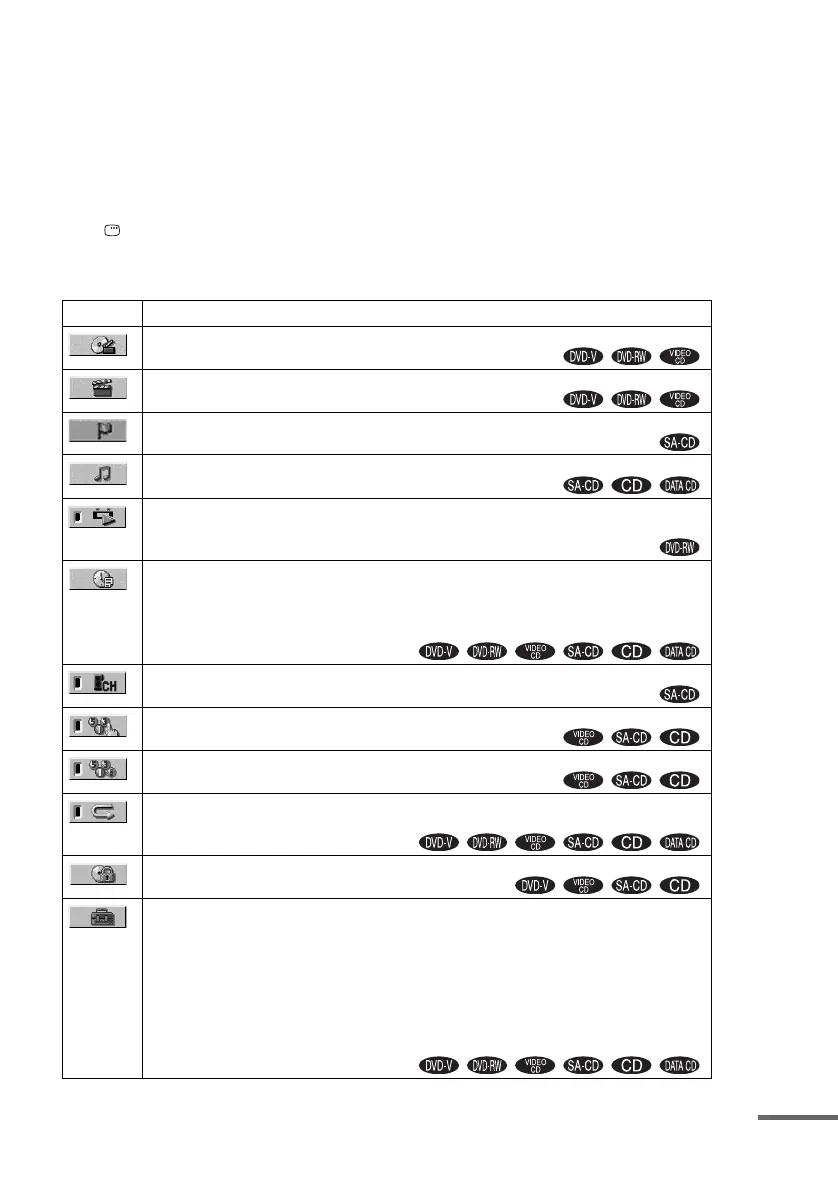
List of Control Menu items
Item Item Name, Function, Relevant Disc Type
[TITLE] (page 52)/[SCENE] (page 52)/[TRACK] (page 52)
Selects the title, scene, or track to be played.
[CHAPTER] (page 52)/[INDEX] (page 52)
Selects the chapter or index to be played.
[INDEX] (page 52)
Displays the index and selects the index to be played.
[TRACK] (page 52)
Selects the track to be played.
[ORIGINAL/PLAY LIST] (page 42)
Selects the type of titles (DVD-RW) to be played, the [ORIGINAL] one, or an edited [PLAY
LIST].
[TIME/TEXT] (page 53)
Checks the elapsed time and the remaining playback time.
Input the time code for picture and music searching.
Displays the DVD/CD text or the MP3 track name.
[MULTI/2CH] (page 42)
Selects the playback area on Super Audio CDs when available.
[PROGRAM] (page 38)
Selects the track to play in the order you want.
[SHUFFLE] (page 39)
Plays the track in random order.
[REPEAT] (page 40)
Plays the entire disc (all titles/all tracks/all albums) repeatedly or one title/chapter/track/album
repeatedly.
[PARENTAL CONTROL] (page 65)
Sets to prohibit playback on this system.
[SETUP] (page 77)
[QUICK] Setup (page 33)
Use Quick Setup to choose the desired language of the on-screen display, the aspect ratio of
the TV, and the size of the speakers you are using.
[CUSTOM] Setup
In addition to the Quick Setup setting, you can adjust various other settings.
[RESET]
Returns the settings in [SETUP] to the default setting.
continued



 To Next Page