Sound Adjustments
59
US
Checking the audio signal
format
(DVD only)
If you press AUDIO repeatedly during
playback, the format of the current audio signal
(PCM, Dolby Digital, DTS, etc.) appears as
shown below.
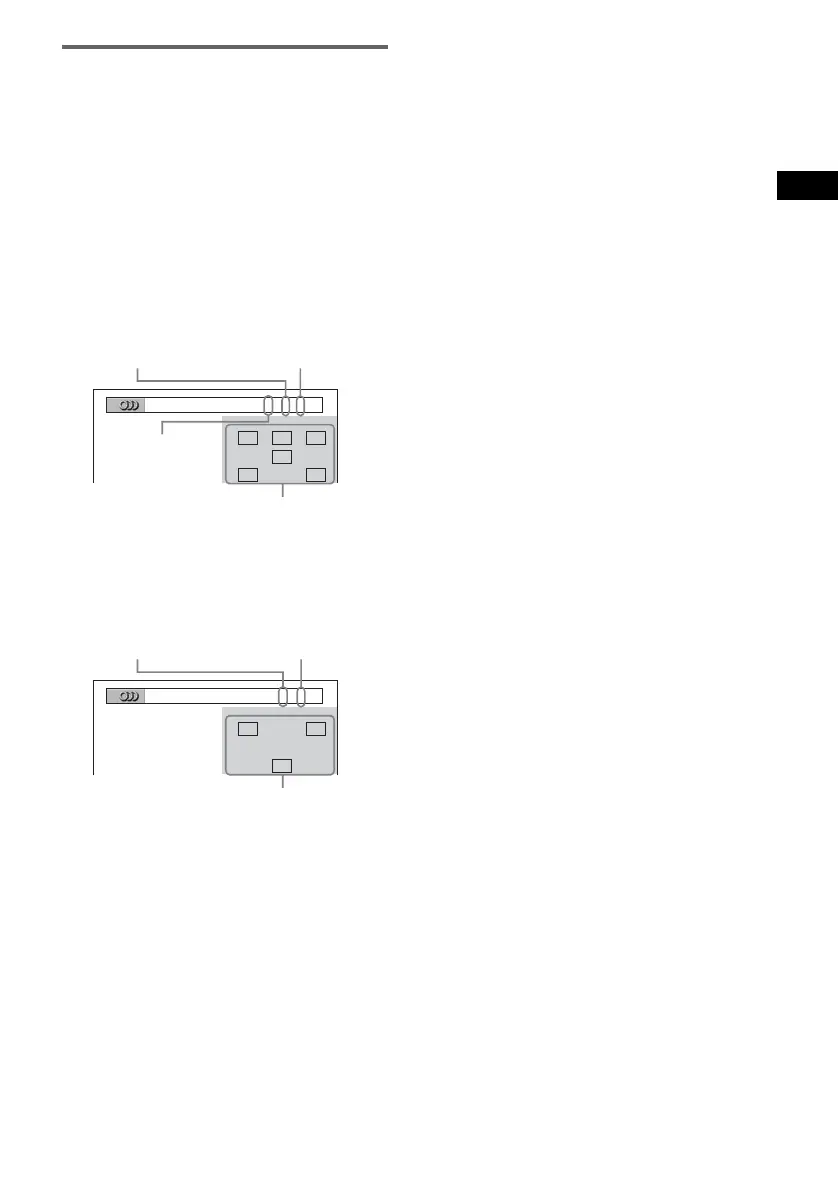
x When playing a DVD VIDEO
Example:
Dolby Digital 5.1 ch
Example:
Dolby Digital 3 ch
About audio signals
Audio signals recorded in a disc contain the
sound elements (channels) shown below. Each
channel is output from a separate speaker.
• Front (L)
• Front (R)
•Center
• Surround (L)
• Surround (R)
• Surround (Monaural): This signal can be either
the Dolby Surround Sound processed signals
or the Dolby Digital sound’s monaural
Surround audio signals.
• LFE (Low Frequency Effect) signal
LRC
LFE
LS RS
1
:
ENGLISH DOLBY DIGITAL
3 / 2 .1
Surround (L/R)
Front (L/R) +
Center
LFE (Low
Frequency Effect)
Currently playing
program format
LR
S
2
:
SPANISH DOLBY DIGITAL
2 / 1
Front (L/R)
Surround
(Monaural)
Currently playing
program format



 To Next Page