50
US
Selecting an effect for image
files in the slide show
(JPEG only)
When you play a JPEG image file, you can
select the effect to be used when viewing the
slide show.
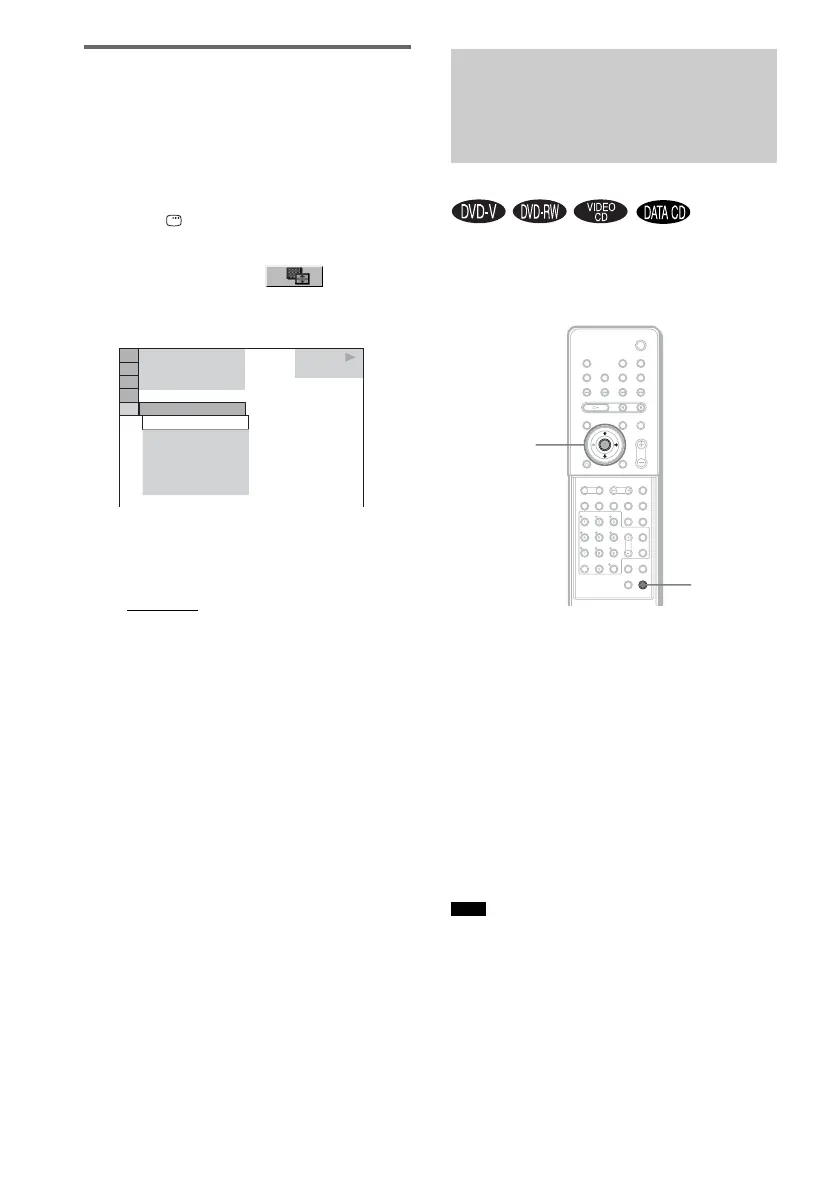
1 Press DISPLAY twice.
The Control Menu for JPEG appears.
2 Press X/x to select [EFFECT],
then press ENTER.
The options for [EFFECT] appear.
3 Press X/x to select the setting you
want.
The default setting is underlined.
• [MODE1]
: The image sweeps in from top
to bottom.
• [MODE2]: The image stretches out from
left to right of the screen.
• [MODE3]: The image stretches out from
the center of the screen.
• [MODE4]: The images randomly cycle
through the effects.
• [MODE5]: The next image slides over the
previous image.
• [OFF]: Turns off this function.
4 Press ENTER.
The selected setting takes effect.
When the sound does not match the pictures on
the screen, you can adjust the delay between the
picture and sound.
1 Press AMP MENU.
2 Press X/x repeatedly until “A/V SYNC”
appears in the front panel display, then
press ENTER or c.
3 Press X/x to select the setting.
• SYNC OFF: does not adjust.
• SYNC ON: adjusts the difference
between picture and sound.
4 Press ENTER or AMP MENU.
The AMP menu turns off.
• Depending on the input stream, this function may not
be effective.
• Depending on the sound field, this function may not
be effective.
1 0 / 2 3 / 2 0 0 4
1(
MODE1
DATA CD
JPEG
MODE1
MODE2
MODE3
MODE4
MODE5
OFF
4)
3 (
12)
Adjusting the Delay
Between the Picture and
Sound
(A/V SYNC)
Note
AMP MENU
X/x/c
ENTER
With cover opened.



 To Next Page