55-GB
Network Operation
Viewing Web pages
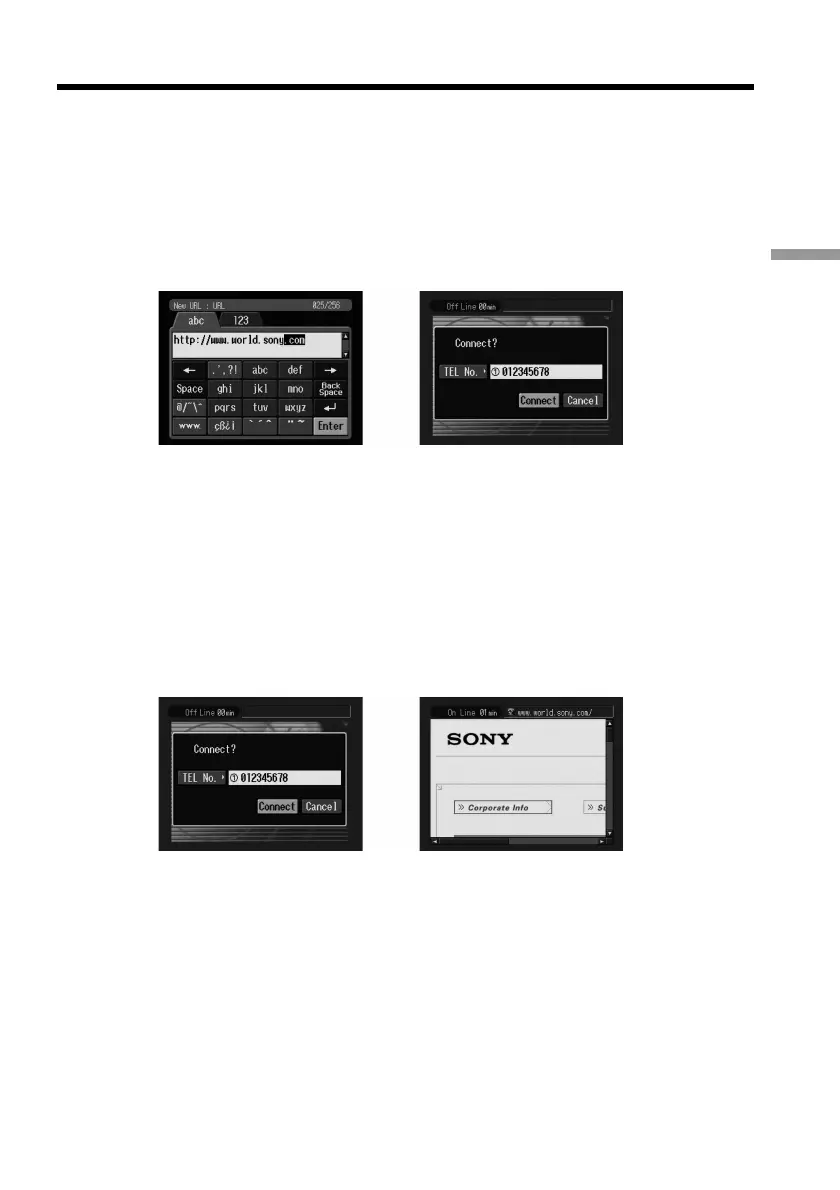
(4) Enter the URL.
For details on how to input characters, see “How to input characters” on page
8.
(5) Select [Enter], then press the centre z on the control button.
The screen used for verifying the connection appears. Set the Bluetooth device
to connection standby with the camcorder beforehand. For details, refer to the
operating instructions supplied with the Bluetooth device.
,
(6) Check the telephone number.
When dialling other telephone numbers
Select [TEL No.], then press the centre z on the control button. The registered
telephone number list appears. Select the desired telephone number, then
press the centre z on the control button. The selected telephone number is
specified.
(7) Select [Connect], then press the centre z on the control button.
The camcorder starts dialling the selected telephone number. After the
connection is completed, the Web page selected in step 4 is loaded.
,
(8) Operate the browser using the menu bar.
For details on the menu bar, see “How to use the menu bar on the browser” on
page 13.











 To Next Page