6
GB
Identifying the parts
For details, see the pages indicated in the
parentheses.
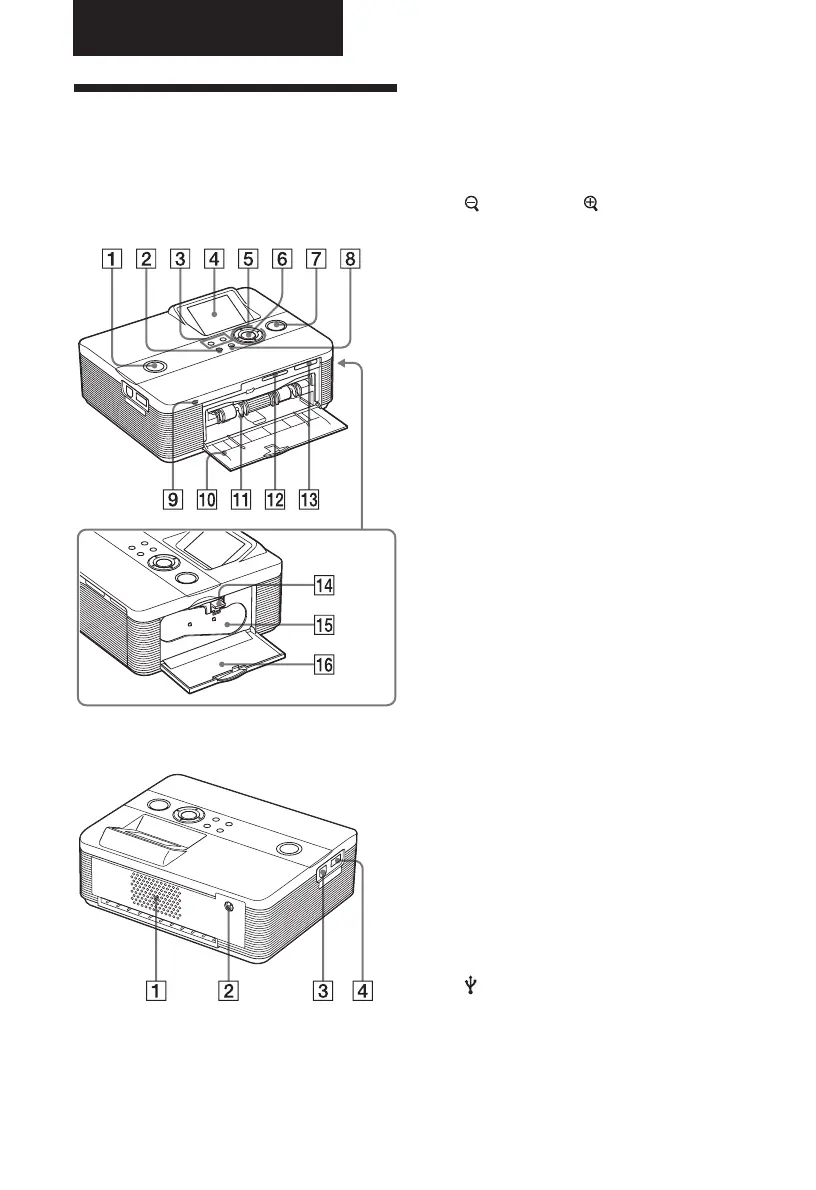
Printer front panel
1 1 (on/standby) switch/indicator
(.Read This First)
2 MENU button
3
(zoom out)/ (zoom in) buttons
(page 8)
4 LCD screen
5 Direction (f/F/g/G) buttons
6 ENTER button
7 PRINT button/indicator
(.Read This First)
8 CANCEL button
9 Access indicator
(.Read This First)
0 Paper tray compartment door
(.Read This First)
qa Paper tray compartment
(.Read This First)
qs SD CARD slot (.Read This First)
(page 67)
qd MEMORY STICK PRO STD/DUO slot
(.Read This First) (page 65)
Printer right side panel
qf Ink ribbon eject lever
(.Read This First)
qg Ink ribbon (.Read This First)
qh Ink ribbon compartment door
(.Read This First)
Printer rear panel
1 Ventilation holes
2 DC IN 24V jack (.Read This
First)
Printer left side panel
3 USB connector (page 31)
4 PictBridge connector
(pages 28 to 31)
Before you begin



 To Next Page