13
GB
Direct printing
Direct printing
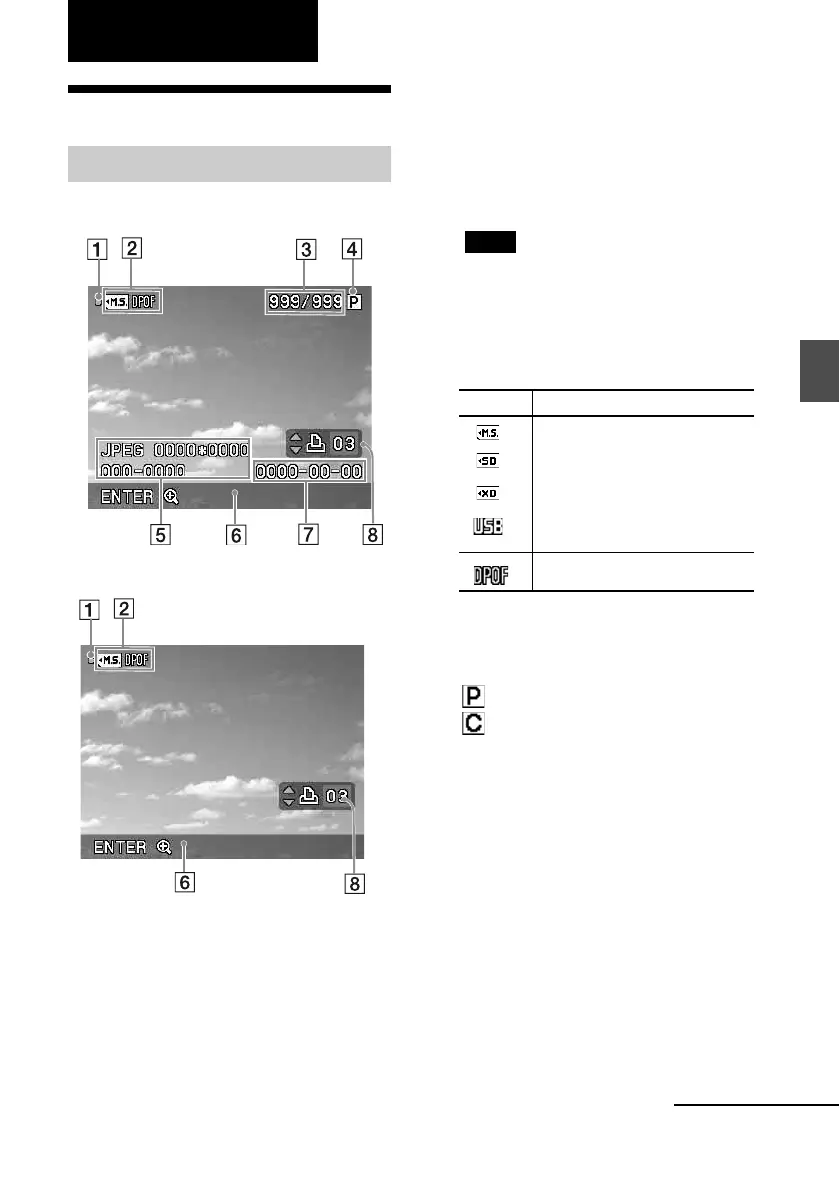
LCD screen display
You can change the image preview view by
setting the “On-screen Display” from the
menu. (page 27)
A Access indication
Appears while the printer is accessing a
memory card or a USB memory.
Note
While the access indication is displayed, do not
remove a memory card or a USB memory, or do
not turn off the power. Data may be damaged.
B Input/setting indications
Input indications and settings information for
an image are displayed.
C Number of selected images/Total
number of image
D Ink ribbon indication
: P size
: Cleaning cartridge
E Image file information (file format,
file size, image number (folder- file
number)*)
(*DCF-compatible files only. In case of other
file formats, only part of file name will be
displayed.)
F Operation tips
G Shot or Saved date (year/month/
day)
H Print quantity setting
An image preview
On-screen Display: On
On-screen Display: Off
Icons Meaning
“Memory Stick” input
SD Memory Card input
xD-Picture Card input
USB Memory input
DPOF print preset indication
Continued



 To Next Page