Viewing
a
Slideshow
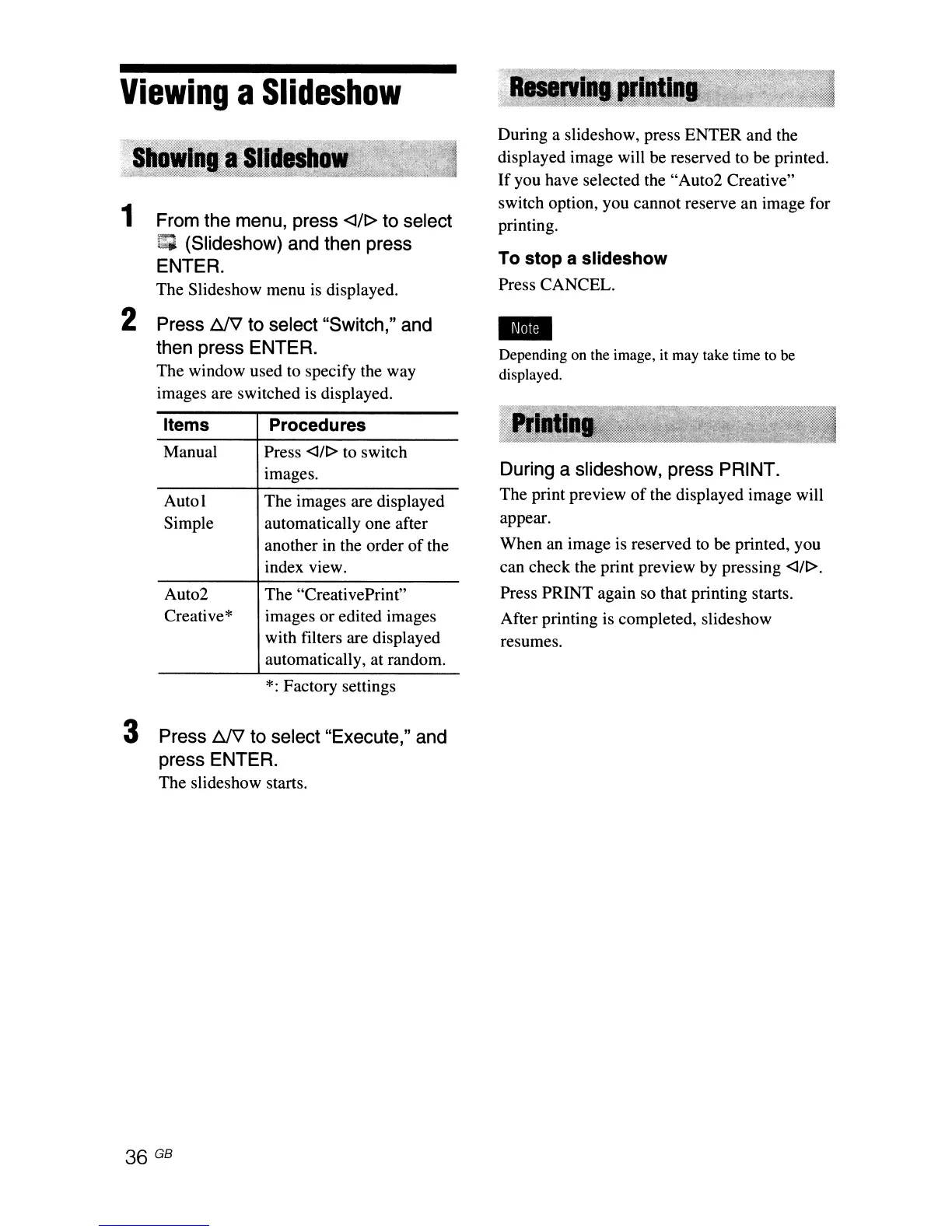
1 From the menu, press <l/I> to select
I;
(Slideshow) and then press
ENTER.
The Slideshow menu is displayed.
2 Press
t:JV
to select "Switch," and
then press ENTER.
The window used to specify the way
images are switched is displayed.
During a slideshow, press ENTER and the
displayed image will be reserved to be printed.
If
you have selected the "Aut02 Creative"
switch option, you cannot reserve an image for
printing.
To stop a slideshow
Press CANCEL.
-
Depending on the image, it may take time to be
displayed.
Items
Manual
Auto!
Simple
Aut02
Creative*
Procedures
Press <l/I> to switch
images.
The images are displayed
automatically one after
another in the order
of
the
index view.
The "CreativePrint"
images or edited images
with filters are displayed
automatically, at random.
*:
Factory settings
During a slideshow, press PRINT.
The print preview
of
the displayed image will
appear.
When an image is reserved
to
be printed, you
can check the print preview by pressing
<l/I>.
Press PRINT again so that printing starts.
After printing is completed, slideshow
resumes.
3 Press
t:JV
to select "Execute," and
press ENTER.
The slideshow starts.



 To Next Page