EasyManua.ls Logo

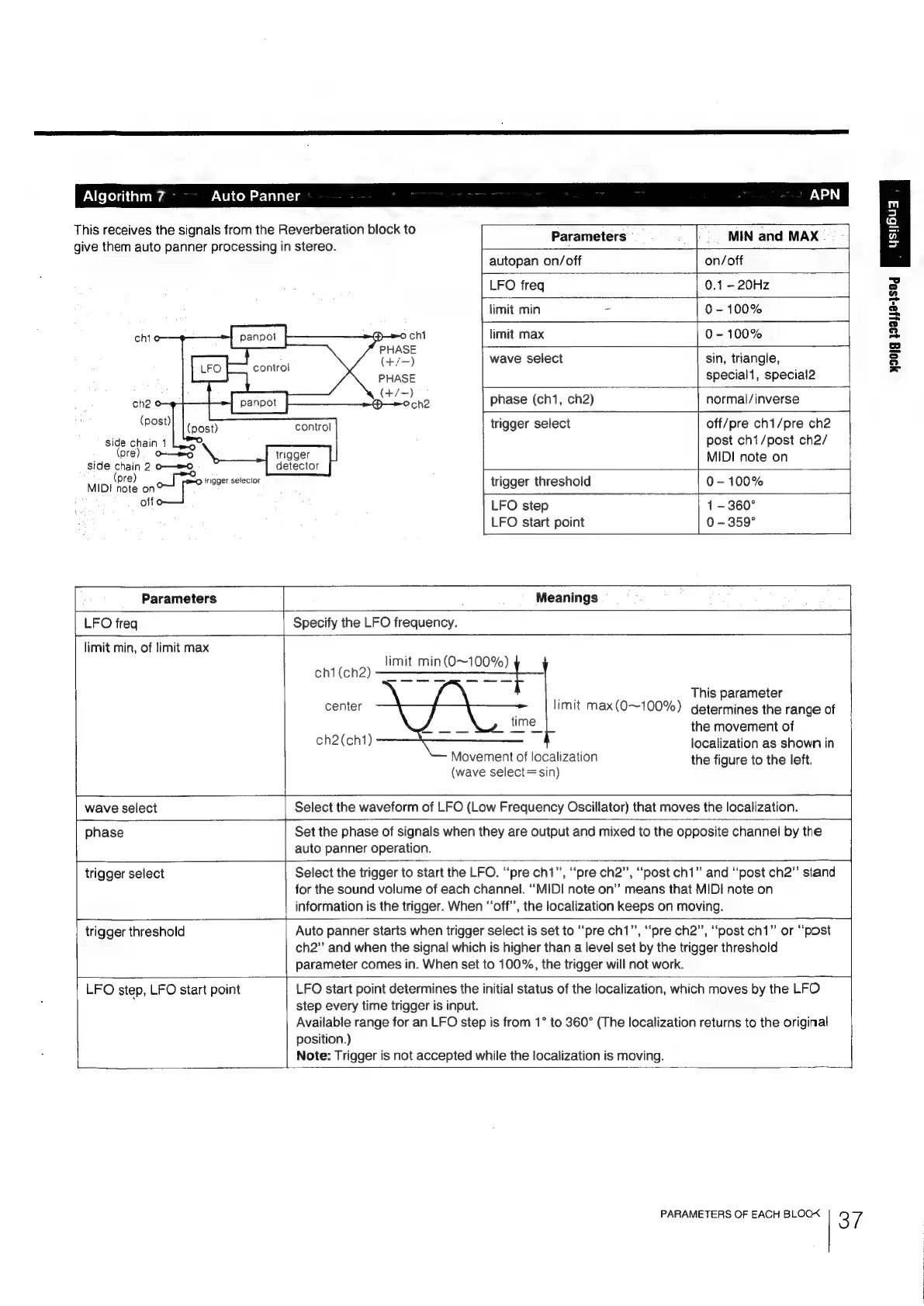
Sony DPS-R7 - Post-effect Auto Panner (APN); Auto Panner Effect Parameters and Meanings

Sony DPS-R7
64 pages
Print Icon
To Next Page IconTo Next Page
To Previous Page IconTo Previous Page
Loading...
Algorithm
7
This
receives
the
signals
from
the
Reverberation
block
to
give
them
auto
panner
processing
in
stereo.
che
©
(post)
side
chain
1
pre).
O-—mo
side
chain
2
o—eo
MIDI
(prs)
a
al
irigger
selector
off
Auto
Panner
APN
Parameters
MIN
and
MAX
autopan
on/off
on/off
LFO
freq
0.1
-
20Hz
timit
min
ee
0-100%
ochi
limit
max
0-100%
|
PHASE
are
(+/-)
wave
select
sin,
triangle,
special1,
special2
phase
(ch1,
ch2)
|
normal/inverse
trigger
select
control
off/pre
ch1/pre
ch2
post
ch1/post
ch2/
MIDI
note
on
detector
trigger
threshold
0-100%
LFO
step
1-
360°
LFO
start
point
0
-
359°
Parameters
LFO
freq
limit
min,
of
limit
max
Meanings
Specify
the
LFO
frequency.
BE
eat
TS
ee
cht
(ch2)
a
oe
oy
This
parameter
center
limit
max(O~100%)
determines
the
range
of
=
the
movement
of
localization
as
shown
in
the
figure
to
the
left.
ch2(ch1)
Movement
of
localization
(wave
select=sin)
wave
select
_|
Select
the
waveform
of
LFO
(Low
Frequency
Oscillator)
that
moves
the
localization.
phase
Set
the
phase
of
signals
when
they
are
output
and
mixed
to
the
opposite
channel
by
the
auto
panner
operation.
|
trigger
select
Select
the
trigger
to
start
the
LFO.
“pre
chi”,
“pre
ch2”,
“post
ch1”
and
“post
ch2”
stand
for
the
sound
volume
of
each
channel.
“MIDI
note
on”
means
that
MIDI
note
on
information
is
the
trigger.
When
“off’,
the
localization
keeps
on
moving.
L
trigger
threshold
Auto
panner
starts
when
trigger
select
is
set
to
“pre
ch1”,
“pre
ch2”,
“post
ch1”
or
“post
ch2”
and
when
the
signal
which
is
higher
than
a
level
set
by
the
trigger
threshold
parameter
comes
in.
When
set
to
100%,
the
trigger
will
not
work.
LFO
step,
LFO
start
point
LFO
start
point
determines
the
initial
status
of
the
localization,
which
moves
by
the
LFO
step
every
time
trigger
is
input.
Available
range
for
an
LFO
step
is
from
to
360°
(The
localization
returns
to
the
original
position.)
Note:
Trigger
is
not
accepted
while
the
localization
is
moving.
PARAMETERS
OF
EACH
BLOCK
3
7
490)g
199)J9-}S0q

Related product manuals