EasyManua.ls Logo

Sony DPS-R7 - System Block Settings; System Block Operating Modes

Sony DPS-R7
64 pages
Print Icon
To Next Page IconTo Next Page
To Previous Page IconTo Previous Page
Loading...
Other
Blocks
a
a
a
Te
PE
a
SS
SS
System
Block
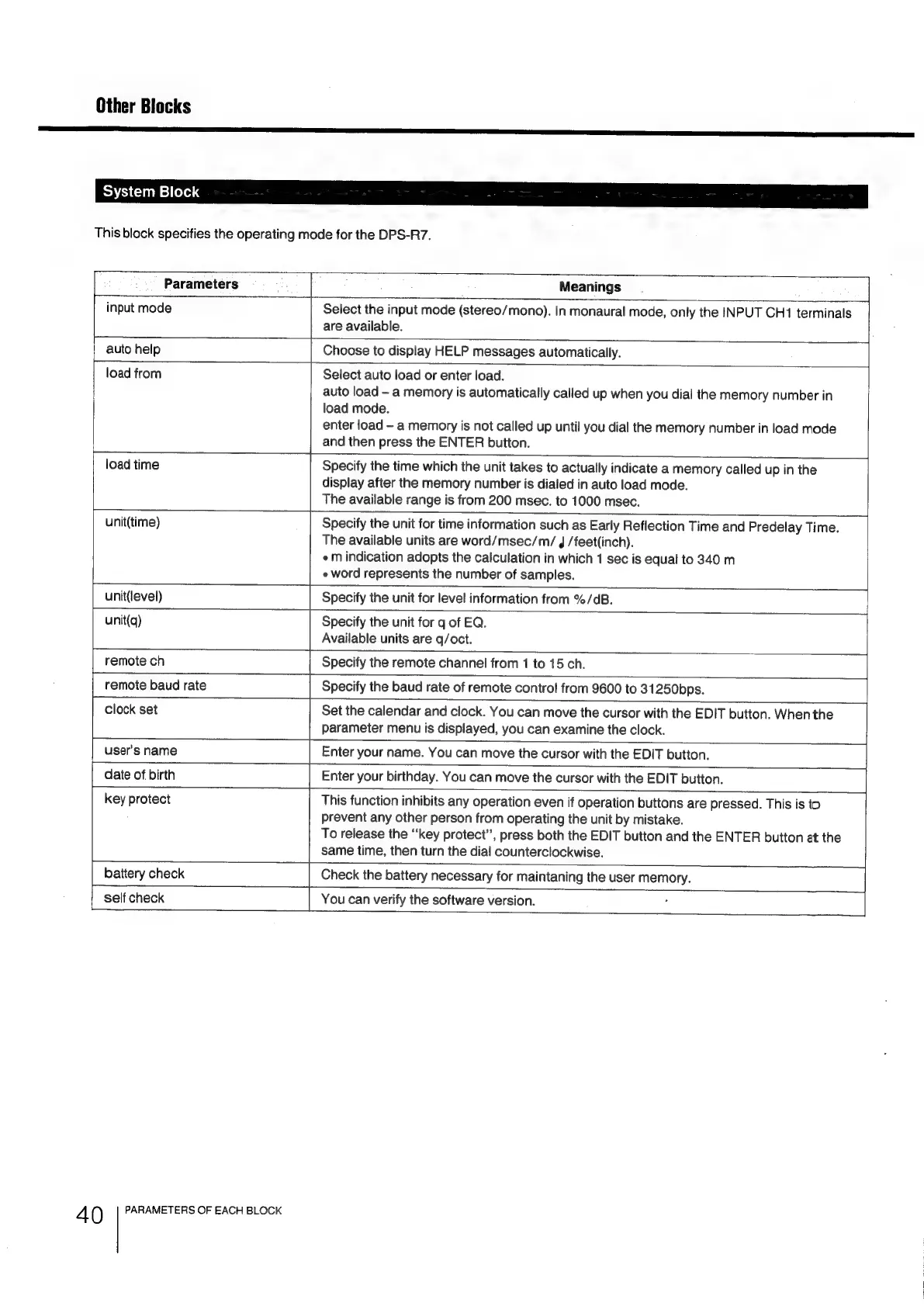
This
block
specifies
the
operating
mode
for
the
DPS-R7.
Parameters
Meanings
“4
input
mode
Select
the
input
mode
(stereo/mono).
In
monaural
mode,
only
the
INPUT
CH1
terminals
are
available.
[auto
help
Choose
to
display
HELP
messages
automatically.
load
from
Select
auto
load
or
enter
load.
auto
load
a
memory
is
automatically
called
up
when
you
dial
the
memory
number
in
load
mode.
enter
load
-
a
memory
is
not
called
up
until
you
dial
the
memory
number
in
load
mode
and
then
press
the
ENTER
button.
load
time
Specify
the
time
which
the
unit
takes
to
actually
indicate
a
memory
called
up
in
the
display
after
the
memory
number
is
dialed
in
auto
load
mode.
The
available
range
is
from
200
msec.
to
1000
msec.
unit(time)
Specify
the
unit
for
time
information
such
as
Early
Reflection
Time
and
Predelay
Time.
The
available
units
are
word/msec/m/
4
/feet(inch).
«m
indication
adopts
the
calculation
in
which
1
sec
is
equal
to
340
m
e
word
represents
the
number
of
samples.
unit(level)
Specify
the
unit
for
level
information
from
%/dB.
unit(q)
Specify
the
unit
for
q
of
EQ.
Available
units
are
q/oct.
remote
ch
Specify
the
remote
channel
from
1
to
15
ch.
remote
baud
rate
Specify
the
baud
rate
of
remote
control
from
9600
to
31250bps.
clock
set
Set
the
calendar
and
clock.
You
can
move
the
cursor
with
the
EDIT
button.
When
the
parameter
menu
is
displayed,
you
can
examine
the
clock.
user’s
name
Enter
your
name.
You
can
move
the
cursor
with
the
EDIT
button.
date
of
birth
Enter
your
birthday.
You
can
move
the
cursor
with
the
EDIT
button.
key
protect
This
function
inhibits
any
operation
even
if
operation
buttons
are
pressed.
This
is
to
prevent
any
other
person
from
operating
the
unit
by
mistake.
To
release
the
“key
protect”,
press
both
the
EDIT
button
and
the
ENTER
button
at
the
same
time,
then
turn
the
dial
counterclockwise.
battery
check
Check
the
battery
necessary
for
maintaning
the
user
memory.
self
check
You
can
verify
the
software
version.
4
0
PARAMETERS
OF
EACH
BLOCK

Related product manuals