EasyManua.ls Logo

Sony DPS-R7 - B.LOAD (Block Load) Function; Partial Block Loading Explained

Sony DPS-R7
64 pages
Print Icon
To Next Page IconTo Next Page
To Previous Page IconTo Previous Page
Loading...
Other
Blocks
canna
rene
seer
ee
eer
eee
recess
a
SS
a
TS
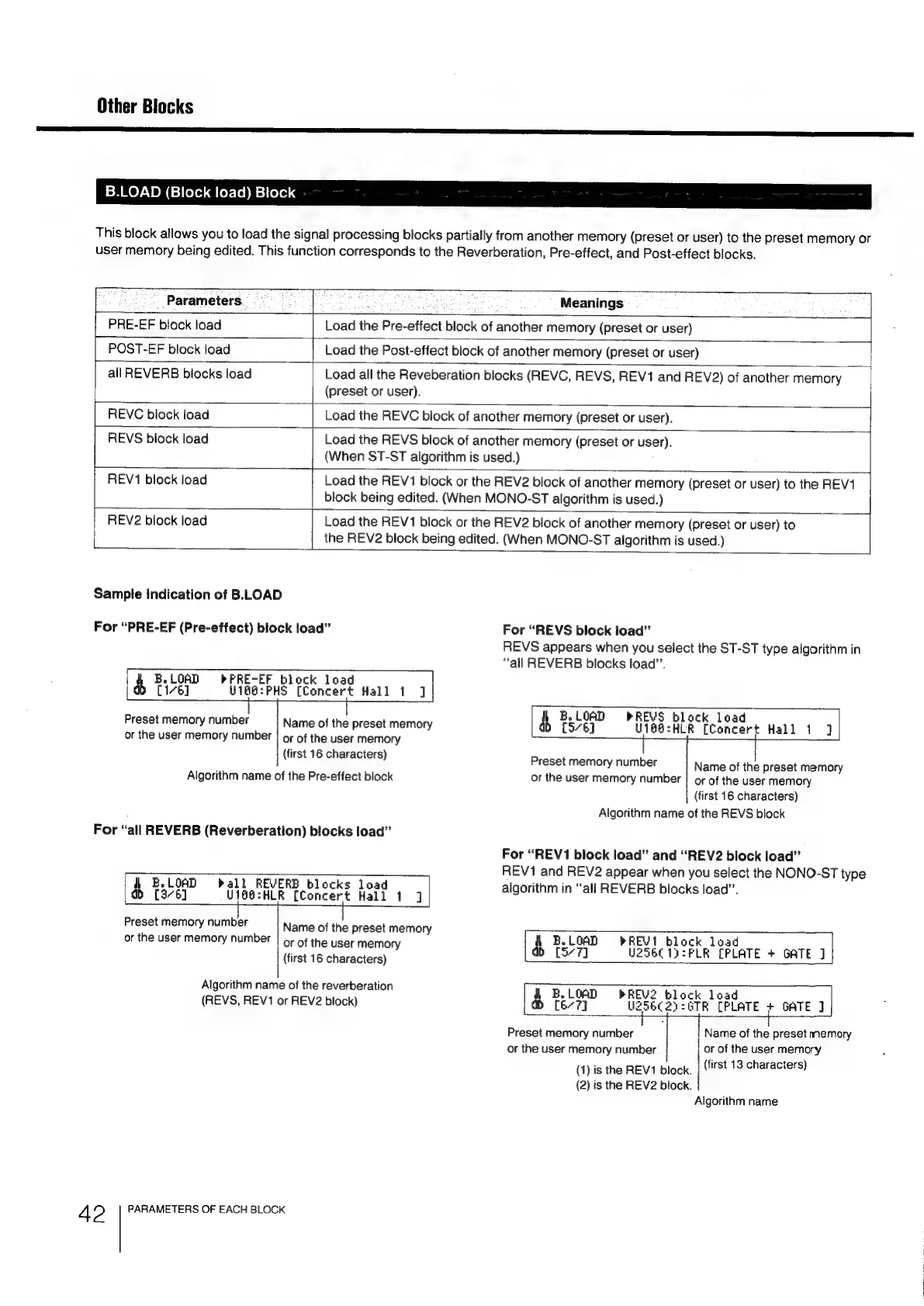
B.LOAD
(Block
load)
Block
This
block
allows
you
to
load
the
signal
processing
blocks
partially
from
another
memory
(preset
or
user)
to
the
preset
memory
or
user
memory
being
edited.
This
function
corresponds
to
the
Reverberation,
Pre-effect,
and
Post-effect
blocks.
Parameters
Meanings
PRE-EF
block
load
Load
the
Pre-effect
block
of
another
memory
(preset
or
user)
POST-EF
block
load
|
Load
the
Post-effect
block
of
another
memory
(preset
or
user)
all
REVERB
blocks
load
Load
all
the
Reveberation
blocks
(REVC,
REVS,
REV1
and
REV2)
of
another
memory
(preset
or
user).
REVC
block
load
Load
the
REVC
block
of
another
memory
(preset
or
user).
REVS
block
load
Load
the
REVS
block
of
another
memory
(preset
or
user).
|
(When
ST-ST
algorithm
is
used.)
REV1
block
load
aa
Load
the
REV1
block
or
the
REV2
block
of
another
memory
(preset
or
user)
to
the
REV1
block
being
edited.
(When
MONO-ST
algorithm
is
used.)
REV2
block
load
Load
the
REV1
block
or
the
REV2
block
of
another
memory
(preset
or
user)
to
the
REV2
block
being
edited.
(When
MONO-ST
algorithm
is
used.)
Sample
Indication
of
B.LLOAD
For
“PRE-EF
(Pre-effect)
block
load”
For
“REVS
block
load”
REVS
appears
when
you
select
the
ST-ST
type
algorithm
in
“all
REVERB
blocks
load”.
t
B.
LOAD
ck
load
a
[16]
Concert
Hall
1
J
Preset
memory
number
Name
of
the
preset
memory
4
Bele
girs
fie
a
Pea
Hall
1
|
or
the
user
memory
number
|
or
of
the
user
memory
first
16
characters
(
Preset
memory
number
Name
of
the
preset
memory
Algorithm
name
of
the
Pre-effect
block
or
the
user
memory
number
}
or
of
the
user
memory
;
(first
16
characters)
Algorithm
name
of
the
REVS
block
For
“all
REVERB
(Reverberation)
blocks
load”
For
“REV1
block
load”
and
“REV2
block
load”
REV1
and
REV2
appear
when
you
select
the
NONO-ST
type
Bey
ERB
blocks
load
1
algorithm
in
“all
REVERB
blocks
load”.
4
E.LOAD
ball
a
[376]
Ui68:HLR
(Concert
Hall
1
Preset
memory
number
Name
of
the
preset
memory
or
the
user
memory
number
|
or
of
the
user
memory
i
Be
LOAD
=
+R
E
2
(first
16
characters)
ab
[5-7]
25
acer
nat
V1
o
S6C1):PLR
[PLATE
+
GATE
J
Algorithm
name
of
the
reverberation
|
B.
LOAD
PREV?
block
(REVS,
REV1
or
REV2
block)
a>
[6-7]
BALLS
Perr
PLATE
+
GATE
]
|
Preset
memory
number
1,
Name
of
the
preset
memory
or
the
user
memory
number
|
or
of
the
user
memory
(1)
is
the
REV1
block.
|
(first
13
characters)
(2)
is
the
REV2
block.
|
Algorithm
name
4
2
PARAMETERS
OF
EACH
BLOCK

Related product manuals