Insert a "Memory Stick" with
recorded images into the camera.
• When copying images in the internal
memory,this step is unnecessary.
/ Insert the batteries with enough
capacity remained in the camera,
or connect the camera to a wall
outlet (wall socket) with the AC
Adaptor (not supplied).
• When you c,.>pyimages to _our computer
using insufficient hatteries, copying may lhil
or image data may be corrupted if the
batteries shut off too soon.
• For DSC-ST80, also refkr to the operating
instructions "Cyber-shot Station".
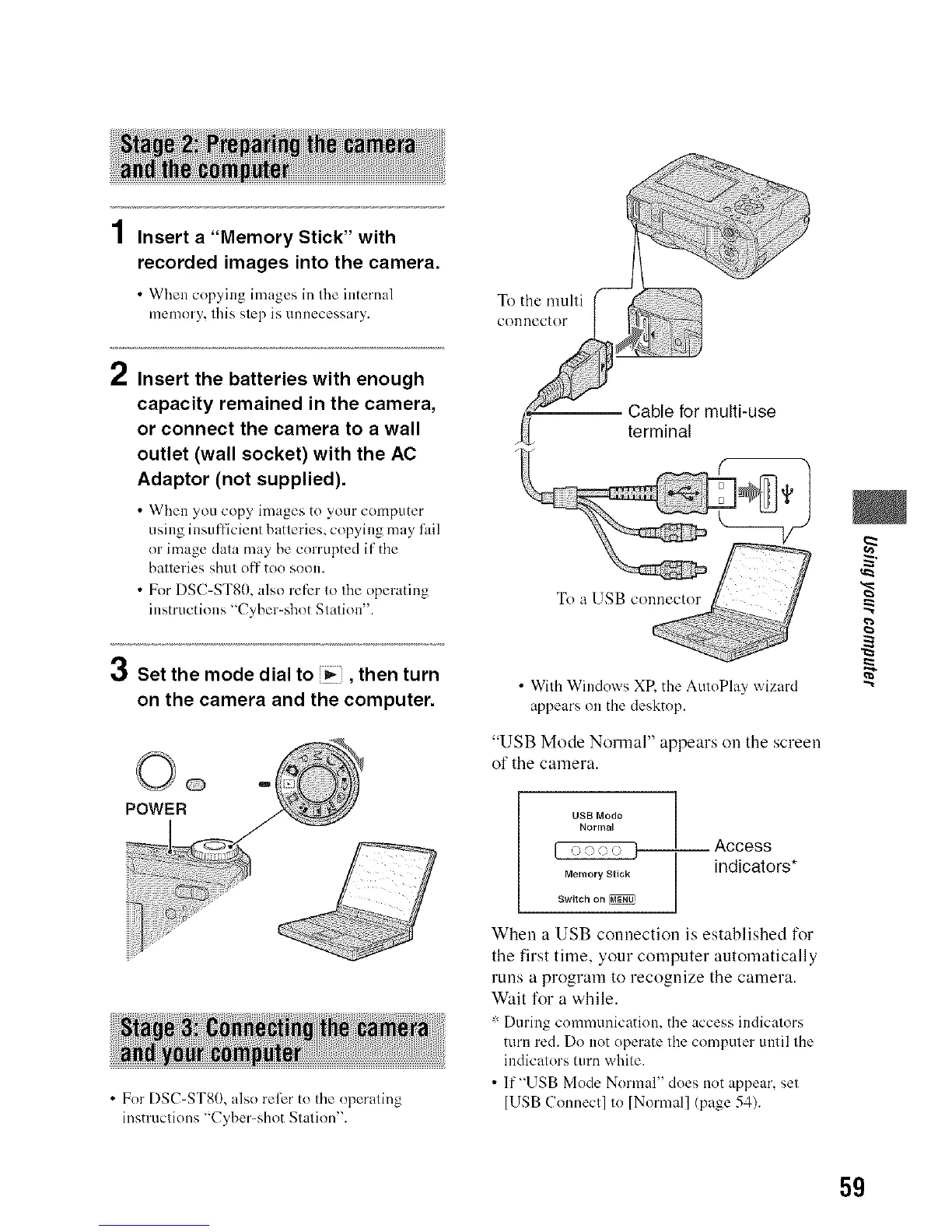
3 Set the mode dial to _, then turn
on the camera and the computer.
• For DSC-ST80, also refer to the operaling
instruclions "Cyber-shot Slalion'.
To the nmlti
COIllleCtOF
-- Cable for multi-use
terminal
• With Windows XR the AutoPlay wizard
appears on the desktop.
"USB Mode Nonnal" appears on the screen
of the camera.
f2gf2ors*
When a USB connection is established for
the first time, your computer automatically
runs a program to recognize the camera.
Wait for a while.
:r"During communication, the access indicators
mrn red. Do not operate the computer until the
indicators turn white.
• lf"USB Mode Normal" does not appear, set
IUSB Connect] to [Normal] (page 54).
g
5g












 To Next Page