gom_eedW your gamem fo y#_lr TV
Viewing images on a TVscreen
You call view images on a TV screen by
connecting the cmnera to a TV.
Turn off both your camera and the TV
before connecting the camera and the TV
with the A/V cable.
• For DSC-ST80, refer to the operating
instructions "Cyber-shot Station".
4
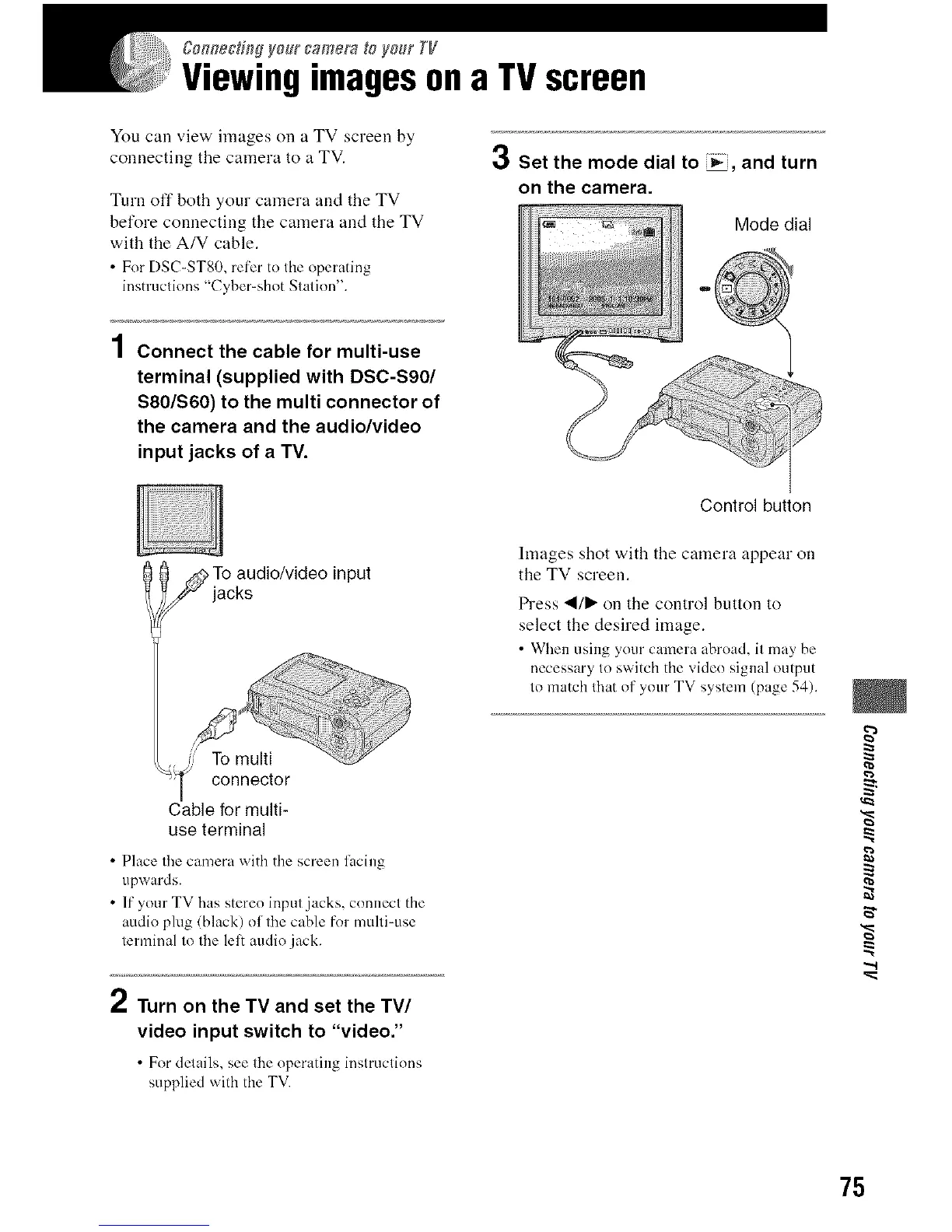
| Connect the cable for multi-use
terminal (supplied with DSC-S90/
$80/$60) to the multi connector of
the camera and the audio/video
input jacks of a TV.
3 Set the mode dial to _, and turn
on the camera.
Mode dial
Control button
To audio/video input
jacks
connector
Cable for multi-
use terminal
• Place the camera with the screen lacing
upwards.
• If your TV has stereo input jacks, connect the
audio plug (black) of the cable for multi-use
terminal to the lel: audio jack.
hnages shot with the camera appear on
the TV screen.
Press "_/_" on the control button to
select the desired image.
• Wben using your camera abroad, it may be
necessary to switch the video signal output
to match that of your TV system (page 54).
/ Turn on the TV and set the TV/
video input switch to "video."
• For details, see the operating inslruclions
supplied with the TV.
g
p_
".,t
75












 To Next Page