
 Need help?
Do you have a question about the Sony DualSense Edge and is the answer not in the manual?
Radio waves can affect electronic equipment and medical devices, causing malfunctions or injury.
Magnets can interfere with pacemakers and other medical devices; consult a doctor before use.
Prolonged exposure to high volume can cause permanent hearing loss; protect your hearing.
Handle lithium-ion batteries with care; leakage requires immediate action and medical attention.
Keep small parts away from young children due to choking hazard and potential injury from cables.
Keep the product free from liquid, dust, and smoke; avoid extreme temperatures and humidity.
Avoid electrical storms and extreme environmental conditions during use and storage.
Steps to pair the controller with your PS5 console using a USB cable.
Warnings regarding young children, hand safety, and cover attachment during replacement.
Touch grounded metal to remove static electricity before handling modules.
How to adjust the L2/R2 buttons' trigger length using stop sliders.
Save and assign controller settings like sensitivity and button assignments to profiles.
How to set the console to use the controller via USB cable.
Connect the controller to the console or a USB device to charge it.
Do not disassemble or modify the product; unauthorized use voids the warranty.
Details conditions that void the guarantee, such as misuse or unauthorized repair.
 General
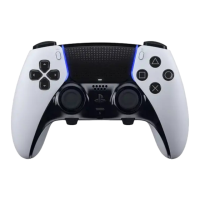
| Device type | Gamepad |
|---|---|
| Analog thumbsticks | Yes |
| Gaming control technology | Analogue / Digital |
| Gaming platforms supported | PlayStation 5 |
| Gaming control function buttons | Options button |
| Device interface | Bluetooth |
| Connectivity technology | Wireless |
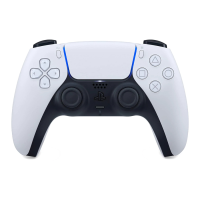
| Product color | Black, White |
| Package type | Hanging box |
| Battery type | Built-in |
| Power source | Battery |
| Cables included | USB |




 To Next Page