EasyManua.ls Logo

Sony EV-C500E - Playing Back a Cassette

Sony EV-C500E
38 pages
Print Icon
To Next Page IconTo Next Page
To Previous Page IconTo Previous Page
Loading...
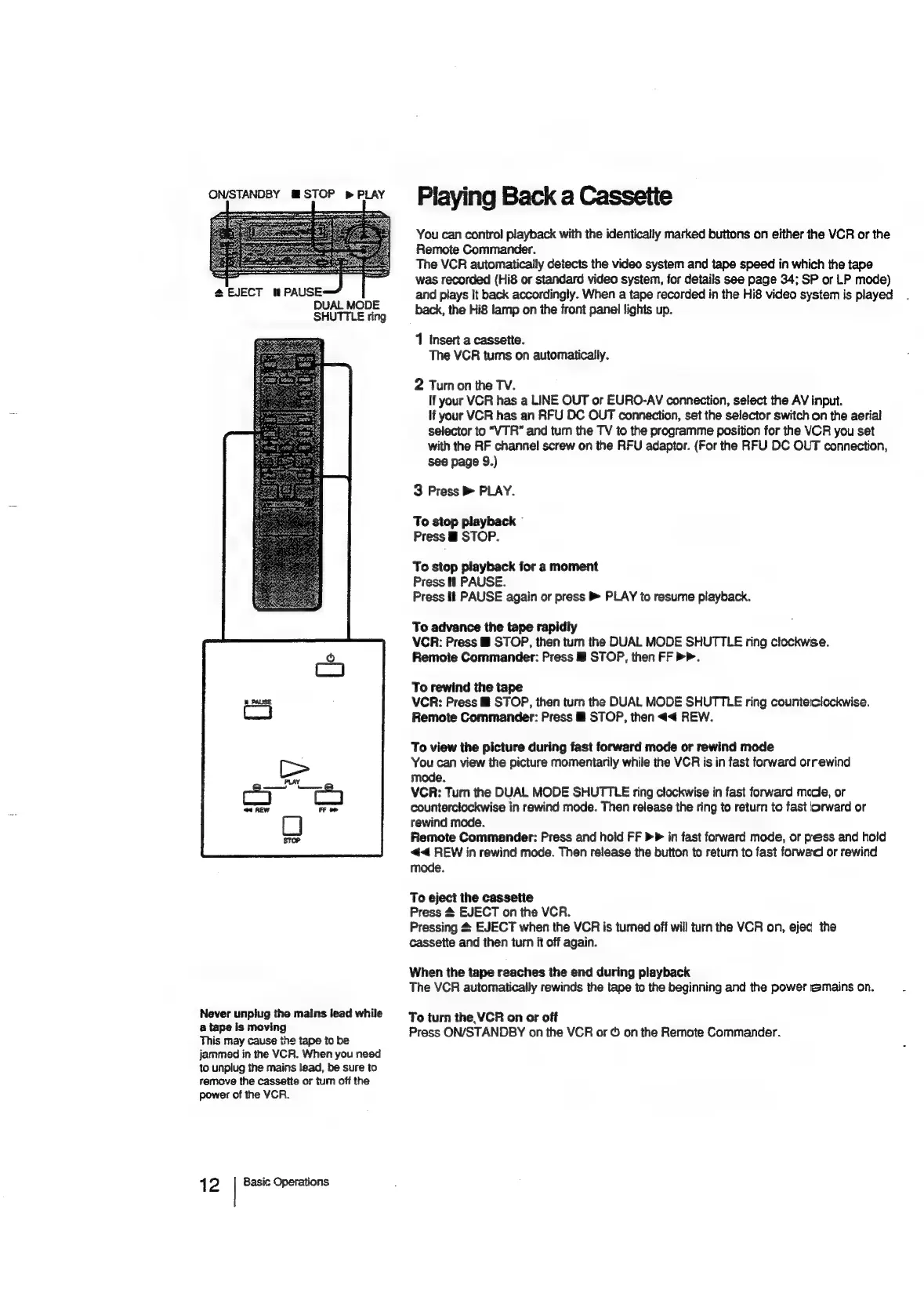
ON/STANDBY
STOP
»
PLAY
DUAL
MODE
SHUTTLE
ring
Never
unplug
the
mains
lead
while
a
tape
is
moving
This
may
cause
the
tape
to
be
jammed
in
the
VCR.
When
you
need
to
unplug
the
mains
lead,
be
sure
to
remove
the
cassette
or
turn
off
the
power
of
the
VCR.
|
2
Basic
Operations
Playing
Back
a
Cassette
You
can
control
playback
with
the
identically
marked
buttons
on
either
the
VCR
or
the
Remote
Commander.
The
VCR
automatically
detects
the
video
system
and
tape
speed
in
which
the
tape
was
recorded
(Hi8
or
standard
video
system,
for
details
see
page
34;
SP
or
LP
mode)
and
plays
it
back
accordingly.
When
a
tape
recorded
in
the
Hi8
video
system
is
played
back,
the
Hi8
lamp
on
the
front
panel
lights
up.
1
Insert
a
cassette.
The
VCR
tums
on
automatically.
2
Turn
on
the
TV.
If
your
VCR
has
a
LINE
OUT
or
EURO-AV
connection,
select
the
AV
input.
If
your
VCR
has
an
RFU
DC
OUT
connection,
set
the
selector
switch
on
the
aerial
selector
to
“VTR”
and
tum
the
TV
to
the
programme
position
for
the
VCR
you
set
with
the
RF
channel
screw
on
the
RFU
adaptor.
(For
the
RFU
DC
OUT
connection,
see
page
9.)
3
Press
B
PLAY.
To
stop
playback
~
Press
B
STOP.
To
stop
playback
for
a
moment
Press
Il
PAUSE.
Press
if
PAUSE
again
or
press
>
PLAY
to
resume
playback.
To
advance
the
tape
rapidly
VCR:
Press
B
STOP,
then
tum
the
DUAL
MODE
SHUTTLE
ring
clockwse.
Remote
Commander:
Press
B
STOP,
then
FF
>>.
To
rewind
the
tape
VCR:
Press
&
STOP,
then
turn
the
DUAL
MODE
SHUTTLE
ring
counterclockwise.
Remote
Commander:
Press
STOP,
then
44
REW.
To
view
the
picture
during
fast
forward
mode
or
rewind
mode
You
can
view
the
picture
momentarily
while
the
VCR
is
in
fast
forward
orrewind
mode.
VCR:
Turn
the
DUAL
MODE
SHUTTLE
ring
clockwise
in
fast
forward
mece,
or
counterclockwise
in
rewind
mode.
Then
release
the
ring
to
return
to
fast
lorward
or
rewind
mode.
Remote
Commander:
Press
and
hold
FF
>>
in
fast
forward
mode,
or
press
and
hold
<4
REW
in
rewind
mode.
Then
release
the
button
to
retum
to
fast
forward
or
rewind
mode.
To
eject
the
cassette
Press
&
EJECT
on
the
VCR.
Pressing
&
EJECT
when
the
VCR
is
turned
off
will
turn
the
VCR
on,
ejec
the
cassette
and
then
turn
it
off
again.
When
the
tape
reaches
the
end
during
playback
The
VCR
automatically
rewinds
the
tape
to
the
beginning
and
the
power
remains
on.
To
turn
the,
YCR
on
or
off
Press
ON/STANDBY
on
the
VCR
or
©
on
the
Remote
Commander.

Related product manuals