EasyManua.ls Logo

Sony EV-C500E - Tape Dubbing

Sony EV-C500E
38 pages
Print Icon
To Next Page IconTo Next Page
To Previous Page IconTo Previous Page
Loading...
Tape
Dubbing
Editing
from
the
Other
VCR
Here's
how
to
edit
from
another
VCR
(such
as
an
8
mm
video
camera
recorder
or
a
VHS-format
VCR
for
playback)
when
using
this
VCR
for
recording.
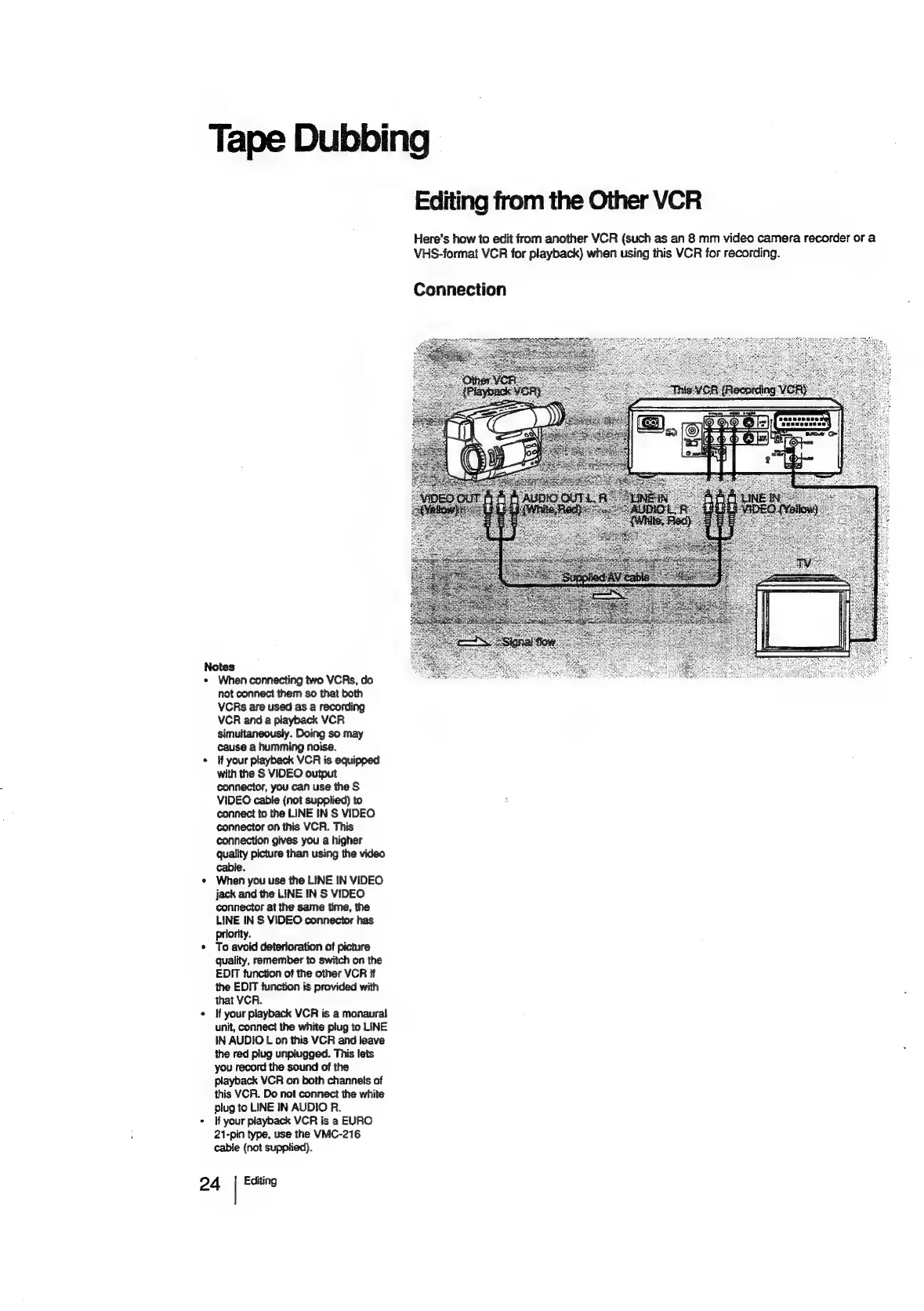
Connection
Notes
*
When
connecting
two
VCRs,
do
not
connect
them
so
that
both
VCRs
are
used
as
a
recording
VCR
and
a
playback
VCR
simultaneously.
Doing
so
may
cause
a
humming
noise.
¢
If
your
playback
VCR
is
equipped
with
the
S
VIDEO
output
connector,
you
can
use
the
S
VIDEO
cabie
(not
supplied)
to
connect
to
the
LINE
IN
S
VIDEO
connector
on
this
VCR.
This
connection
gives
you
a
higher
quality
picture
than
using
the
video
cable.
*
When
you
use
the
LINE
IN
VIDEO
jack
and
the
LINE
IN
S
VIDEO
connector
at
the
same
time,
the
LINE
IN
S
VIDEO
connector
has
Priority.
*
To
avoid
deterioration
of
picture
Quality,
remember
to
switch
on
the
EDIT
function
of
the
other
VCR
if
the
EDIT
function
is
provided
with
that
VCR.
¢
If
your
playback
VCR
is
a
monaural
unit,
connect
the
white
plug
to
LINE
IN
AUDIO
L
on
this
VCR
and
leave
the
red
plug
unplugged.
This
lets
you
record
the
sound
of
the
playback
VCR
on
both
channels
of
this
VCR.
Do
not
connect
the
white
plug
to
LINE
IN
AUDIO
R.
*
lf
your
playback
VCR
is
a
EURO
21-pin
type,
use
the
VMC-216
cable
(not
supplied).
2
4
Editing

Related product manuals