EasyManua.ls Logo

Sony EV-C500E - Synchronized Editing Setup

Sony EV-C500E
38 pages
Print Icon
To Next Page IconTo Next Page
To Previous Page IconTo Previous Page
Loading...
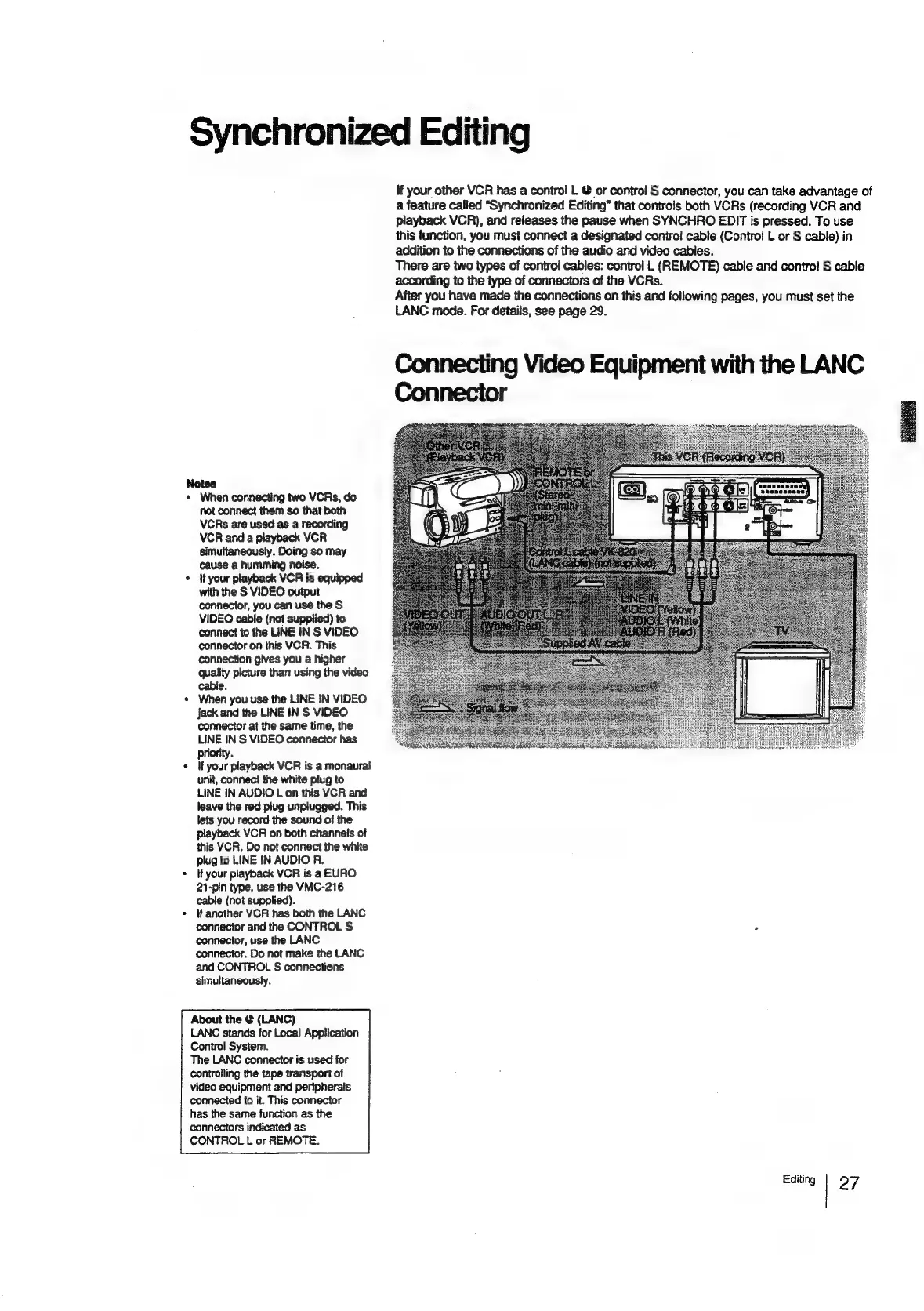
Synchronized
Editing
Notes
*
When
connecting
two
VCRs,
do
not
connect
them
so
that
both
VCRs
are
used
as
a
recording
VCR
and
a
playback
VCR
simultaneously.
Doing
so
may
cause
a
humming
noise.
*
Ifyour
playback
VCR
is
equipped
with
the
S
VIDEO
output
connector,
you
can
use
the
S
VIDEO
cable
(not
supplied)
to
connect
to
the
LINE
IN
S
VIDEO
connector
on
this
VCR.
This
connection
gives
you
a
higher
quality
picture
than
using
the
video
cable.
«
When
you
use
the
LINE
IN
VIDEO
jack
and
the
LINE
IN
S
VIDEO
connector
at
the
same
time,
the
LINE
IN
S
VIDEO
connector
has
priority.
«
Myour
playback
VCR
is
a
monaural
unit,
connect
the
white
plug
to
LINE
IN
AUDIO
L
on
this
VCR
and
leave
the
red
piug
unplugged.
This
lets
you
record
the
sound
of
the
playback
VCR
on
both
channels
of
this
VCR. Do
not
connect
the
white
plug
to
LINE
IN
AUDIO
R.
*
Ifyour
playback
VCR
is
a
EURO
21-pin
type,
use
the
VMC-216
cable
(not
supplied).
*
lf
another
VCR
has
both
the
LANC
connector
and
the
CONTROL
S
connector,
use
the
LANC
connector.
Do
not
make
the
LANC
and
CONTROL
S
connections
simultaneously.
About
the
@
(LANC)
LANC
stands
for
Local
Application
Control
System.
The
LANC
connector
is
used
for
controlling
the
tape
transport
of
video
equipment
and
peripherals
connected
to
it.
This
connector
has
the
same
function
as
the
connectors
indicated
as
CONTROL
L
or
REMOTE.
If
your
other
VCR
has
a
control
L
@
or
contro!
S
connector,
you
can
take
advantage
of
a
feature
called
“Synchronized
Editing”
that
controls
both
VCRs
(recording
VCR
and
playback
VCR),
and
releases
the
pause
when
SYNCHRO
EDIT
is
pressed.
To
use
this
function,
you
must
connect
a
designated
control
cable
(Contro!
L
or
S
cable)
in
addition
to
the
connections
of
the
audio
and
video
cables.
There
are
two
types
of
control
cables:
control
L
(REMOTE)
cable
and
control
S
cable
according
to
the
type
of
connectors
of
the
VCRs.
After
you
have
made
the
connections
on
this
and
following
pages,
you
must
set
the
LANC
mode.
For
details,
see
page
29.
Connecting
Video
Equipment
with
the
LANC
Connector
Editing
27

Related product manuals