EasyManua.ls Logo

Sony EV-C500E - Page 7

Sony EV-C500E
38 pages
Print Icon
To Next Page IconTo Next Page
To Previous Page IconTo Previous Page
Loading...
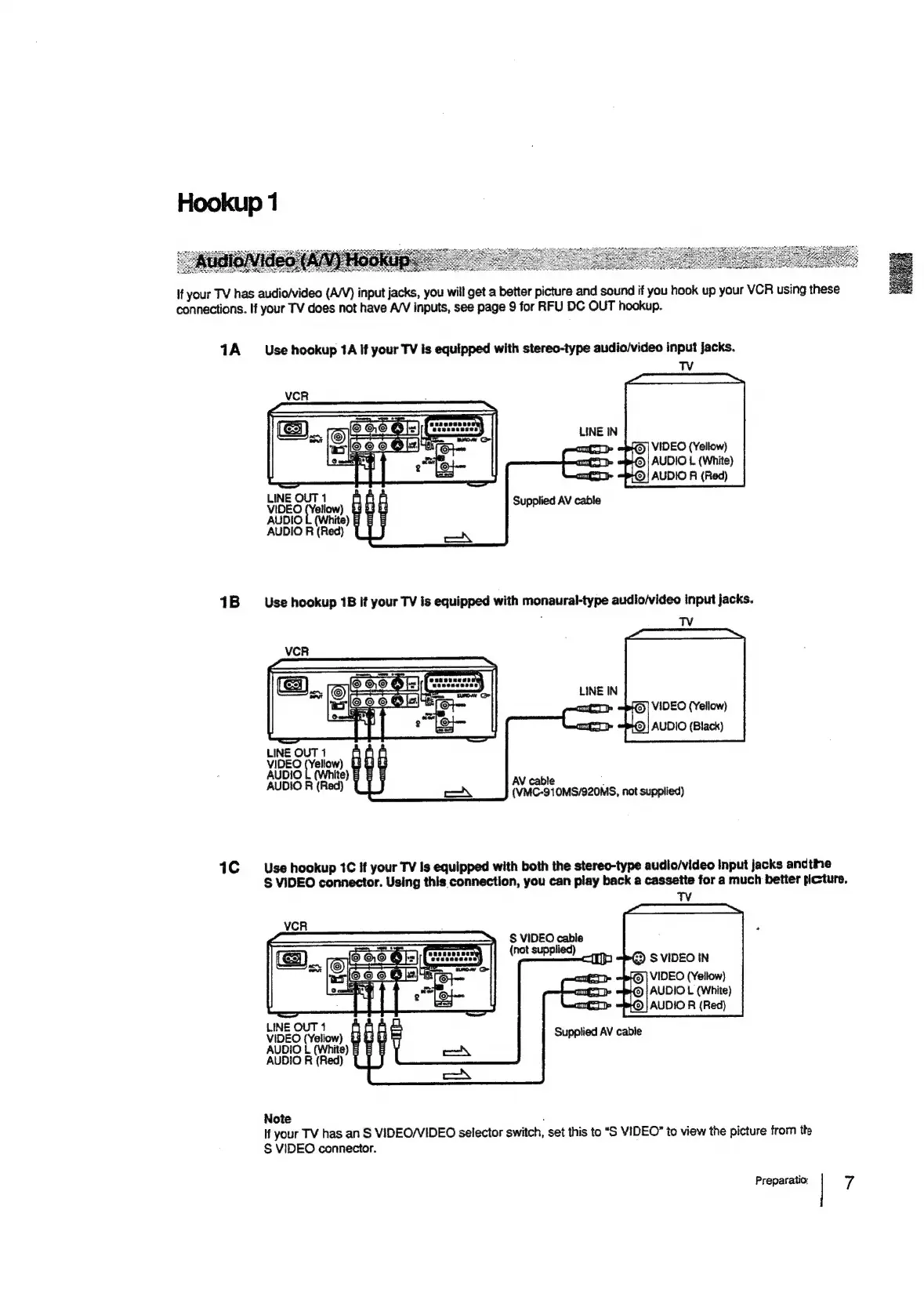
if
your
TV
has
audio/video
(A/V)
input
jacks,
you
will
get
a
better
picture
and
sound
if
you
hook
up
your
VCR
using
these
connections.
If
your
TV
does
not
have
A/V
inputs,
see
page
9
for
RFU
DC
OUT
hookup.
1A
1B
ic
Use
hookup
1A
if
your
TV
is
equipped
with
stereo-type
audio/video
input
Jacks.
TV
LINE
IN
©]
VIDEO
(Yellow)
©
|
AUDIO
L
(White)
@|
AUDIO
R
(Red)
LINEOUT1
VIDEO
(Yellow)
ro
AUDIO
L
(White)
8
E
E
AUDIO
R
(Red)
Supplied
AV
cable
VIDEO
(Yellow)
AUDIO
(Black)
LINEOUT1
VIDEO
(Yellow)
oo
AUDIO
L
(White)
8
BE
AUDIO
R
(Red)
Use
hookup
1C
If
your
TV
Is
equipped
with
both
the
stereo-type
audio/video
Input
jacks
andtine
S$
VIDEO
connector.
Using
this
connection,
you
can
play
back
a
cassette
for
a
much
better
picture.
S
VIDEO
cable
(not
supplied)
VIDEO
(Yellow)
AUDIO
L
(White)
AUDIO
R
(Red)
LINEOUT1
VIDEO
(Yeliow)
3
3
G
AUDIO
L
(White)
E
AUDIO
Ri
(Red)
Supplied
AV
cable
Note
:
If
your
TV
has
an
S
VIDEO/VIDEO
selector
switch,
set
this
to
“S
VIDEO”
to
view
the
picture
from
the
§S
VIDEO
connector.
Preparatio;
7

Related product manuals