GB
9
Selecting recording format/image
quality
1
Press the MENU button select (REC/OUT SET)
[REC SET] [FILE FORMAT] desired setting
value.
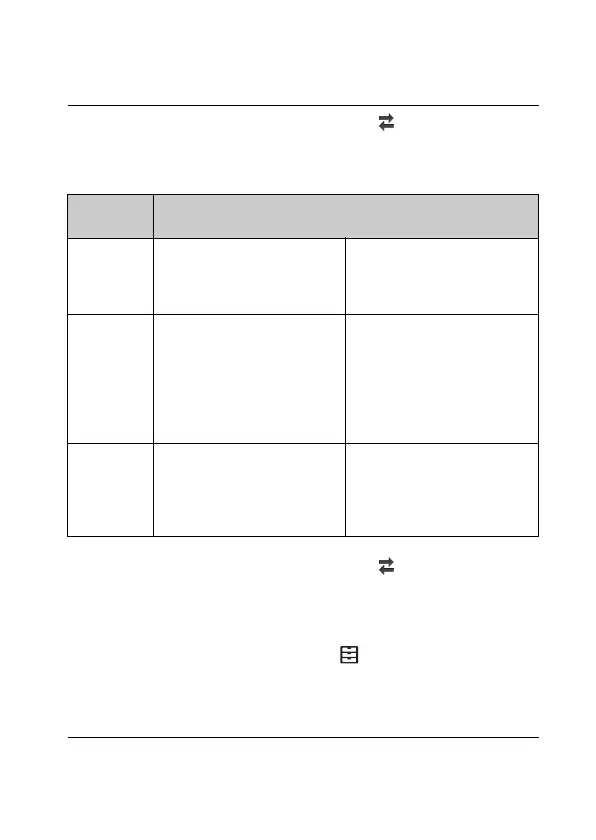
FILE
FORMAT
Features
XAVC S 4K Allows recording with 4K
resolution (3,840 × 2,160)
Data can be saved in the
computer using the
PlayMemories Home™
software.
XAVC S HD Information volume is
greater compared to AVCHD,
enabling recording of clearer
images.
For supporting memory
cards with this format, see
page 19.
Data can be saved in the
computer using the
PlayMemories Home
software.
AVCHD Compatibility with recording
devices other than
computers is good.
Data can be saved in the
computer or can be created
into supporting media using
the PlayMemories Home
software.
2
Press the MENU button select (REC/OUT SET)
[REC SET] [REC FORMAT] desired setting
value.
• Setting with a higher bit-rate makes image quality higher.
• Selectable setting value depends on the setting you have made by
pressing the MENU button select (OTHERS) [60i/50i SEL].
• Refer to the Help Guide for details of the following:
– S&Q MOTION recording
–SUPER SLOW MOTION recording
– Estimated maximum recording time of each recording format



 To Next Page