EasyManua.ls Logo

Sony HCD-C70 - Page 8

Sony HCD-C70
48 pages
Print Icon
To Next Page IconTo Next Page
To Previous Page IconTo Previous Page
Loading...
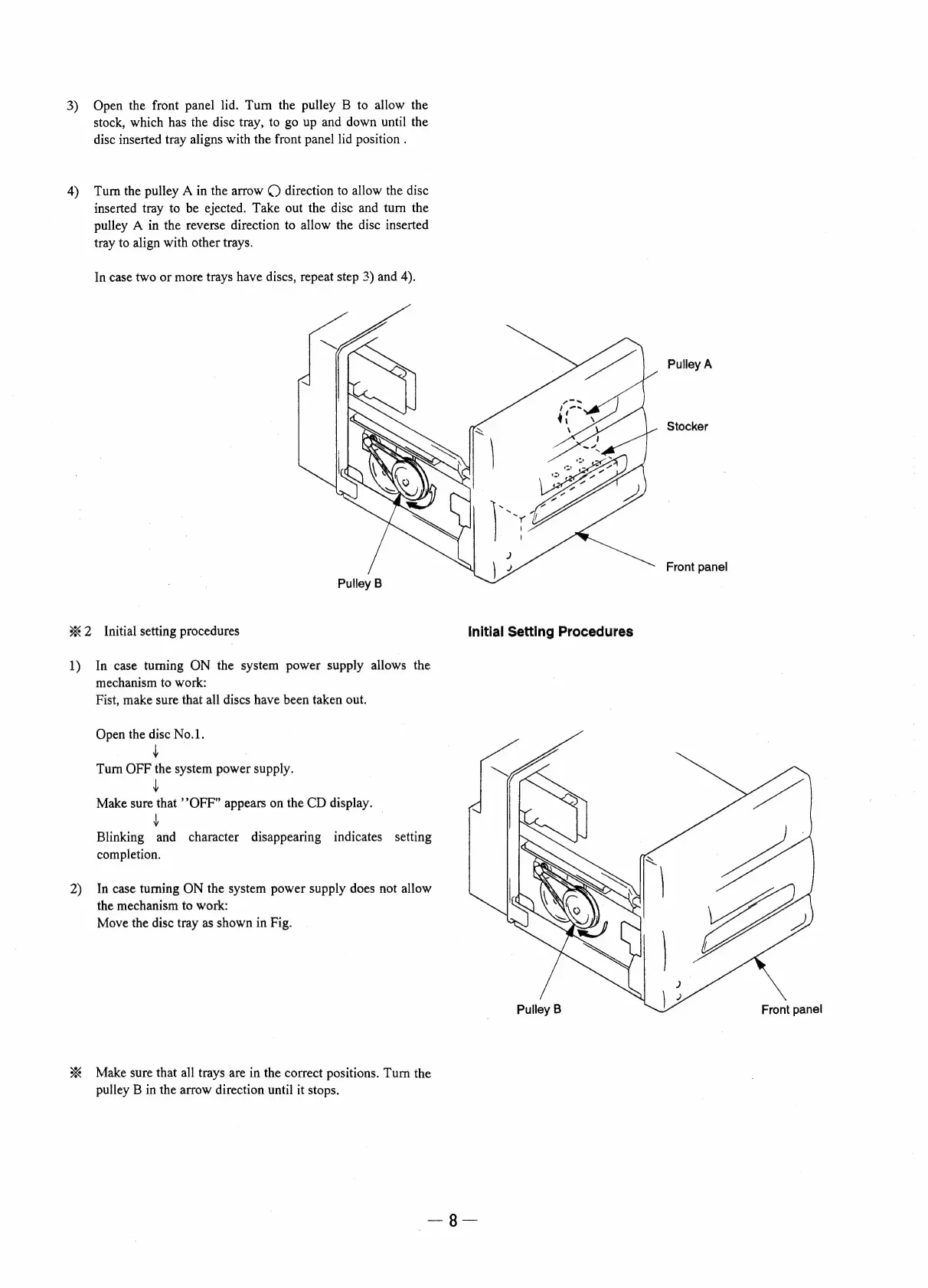
3)
Open
the
front
panel
lid.
Tum
the
pulley
B
to
allow
the
stock,
which
has
the
disc
tray,
to
go up
and
down
until
the
disc
inserted
tray
aligns
with
the
front
panel
lid
position
.
4)
Turn
the
pulley
A
in
the
arrow
©)
direction
to
allow
the
disc
inserted
tray
to
be
ejected.
Take
out
the
disc
and
tum
the
pulley
A
in
the
reverse
direction
to
allow
the
disc
inserted
tray
to
align
with
other
trays.
In
case
two
or
more
trays
have
discs,
repeat
step
3)
and
4).
Pulley
A
Stocker
Front
panel
Pulley
B
%2
Initial
setting
procedures
Initial
Setting
Procedures
1)
In
case
tuming
ON
the
system
power
supply
allows
the
mechanism
to
work:
Fist,
make
sure
that
all
discs
have
been
taken
out.
Open
the
disc
No.1.
Tum
ae
system
power
supply.
Make
ate
’?OFF”
appears
on
the
CD
display.
Blinking
ee
character
disappearing
indicates
setting
completion.
2)
In
case
turning
ON
the
system
power
supply
does
not
allow
the
mechanism
to
work:
Move
the
disc
tray
as
shown
in
Fig.
Pulley
B
Front
panel
%
Make
sure
that
all
trays
are
in
the
correct
positions.
Tum
the
pulley
B
in
the
arrow
direction
until
it
stops.

Related product manuals