17
HCD-GN600
[COLD RESET]
• The cold reset clears all data including preset data stored in the
RAM to initial conditions. Execute this mode when returning
the set to the customer.
Procedure:
1. Press x button, [AMP MENU] button, and
?/1
button
simultaneously.
2. The fluorescent indicator tube becomes blank for a while, and
the set is reset.
[VACS ON/OFF]
• This mode is used to switch ON and OFF the VACS (Variable
Attenuation Control System).
Procedure:
1. Press
?/1
button to turn the set ON.
2. Press
[AMP MENU] button and [GAME MIXING] button
simultaneously. The message “VACS OFF” or “VACS ON”
appears.
[TUNER STEP CHANGE]
• The step interval of AM channels can be toggled between 9 kHz
and 10 kHz.
Procedure:
1. Press
?/1
button to turn the set ON.
2. Press
[TUNER/BAND] button to select the “AM”.
3. Press
?/1
button to turn the set OFF.
4. Press [AMP MENU] button and
?/1
button simultaneously.
The system will turn ON automatically. The message “AM 9k
STEP” or AM 10k STEP” appears and thus the channel step is
changed.
[CD SERVICE MODE]
• This mode let you move the CD sled motor freely. Use this mode
when you want to clean the optical pick-up.
Procedure:
1. Pressbutton to turn the set ON.
2. Select CD function.
3. Press x , [AMP MENU] button, and
Z
OPEN/CLOSE
button
simultaneously.
4. The CD service mode is activated. The message “SERVICE
MODE” appears.
5. With the CD in stop status, press
M
button to move the
optical pick-up to outside track, or press
m
button to move
to inside track. The message “SLED OUT” or “SLED IN”
appears.
6. To release this mode, press
?/1
button.
[AGING MODE]
This mode can be used for operation check of CD section.
• If an error occurs, the aging operation would stops and the status
is displayed.
• If there are no error occurs, the aging operation would continues
repeatedly.
Procedure:
1. Press
?/1
button to turn the set ON
2. Select CD function.
3. Load three discs on the disc tray.
4. Press
[PLAY MODE] button to select the “ALL DISCS” mode,
and press the
[REPEAT] button to select “REPEAT OFF” mode.
5. Press x button, [AMP MENU] button, and [DISC SKIP/ EX-
CHANGE] button simultaneously.
6. Aging operation is started.
7. To release this mode, press
?/1
button or disconnect the
power cord to turn the power OFF.
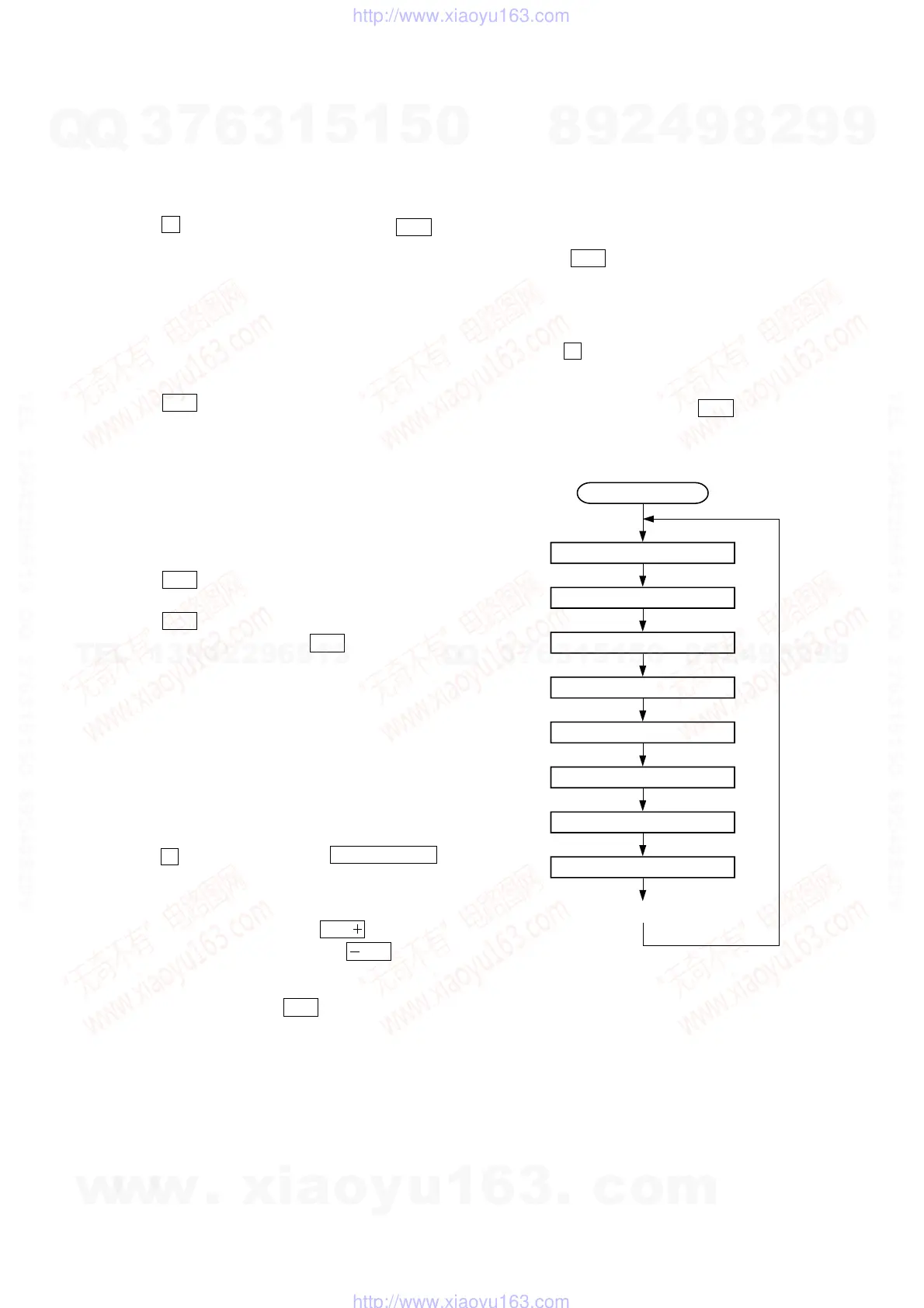
2. Aging mode sequence:
Start (from disc 1)
Disc chucking
TOC read
Play first track for 2 seconds
Play last track for 2 seconds
EX-change open/close
Open the disc tray
Disc skip
Close the tray
Change the next disc.
w
w
w
.
x
i
a
o
y
u
1
6
3
.
c
o
m
Q
Q
3
7
6
3
1
5
1
5
0
9
9
2
8
9
4
2
9
8
T
E
L
1
3
9
4
2
2
9
6
5
1
3
9
9
2
8
9
4
2
9
8
0
5
1
5
1
3
6
7
3
Q
Q
TEL 13942296513 QQ 376315150 892498299
TEL 13942296513 QQ 376315150 892498299
http://www.xiaoyu163.com
http://www.xiaoyu163.com


 To Next Page