6
HCD-VM330AV
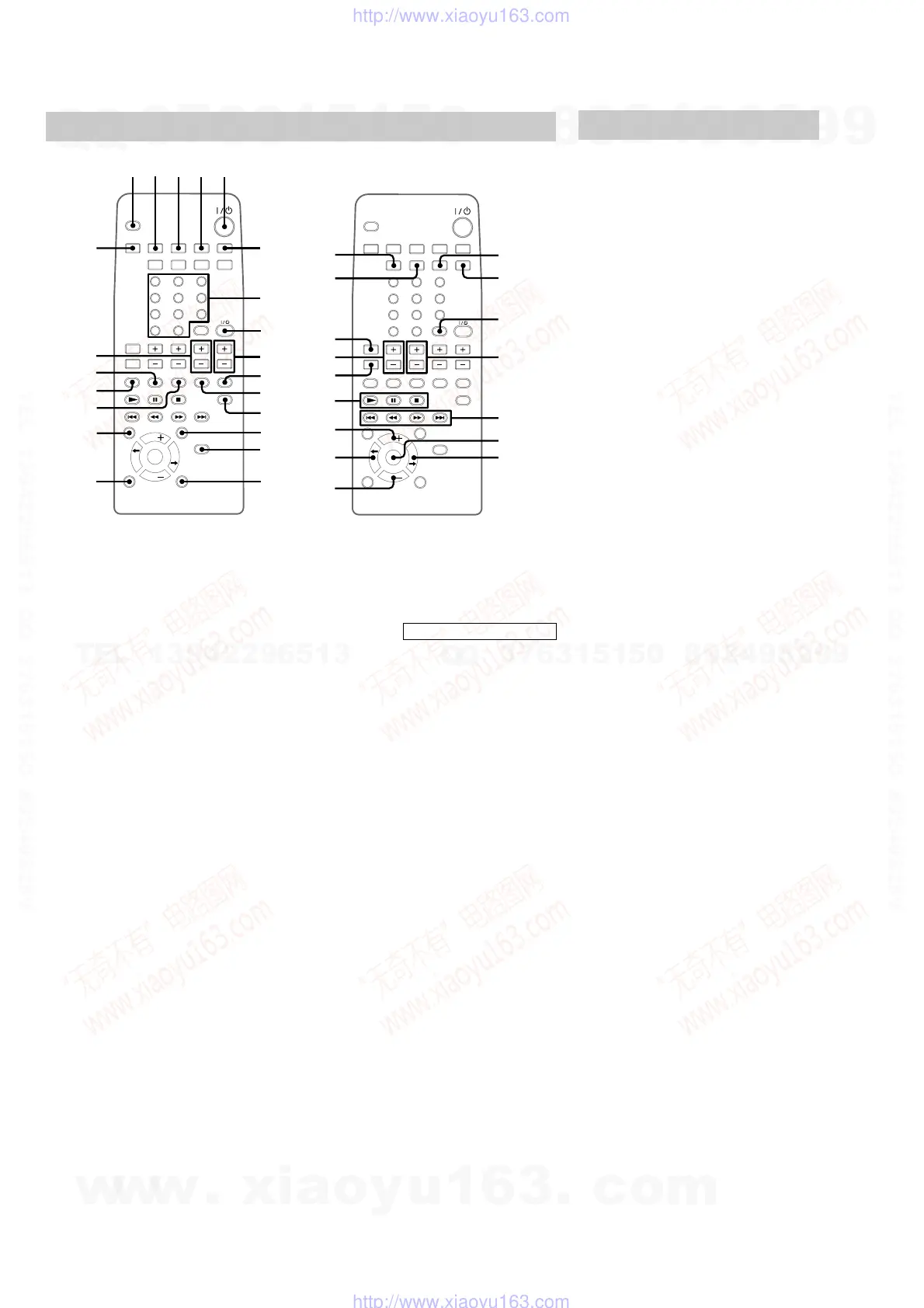
Remote Control
qg
qh
ql
qk
qj
w;
1234
wa
ws
6
7
8
9
5
qf
0
qd
qa
qs
wd
wf
wg
wh
wj
wk
wl
e;
ea
es
ed
ef
eg
eh
ek
ej
5.1CH 0 (36)
CD ql (13, 16, 27)
CENTER +/— eg (10)
CLOCK/TIMER SELECT 2
(29, 33)
CLOCK/TIMER SET 3 (11, 29,
32)
DBFB qg (30)
DISPLAY qf (11, 19, 25)
ENTER wg (11, 15, 17, 18, 25,
28, 29)
GAME qa (32, 35)
GROOVE wk (30)
NEXT wj (14, 15, 22)
Number buttons 7 (14, 16)
ON SCREEN ek (20)
PICTURE EFFECT ej (23)
PLAY MODE 4 (17, 28)
PRESET EQ qj (30)
PREV wj (14, 15, 22)
PRO LOGIC eh (10, 31)
REAR +/— wh (10)
REPEAT 6 (14)
RETURN O wf (15)
SCROLL qd (19)
SELECT ed (15)
SLEEP ws (32)
SPECIAL MENU wd (21, 22)
SURROUND qh (31)
TAPE A/B w; (26)
TEST TONE ef (10)
TUNER BAND qk (24)
TV @/1 (power) 8 (9)
TV CH +/— 9 (9)
TV/VIDEO 1 (9)
TV VOL +/— wa (9)
VIDEO (MD) qs (34)
VOL — e;
VOL + es
BUTTON DESCRIPTIONS
@/1 (power) 5
N (play) ed
X (pause) ed
x (stop) ed
. (go back) wj
m (rewind) wj
M (fast forward) wj
> (go forward) wj
TDISC/DISCt wl ea
Setting the time
1
Turn on the system.
2
Press TIMER SET (or CLOCK/TIMER
SET on the remote).
When you set the clock for the first time, go
to step 5.
3
Press — . or > + (or . or >
on the remote) repeatedly to select
CLOCK SET.
4
Press ENTER.
5
Press — . or > + (or . or >
on the remote) repeatedly to set the
hour.
6
Press ENTER.
7
Press — . or > + (or . or >
on the remote) repeatedly to set the
minute.
8
Press ENTER.
Tip
If you made a mistake or want to change the time,
start over from step 1.
Note
The clock settings are canceled when you disconnect
the power cord or if a power failure occurs.
w
w
w
.
x
i
a
o
y
u
1
6
3
.
c
o
m
Q
Q
3
7
6
3
1
5
1
5
0
9
9
2
8
9
4
2
9
8
T
E
L
1
3
9
4
2
2
9
6
5
1
3
9
9
2
8
9
4
2
9
8
0
5
1
5
1
3
6
7
3
Q
Q
TEL 13942296513 QQ 376315150 892498299
TEL 13942296513 QQ 376315150 892498299
http://www.xiaoyu163.com
http://www.xiaoyu163.com


 To Next Page