– 5 –
AMS Test Mode
• This mode is used for checking the AMS operations of the tape deck.
JIG
7-819-039-12 Alignment tape, AMS-110A
Procedure:
1. Press the 1/u button to turn the set ON.
2. Set the tape (AMS-110A).
3. Press the three buttons t/CLOCK SET , ENTER , and DISC 3 button simultaneously.
4. “TEST MODE” is displayed on the fluorescent display tube.
5. Press the FUNCTION button and switch the function to the deck with the tape (AMS-110A).
6. Press the CD SYNCHRO button. “AMS CHECK” is displayed on the fluorescent display tube and the tape is rewound.
7. AMS starts in the normal direction. If the AMS count is 2 at shut down, proceed to step 8.
“NG” is displayed at other times, and the deck stops.
8. AMS starts in the opposite direction. If the AMS count is 2 at shut down again, “OK” is displayed.
“NG” is displayed at other times.
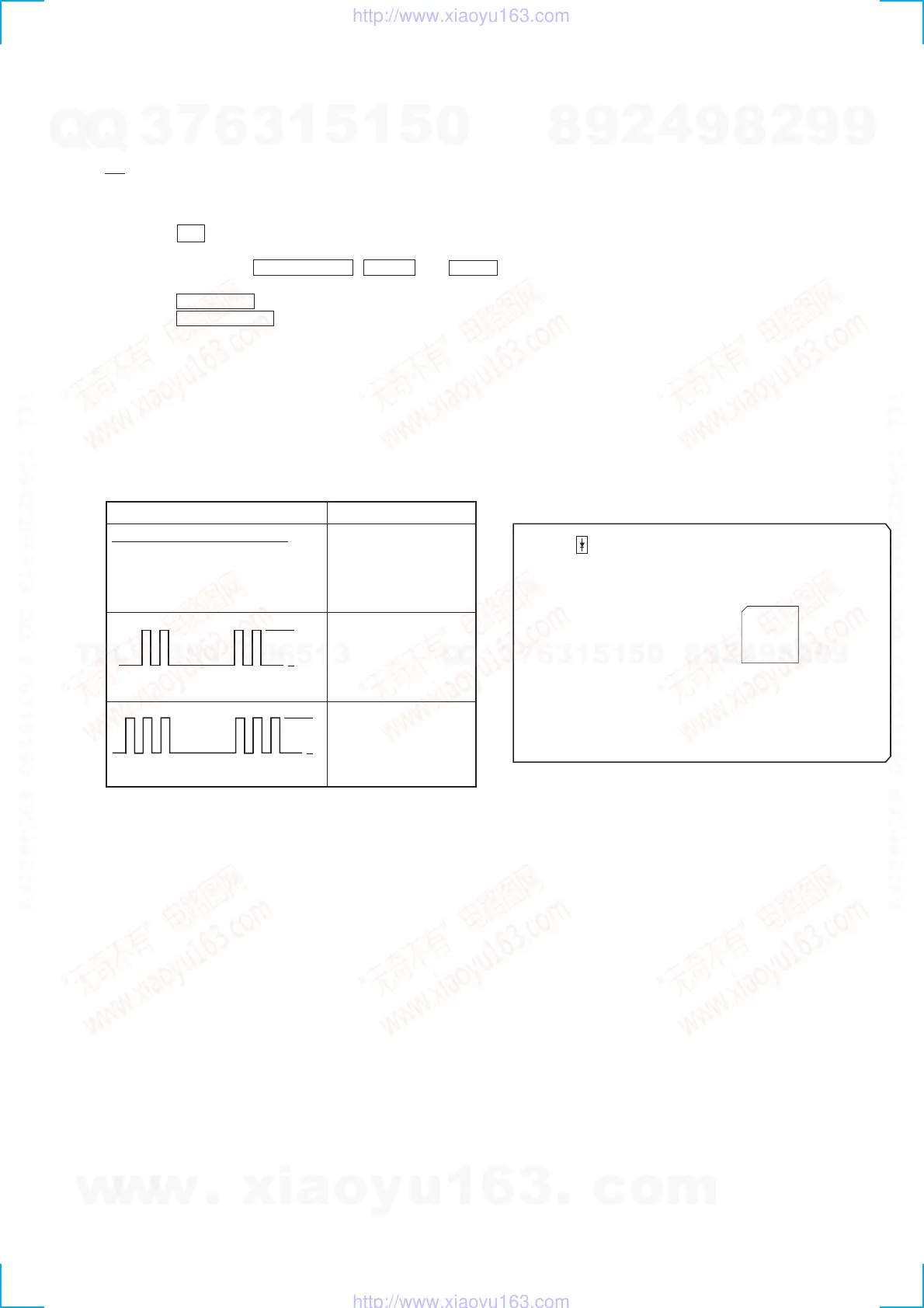
SELF-DIAGNOSIS
This model has the self-diagnosis function for the VIDEO and AUDIO decoder sections.
Immediately after the power on, the self-diagnosis function searches each operation of IC’s around the mechanism control microcomputer
(IC701).
The results can be checked by D502 of the VIDEO board.
Oscilloscope (Waveform) Symptom
No error
MPEG decoder (IC505)
error
MPEG decoder (IC505)
or
DRAM (IC507) error
[VIDEO BOARD] (SIDE A)
D502
IC505
100
91
33
64
90
65
1
32
L
Li
ht
2 time blinkin
L
L
3 time blinkin
w
w
w
.
x
i
a
o
y
u
1
6
3
.
c
o
m
Q
Q
3
7
6
3
1
5
1
5
0
9
9
2
8
9
4
2
9
8
T
E
L
1
3
9
4
2
2
9
6
5
1
3
9
9
2
8
9
4
2
9
8
0
5
1
5
1
3
6
7
3
Q
Q
TEL 13942296513 QQ 376315150 892498299
TEL 13942296513 QQ 376315150 892498299
http://www.xiaoyu163.com
http://www.xiaoyu163.com


 To Next Page