20
GB
3b: Connecting the video components
This section describes how to hook up your
components to this receiver. Before you begin,
refer to “Component to be connected” below
for the pages which describe how to connect
each component.
After hooking up all your components,
proceed to “4: Connecting the antennas” (page
28).
Component to be connected
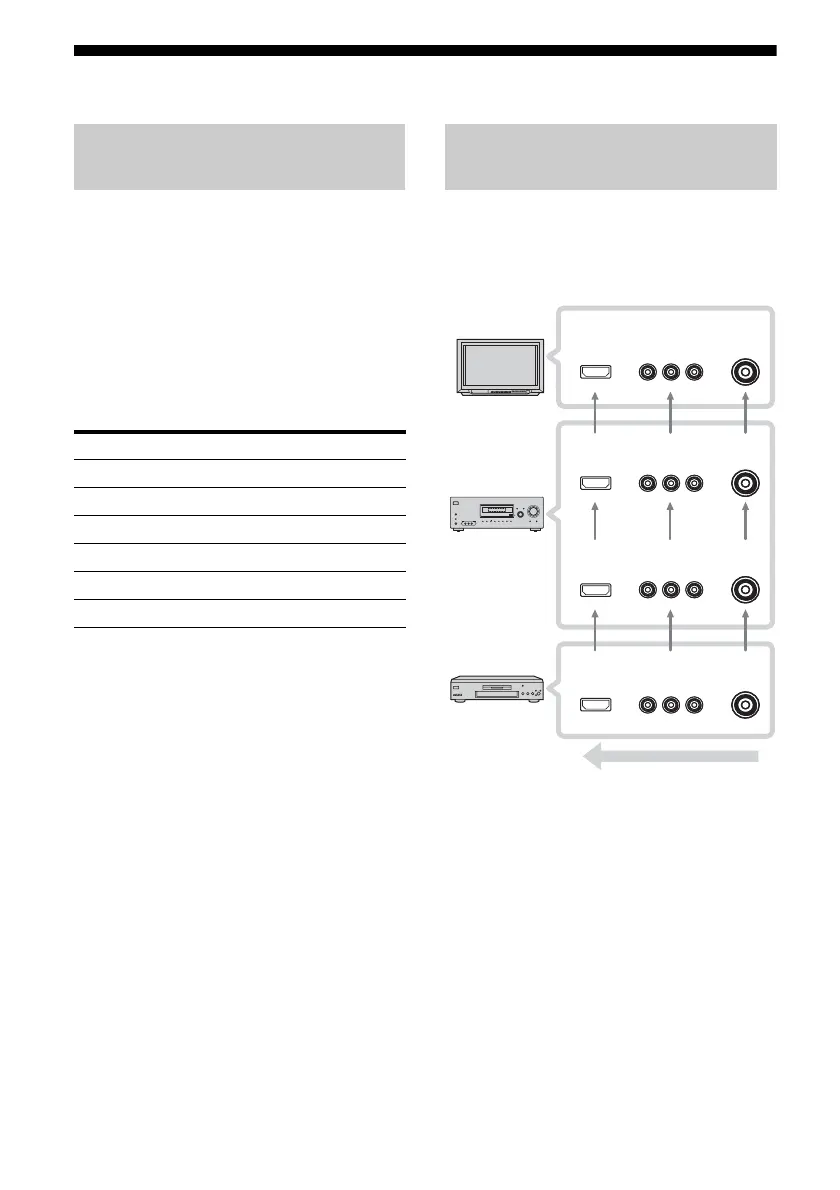
The image quality depends on the connecting
jack. Refer to the illustration that follows.
Select the connection according to the jacks on
your components.
Notes
• Connect image display components such as a TV
or a projector to the HDMI OUT or MONITOR
OUT jack on the receiver.
• Turn on the receiver when the video and audio of a
playback component are being output to a TV
through the receiver. If the power supply of the
receiver is not on, neither video nor audio is
transmitted.
How to hook up your
components
Component Page
With HDMI jack 21
TV 23
DVD player/DVD recorder 24
Satellite tuner/Set-top box 26
VCR 27
Camcorder, video game, etc. 27
Video input/output jack to be
connected
?/1
AUTO CAL MIC
SPEAKERS
(OFF/A/B/A+B)
PHONES
VIDEO 3 IN/PORTABLE AV IN
VIDEO L AUDIO R
MEMORY/
ENTER
TUNING
MODE
TUNING 2CH A.F.D. MOVIE MUSIC
AUTO CAL MUTING
DISPLAY INPUT MODE
INPUT SELECTOR
MASTER VOLUME
TV, etc. INPUT
jack
Receiver HDMI
OUT, MONITOR
OUT jack
Receiver INPUT
jack
High quality image
COMPONENT
VIDEO
VIDEO
HDMI
COMPONENT
VIDEO VIDEO
HDMI
COMPONENT
VIDEO VIDEO
HDMI
COMPONENT
VIDEO VIDEO
HDMI
Video component
OUTPUT jack



 To Next Page