39
GB
Amplifier Operations
Navigating through
menus
By using the amplifier menus, you can make
various adjustments to customize the receiver.
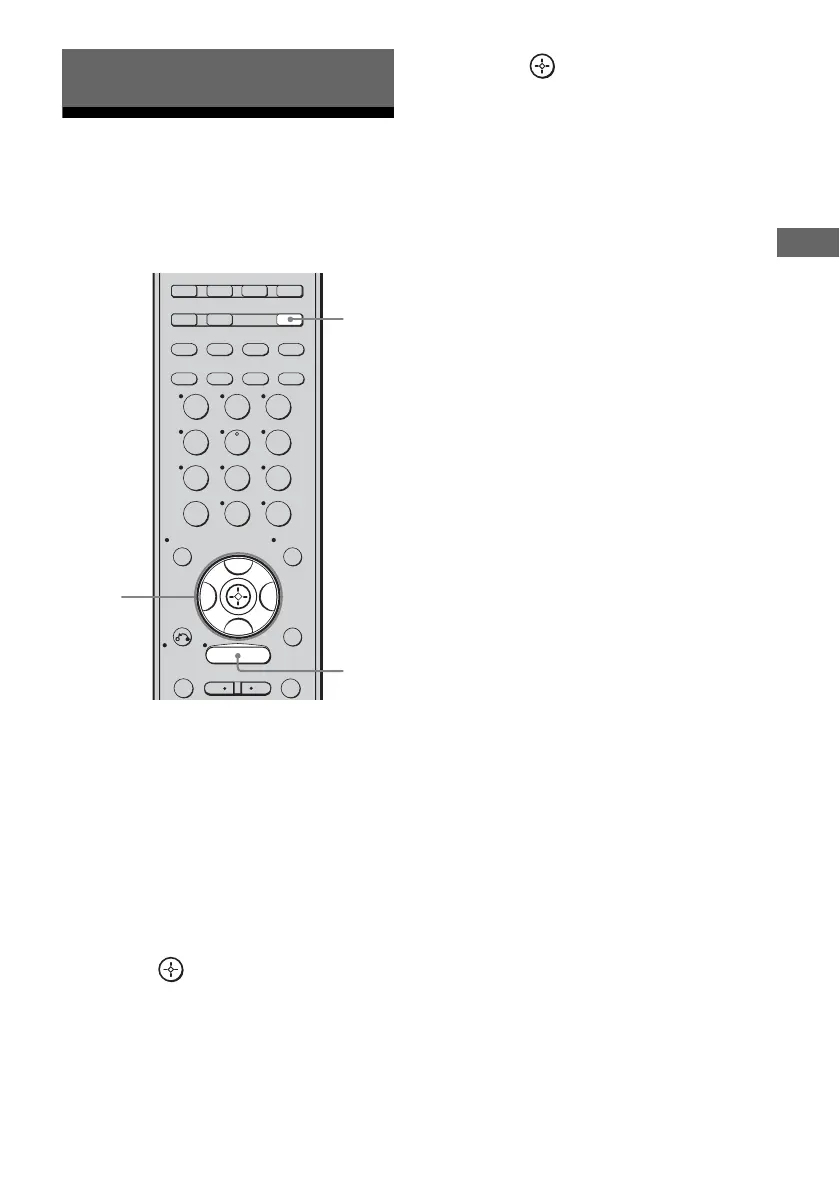
1 Press RECEIVER.
The RECEIVER indicator lights up and
receiver operation is activated.
2 Press MENU.
“1-LEVEL” appears on the display.
3 Press V/v repeatedly to select
the menu you want.
4 Press or b to enter the
menu.
5 Press V/v repeatedly to select
the parameter you want to
adjust.
6 Press or b to enter the
parameter.
7 Press V/v repeatedly to select
the setting you want.
The setting is entered automatically.
8 Repeat steps 3 to 7 when you
want to make other settings.
To return to the previous
display
Press B.
To exit the menu
Press MENU.
However, if the RECEIVER button is light off,
press RECEIVER and then press MENU.
Note
Some parameters and settings may appear dimmed
on the display. This means that they are either
unavailable or fixed and unchangeable.
Amplifier Operations
GUIDE DISPLAY
RETURN/
EXIT
OPTIONS
TOOLS
REPLAY ADVANCE
SAT TV TUNER
2CH A.F.D. MOVIE MUSIC
SLEEP
FM MODE D. TUNING
SA-CD/CD
AUX DMPORT RECEIVER
MEMORY
.
>
MENU
CLEAR
>10
–
/
– –
<
<
23
456
789
ENTER
0/10
1
AUTO CAL
B
V
v
B
3-7
2
1



 To Next Page