31
GB
Getting Started
7: Calibrating the
appropriate settings
automatically
(AUTO CALIBRATION)
This receiver is equipped with D.C.A.C.
(Digital Cinema Auto Calibration)
Technology which allows you to perform
automatic calibration as follows:
• Check the connection between each speaker
and the receiver.
• Adjust the speaker level.
• Measure the distance of each speaker to your
listening position.
You can also adjust the speaker levels and
balance manually. For details, see
“8: Adjusting the speaker levels and balance
(TEST TONE)” (page 34).
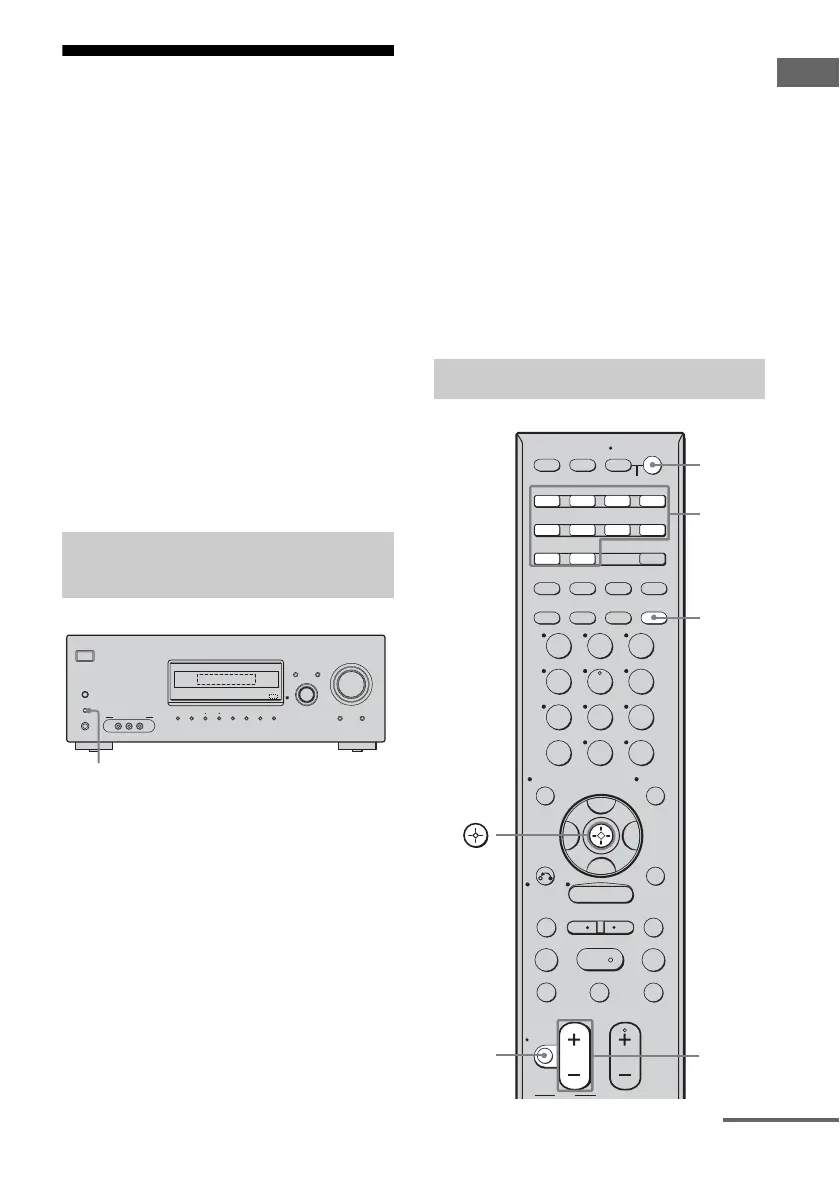
1 Connect the supplied optimizer
microphone to the AUTO CAL
MIC jack.
2 Place the optimizer
microphone at your listening
position.
3 Place the speakers so that the
speakers are facing the
optimizer microphone.
Note
To avoid damaging the receiver and the microphone,
be sure to use the supplied optimizer microphone
only.
Tips
• You can also fix the optimizer microphone to a
tripod (not supplied) and place the tripod at your
listening position.
• Be sure to remove any obstacles in the path
between the optimizer microphone and the
speakers.
• When you face the speaker towards the optimizer
microphone, you will get a more accurate
measurement.
Before you perform Auto
Calibration
?/1
AUTO CAL MIC
SPEAKERS
(OFF/A/B/A+B)
PHONES
VIDEO 3 IN/PORTABLE AV IN
VIDEO L AUDIO R
MEMORY/
ENTER
TUNING
MODE
TUNING 2CH A.F.D. MOVIE MUSIC
AUTO CAL MUTING
DISPLAY INPUT MODE
INPUT SELECTOR
MASTER VOLUME
1
Performing Auto Calibration
SYSTEM STANDBY
TUNING –
DISC SKIP
MUTING
TV VOL
MASTER VOL
TV CH
PRESET
TUNING +
GUIDE DISPLAY
RETURN/
EXIT
OPTIONS
TOOLS
REPLAY ADVANCE
TV
VIDEO 1 VIDEO 2 VIDEO 3 DVD
SAT TV TUNER
2CH A.F.D. MOVIE MUSIC
SLEEP
FM MODE D. TUNING
SA-CD/CD
AUX DMPORT RECEIVER
RM SET UP
?/1
MEMORY
.
>
m M
xX
MENU
H
CLEAR
>10
–
/
– –
<
<
23
456
789
ENTER
0/10
1
AV ?/1
AUTO CAL
B
V
v
B
AUTO
CAL
Input
buttons
?/1
switch
MUTING
MASTER
VOL +/–
continued



 To Next Page