24
GB
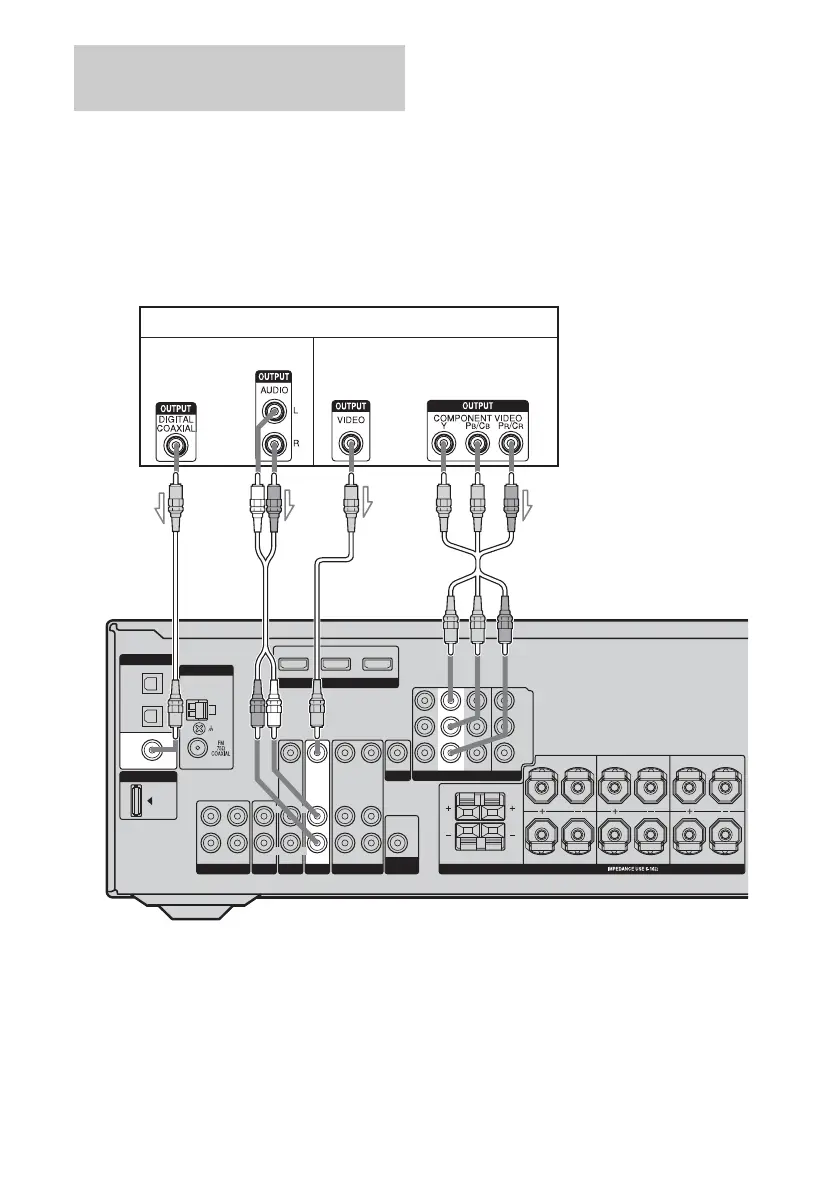
The following illustration shows how to
connect a DVD player and DVD recorder.
It is not necessary to connect all the cables.
Connect audio and video cords according to
the jacks of your components.
Note
To input multi channel digital audio from the DVD
player, set the digital audio output setting on the
DVD player. Refer to the operating instructions
supplied with the DVD player.
Tip
All the digital audio jacks are compatible with
32 kHz, 44.1 kHz, 48 kHz, and 96 kHz sampling
frequencies.
Connecting a DVD player
Connecting a DVD player/DVD
recorder
DMPORT
ANTENNA
AM
SA-CD/CD/CD-R
TV
L
R
OUT IN IN
HDMI
DVD IN VIDEO 2/BD IN OUT
SAT
AUDIO IN
VIDEO IN
VIDEO 1
AUDIO OUT
VIDEO OUT
VIDEO OUT
AUDIO IN
AUDIO OUT
VIDEO IN
L
R
L
R
SUB
WOOFER
MONITOR
SPEAKERS
FRONT B
FRONT A
L
L
R
R
SURROUND
L
R
CENTER
SURROUND BACK
DVD
AUDIO IN
VIDEO IN
L
R
DIGITAL
OPTICAL
SAT
IN
DVD
IN
COAXIAL
VIDEO 2/
BD IN
SAT IN
COMPONENT VIDEO
DVD IN VIDEO 1 IN
Y
P
B
/C
B
P
R
/C
R
MONITOR OUT
DVD player
AB
A Coaxial digital cord (supplied)
B Audio cord (not supplied)
C Component video cord (not supplied)
D Video cord (not supplied)
CD
Audio signals Video signals



 To Next Page