23
GB
Getting Started
The image from a visual component connected
to this receiver can be displayed on a TV
screen.
It is not necessary to connect all the cables.
Connect audio and video cords according to
the jacks of your components.
Notes
• Connect image display components such as a TV
or a projector to the MONITOR OUT jack on the
receiver.
• Turn on the receiver when the video and audio of a
playback component are being output to a TV via
the receiver. If the power supply of the receiver is
not turned on, neither video nor audio is
transmitted.
Tips
• You can watch the selected input image when you
connect the MONITOR OUT jack to a TV.
• To output the sound of the TV from the speakers
connected to the receiver, be sure to
– connect the audio output jacks of the TV to the
TV IN jack of the receiver.
– turn off or mute the TV’s volume.
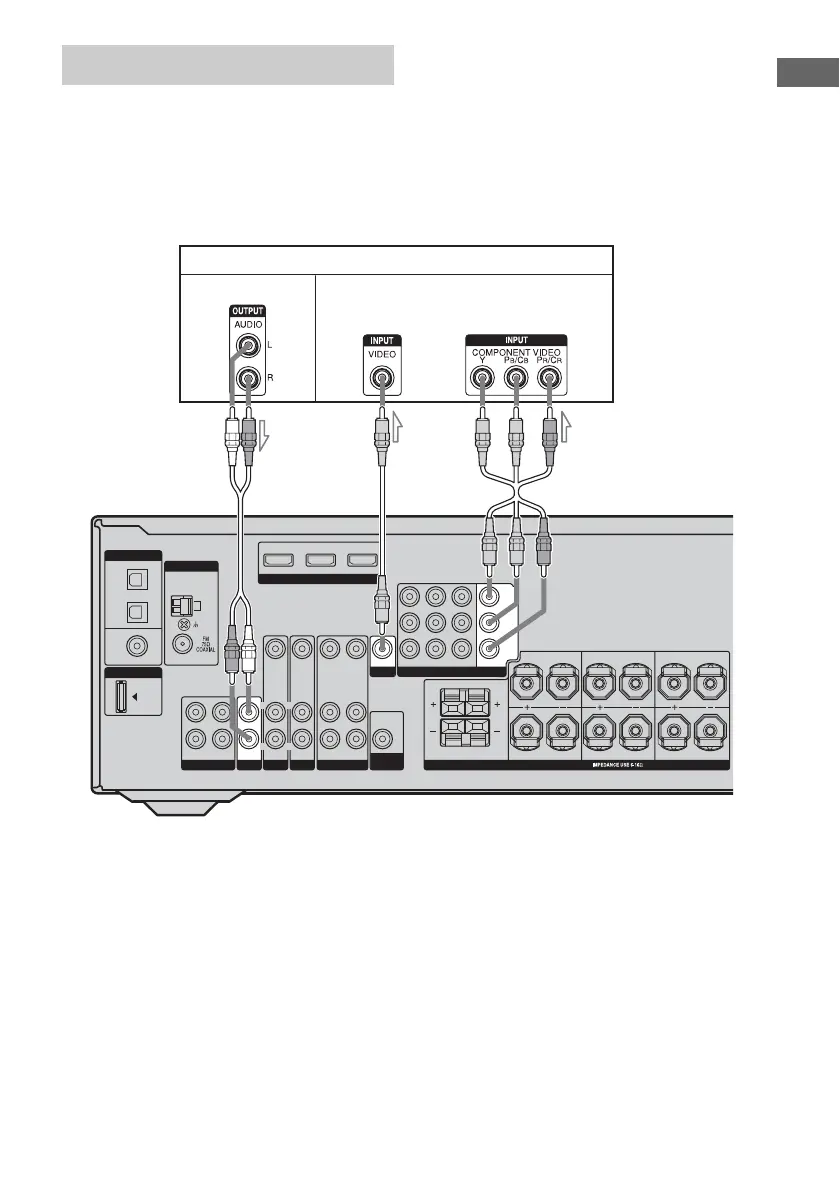
Connecting a TV
DIGITAL
DMPORT
OPTICAL
SAT
IN
DVD
IN
COAXIAL
ANTENNA
VIDEO 2/
BD IN
AM
SA-CD/CD/CD-R
L
R
OUT IN
HDMI
DVD IN VIDEO 2/BD IN OUT
SAT
AUDIO IN
VIDEO IN
DVD
AUDIO IN
VIDEO IN
VIDEO 1
AUDIO OUT
VIDEO OUT
AUDIO IN
AUDIO OUT
VIDEO IN
L
R
L
R
SUB
WOOFER
SPEAKERS
FRONT B
FRONT A
L
L
R
R
SURROUND
L
R
CENTER
SURROUND BACK
VIDEO OUT
MONITOR
TV
IN
L
R
SAT IN
COMPONENT VIDEO
DVD IN VIDEO 1 IN
Y
P
B
/C
B
P
R
/C
R
MONITOR OUT
TV
BA
A Audio cord (not supplied)
B Video cord (not supplied)
C Component video cord (not supplied)
Audio signals Video signals
C



 To Next Page