57
GB
Tuner Operations
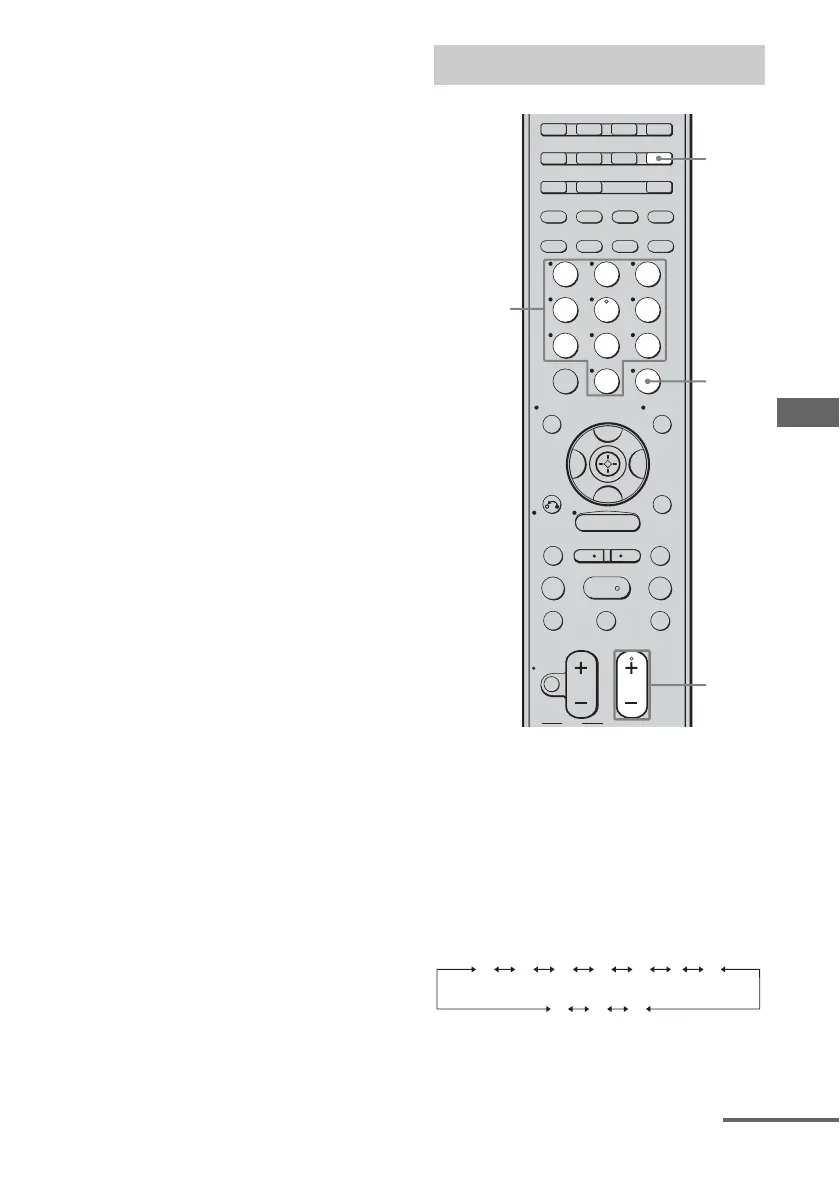
2 Tune in the station that you
want to preset using Automatic
Tuning (page 55) or Direct
Tuning (page 56).
Switch the FM reception mode, if
necessary (page 55).
3 Press MEMORY.
You can also use MEMORY/ENTER on
the receiver.
“MEMORY” lights up for a few seconds.
Perform steps 4 and 5 before
“MEMORY” goes out.
4 Press the numeric buttons to
select a preset number.
You can also press PRESET + or
PRESET – to select a preset number.
If “MEMORY” goes out before you
select the preset number, start again from
step 3.
5 Press ENTER.
You can also use MEMORY/ENTER on
the receiver.
The station is stored as the selected preset
number.
If “MEMORY” goes out before you press
ENTER, start again from step 3.
6 Repeat steps 1 to 5 to preset
another station.
1 Press TUNER repeatedly to
select the FM or AM band.
2 Press PRESET + or PRESET –
repeatedly to select the preset
station you want.
Each time you press the button, you can
select a preset station as follows:
You can also press the numeric buttons to
select the preset station you want. Then,
press ENTER to enter the selection.
Tuning to preset stations
1
ENTER
2
TUNING –
DISC SKIP
MUTING
TV VOL
MASTER VOL
TV CH
PRESET
TUNING +
GUIDE DISPLAY
RETURN/
EXIT
OPTIONS
TOOLS
REPLAY ADVANCE
VIDEO 1 VIDEO 2 VIDEO 3 DVD
SAT TV TUNER
2CH A.F.D. MOVIE MUSIC
SLEEP
FM MODE D. TUNING
SA-CD/CD
AUX DMPORT RECEIVER
MEMORY
.
>
m M
xX
MENU
H
CLEAR
>10
–
/
– –
<
<
23
456
789
ENTER
0/10
1
AUTO CAL
B
V
v
B
Numeric
buttons
01 02 03 04 05 27...
30 29 28
continued



 To Next Page