12
Step 3: Turning the power on, and setting the
date and time
Set the date and time when using this
camcorder for the first time.
If you do not set the date and time, the
[CLOCK SET] screen appears every time
you turn on your camcorder or press the
(Movie)/ (Still) select button.
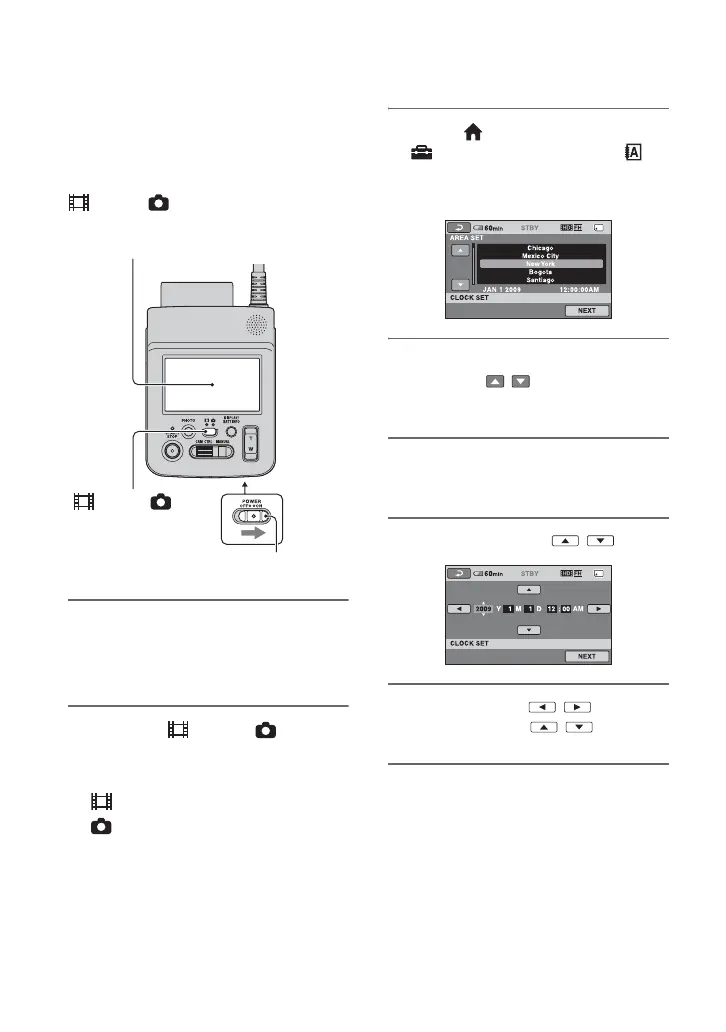
1 Turn on your camcorder.
While pressing the green button, slide
the POWER switch to ON.
2 Press the (Movie)/ (Still)
select button and turn on the
desired mode lamp.
(Movie): To record movies
(Still): To record still images
Go to step 4 when you turn on your
camcorder for the first time.
3 Touch (HOME) t
(SETTINGS) t [CLOCK/
LANG] t [CLOCK SET].
The [CLOCK SET] screen appears.
4 Select the desired geographical
area with / , then touch
[NEXT].
5 Set [DST SET] or [SUMMERTIME],
then touch [NEXT].
6 Set [Y] (year) with / .
7 Select [M] with / , then set
the month with / .
8 Set [D] (day), hour and minute in
the same way, then touch [NEXT].
POWER switch
Touch the button on the
LCD screen.
(Movie)/ (Still)
select button



 To Next Page
 Loading...










