24
1 :Goes to the Film Roll Index screen (p. 26).
2 :Goes to the Face Index screen (p. 26).
3 :Displays movies with HD (high definition) image quality.*
4 :Displays still images.
* appears when you select the movie with SD (standard definition) image quality in
[ / SET] (p. 43).
z Tips
• The number of the images on the VISUAL INDEX screen can be changed 6 y 12 by moving the power
zoom lever C. To fix this number, touch (HOME) A t (SETTINGS) t [VIEW IMAGES
SET] t [ DISPLAY] (p. 53).
3 Start playing back.
Touch the or tab, then select the desired movie to play back.
z Tips
• When playback from the selected movie reaches the last movie, the screen returns to the VISUAL INDEX
screen.
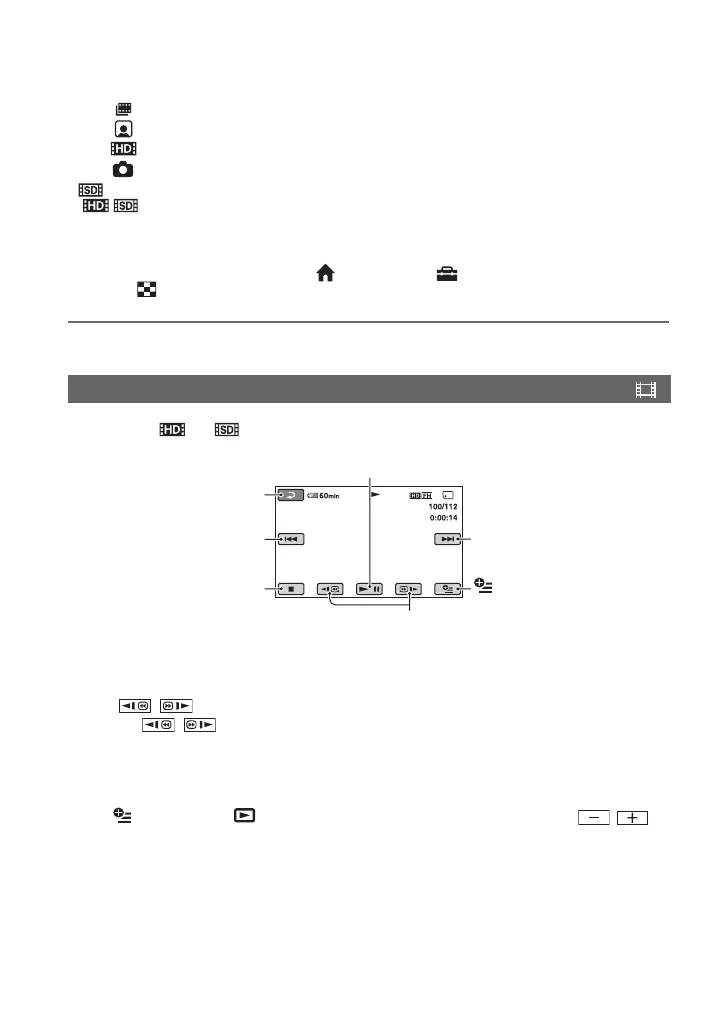
• Touch / during pause to play back movie slowly.
• A touch of
/ makes the reverse/fast forward approximately 5 times faster, 2 touches makes it
approximately 10 times faster, 3 touches makes it approximately 30 times faster, and 4 touches makes it
approximately 60 times faster.
To adjust the sound volume
Touch (OPTION) t tab t [VOLUME], then adjust the volume with / .
Playing movies
Beginning of the scene/
previous scene
Toggles Play or Pause as you touch
Next scene
Stop (go to the VISUAL
INDEX screen)
Reverse/Forward
(OPTION)
Return (to the VISUAL
INDEX screen)


 To Next Page
 Loading...











