25
Advanced Operations
Preventing Accidental Operation —
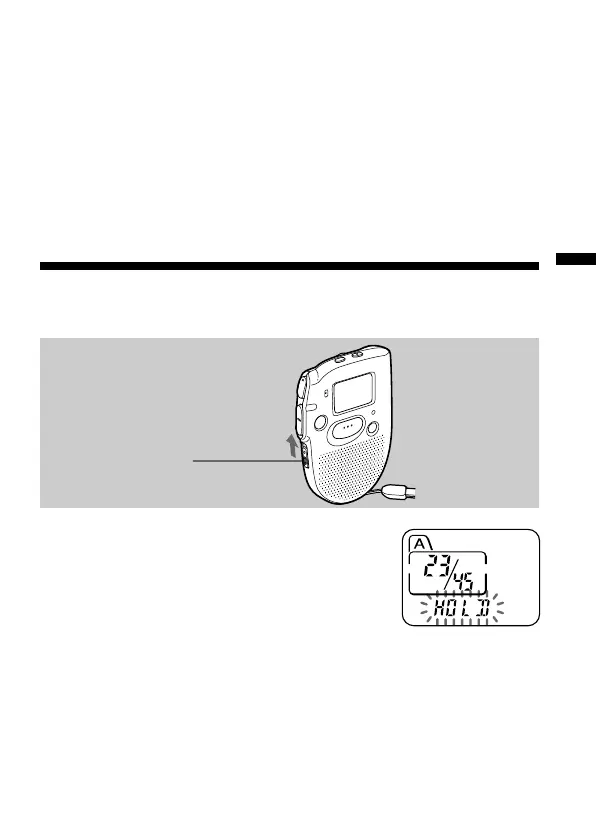
HOLD function
Slide the HOLD switch in the direction of the
arrow. “HOLD” will flash three times, indicating
that all the functions of the buttons are locked,
except for STOP to stop an alarm.
To cancel the HOLD function, simply slide the
HOLD switch in the opposite direction.
Note
When the HOLD function is activated during recording, cancel the HOLD
function first to stop recording.
HOLD switch
To cancel the alarm setting or change the alarm time
1 Select the message you set the alarm to play back, and press MENU.
“ALARM On” will be displayed.
2 Press NxPLAY/STOP to flash “On”.
3 To cancel the alarm setting: Press –. or >+ to flash “OFF” and
press NxPLAY/STOP.
To change the alarm date and time: Press NxPLAY/STOP. When
the alarm date is displayed, follow the steps 3 to 5 on pages 22 and 23
to change the alarm date and time.
4 Press MENU to exit the menu mode.



 To Next Page