Tuning
in
by
Selecting
a
Preset
Station
Name
Once the frequencies of the stations
are
preset, you can
tune
in the
station easily just by selecting
the memory page
and
pressing the
desired preset button.
Up
to
SO
stations of either
FM
or
AM, 5 stations for every 10 pages, can
be
preset. Some stations
are
already preset in this unit
at
the factory.
Lefs
try
to receive some
of
the preset stations.
To preset
the stations,
go
on
to the next section to learn how to
tune
in
a station by direct, manual
or
scan tuning
and
read the "Presetting a
Station (page 24)"
and
"Editing
Labels
<page 26)".
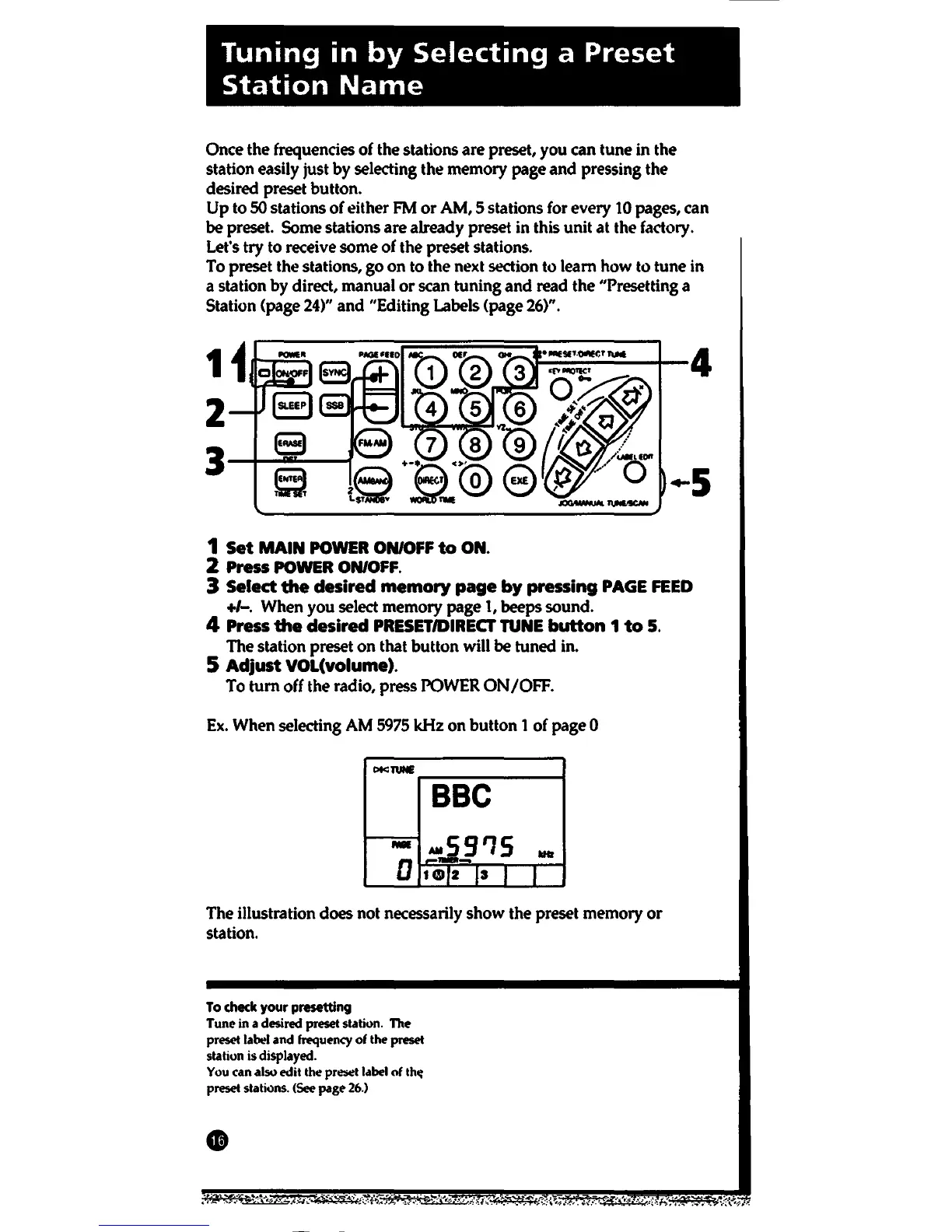
1
Set
MAIN
POWER
ON/OFF
to
ON.
2 Press POWER ON/OFF.
3 Select
the
desired
memory
page
by
pressing
PAGE
FEED
+/-. When you select memory page
1,
beeps sound.
4 Press
the
desired
PRESET/DIRECT
TUNE
button
1
to
5.
The station preset
on
that button will
be
tuned in.
5
Adjust
VOL(volume).
To
tum
off the radio, press POWER
ON/OFF.
Ex.
When selecting AM 5975
kHz
on
button 1 of page 0
C>tc:TUNE
BBC
-59'15
-
llltr
D
---
Hlll2
,,
I
I
The illustration does not necessarily
show
the preset memory
or
station.
To
check your presetting
Tune in a desired
preset
station. The
preset
label
and
frequency
of the preset
station is displayed.
You
can also edit the
preliet
label
of
th~
preset stations.
(See
page
26.)






 To Next Page