EasyManua.ls Logo

Sony ICF-SW1005 - Sleep Timer Operation; Using the Sleep Timer

Sony ICF-SW1005
191 pages
Print Icon
To Next Page IconTo Next Page
To Previous Page IconTo Previous Page
Loading...
Using
the
Sleep
Timer
Before
using
the sleep timer, set
the
dock (see
page
12).
El
OST
8
.......
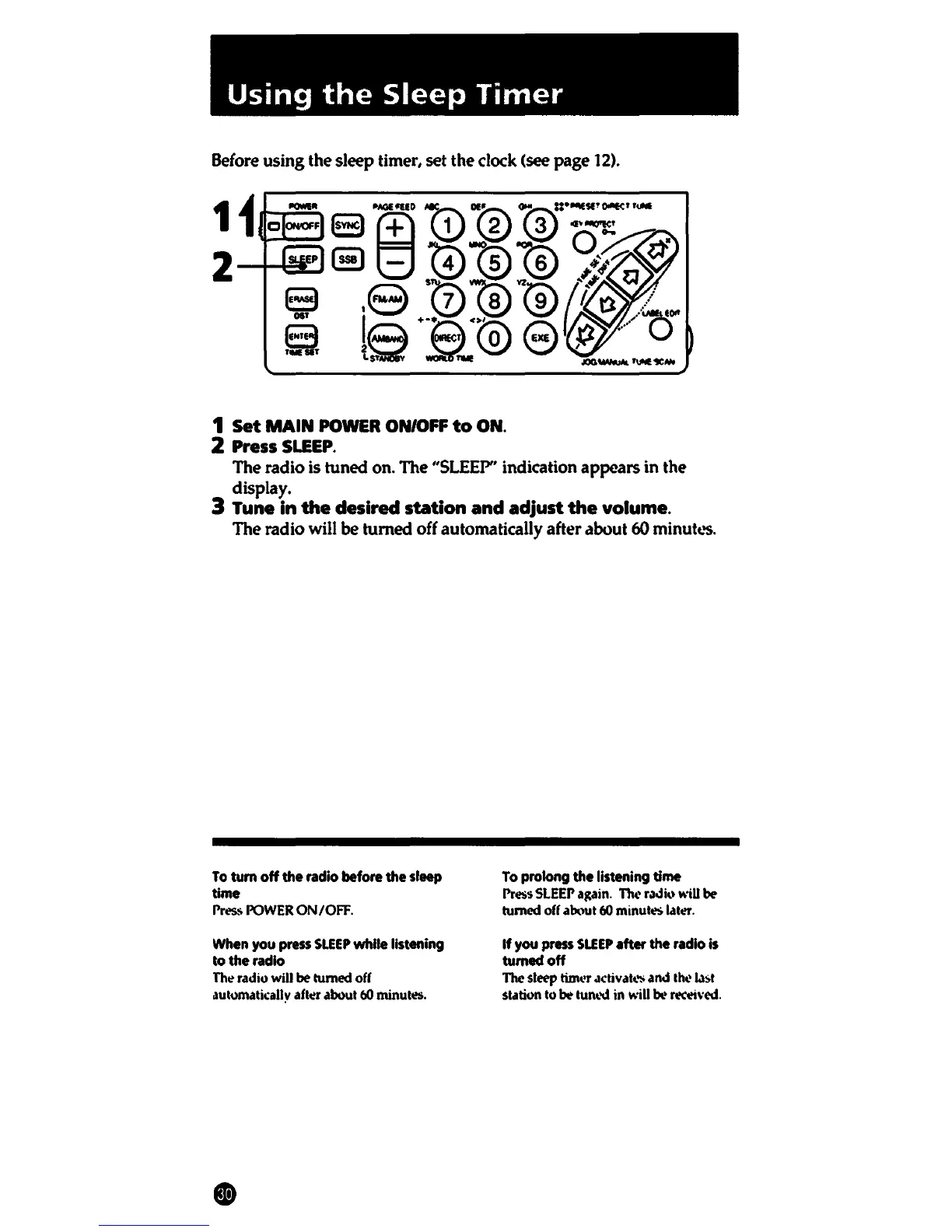
1
Set
MAIN
POWER
ON/OFF
to
ON.
2 Press
SLEEP.
The radio is
tuned
on. The "SLEEP" indication
appears
in
the
display.
3 Tune
in
the
desired station
and
adjust
the
volume.
The radio will
be
turned
off automatically after about 60
minutc..'S.
To
tum off the radio before the sleep
time
l'res.~
POWER
ON/OFF.
When
you
press
SLEEP
while listening
to the radio
Th~
radio will
be
turned off
automatil:ally
afttt aoout
60
minutes.
To
prolong the listening time
l'ress
SLEEP
a1tain.
The
r.idi<•
will
be
turned
off
ab\lUt
60
minutes l.lttt.
If
you press
SLEEP
after the radio
is
tumedoff
The sleep tinwr .ictiv atw and the
l.l:>t
statfon
to
be
turn.'\!
in
will
be re«ived.

Table of Contents