Scan
Tuning
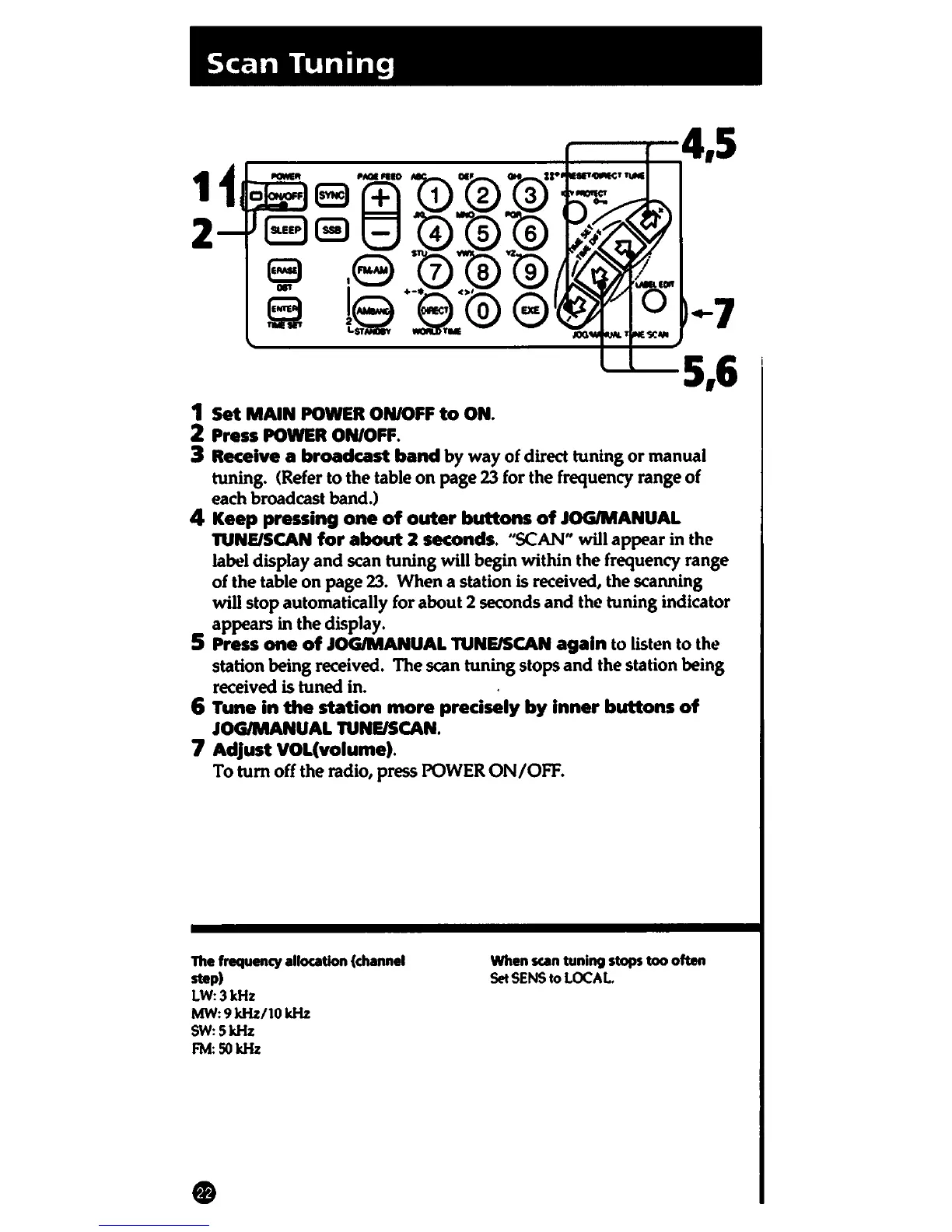
1 Set
MAIN
POWER ON/OFF
to
ON.
2 Press
POWER
ON/OFF.
--4,5
.-7
---5,6
3 Receive a broadcast
band
by
way
of
direct tuning
or
manual
tuning. (Refer to
the
table
on
page 23 for the frequency range of
each broadcast band.)
4 Keep pressing
one
of
outer
buttons
of
JOG/MANUAL
TUNE/SCAN
for
about
2 seconds. "SCAN" will appear in the
label
display
and
scan tuning will begin within the frequency range
of the table
on
page
23.
When a station is received, the scanning
will
stop
automatically for about 2 seconds and the tuning indicator
appears in
the
display.
5 Press
one
of
JOG/MANUAL TUNE/SCAN
again
to listen
to
the
station being received. The scan tuning stops
and
the station being
received is tuned in. .
6 Tune
in
the
station
more
precisely
by
inner
buttons
of
JOG/MANUAL TUNE/SCAN.
7 Adjust VOL(volume).
To
tum
off the radio, press POWER
ON/OFF.
The frequency allocation (channel
step)
LW:3kHz
MW: 9 kHz/10 kHz
SW:5kHz
FM:50kHz
When scan tuning
stops
too often
Set
SENS
to
LOCAL.















 To Next Page