Using the SNC toolbox
16
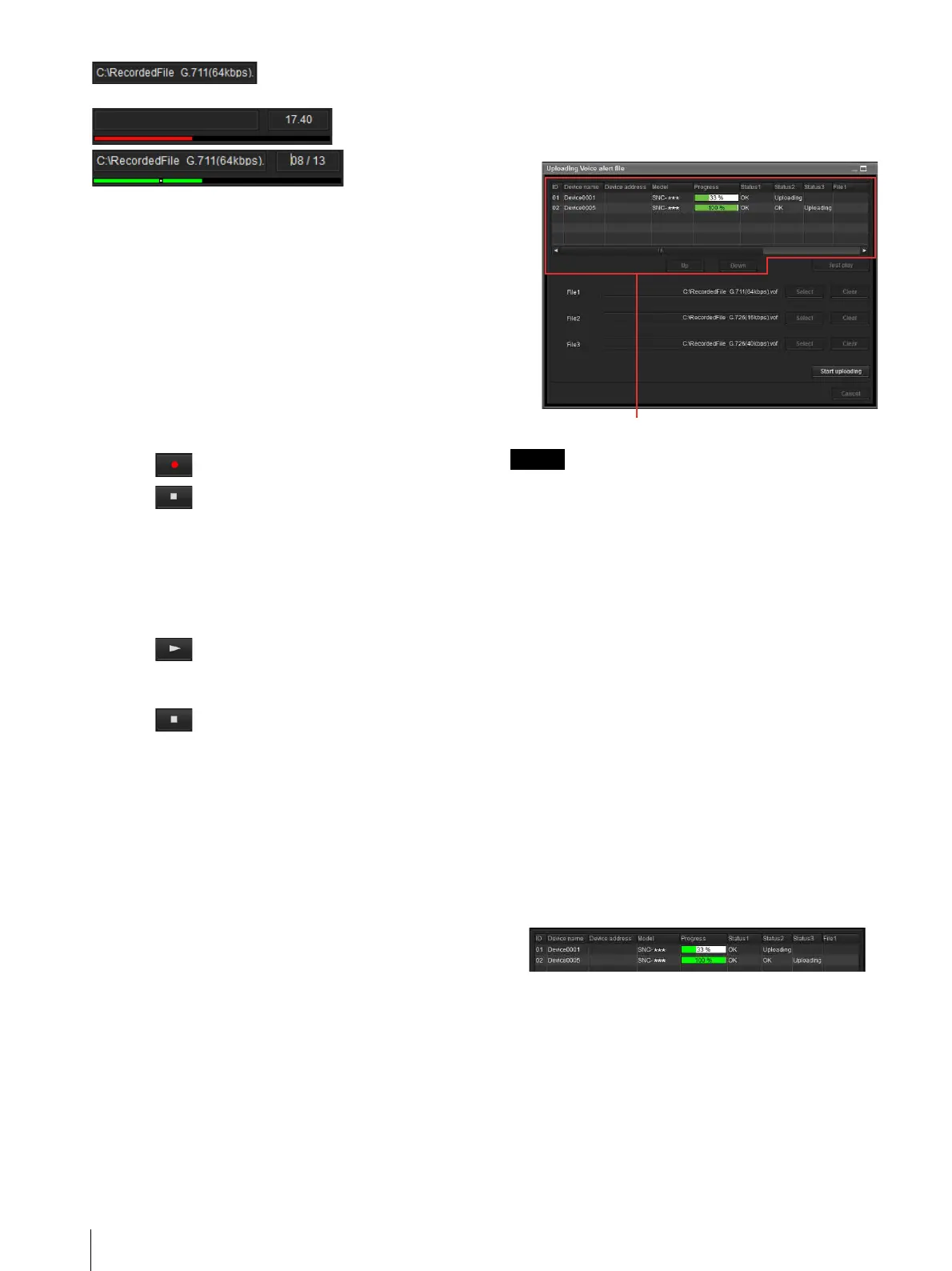
(Voice alert file display)
Displays the name of the saved Voice alert file.
/
(recording/playback progress bar)
You can check recording or playback progress with this
bar.
During recording, the remaining recording time is
displayed on the upper right of the bar.
During playback, the current playback time/the Voice
alert file length are displayed in seconds on the upper
right of the bar.
Canceling
Close the Create Voice alert file screen.
Creating the Voice alert file
1 Click to record a Voice alert file.
2 Click to stop recording the Voice alert file.
Alternatively, recording stops automatically after 30
seconds.
When recording is completed, the recorded Voice
alert file will be saved to the computer.
Checking the Voice alert file
1 Click to start the playback of the recorded
Voice alert file.
You can check the Voice alert file.
2 Click to stop the playback of the Voice alert
file.
Alternatively, the playback stops automatically after
the Voice alert file has completed playing.
Using Uploading Voice alert file
1
From the Device list, select a device to upload a
Voice alert file.
You can select multiple devices at the same time.
2
Right-click the mouse and select Voice alert file
and Upload in this order from the displayed menu.
The Uploading Voice alert file screen will be
displayed.
Tip
The Uploading Voice alert file screen can also be
displayed using the following method:
•From the Tools menu, select Voice alert file and
Upload in this order.
Device List
Devices to be used for the Uploading Voice alert file are
displayed in a list.
During uploading, the progress bar is displayed.
Status 1, Status 2, Status 3
Displays the current status as shown below.
Blank: This is the default status.
Not supported: The Voice alert file is not supported
by the device.
Uploading: The Voice alert file is being uploaded.
OK: The Voice alert file uploaded successfully.
Failed: Uploading of the Voice alert file failed.
Cancel: Uploading of the Voice alert file is canceled.
The current status is displayed by file number.
Display sample:
File1, File2, File3
Voice alert file names currently uploaded in the
device are displayed. If the device does not support
File2 and File3, <No match> is displayed.
Device list








 To Next Page