Help Guide
print.html[3/31/2021 7:15:59 AM]
2
1
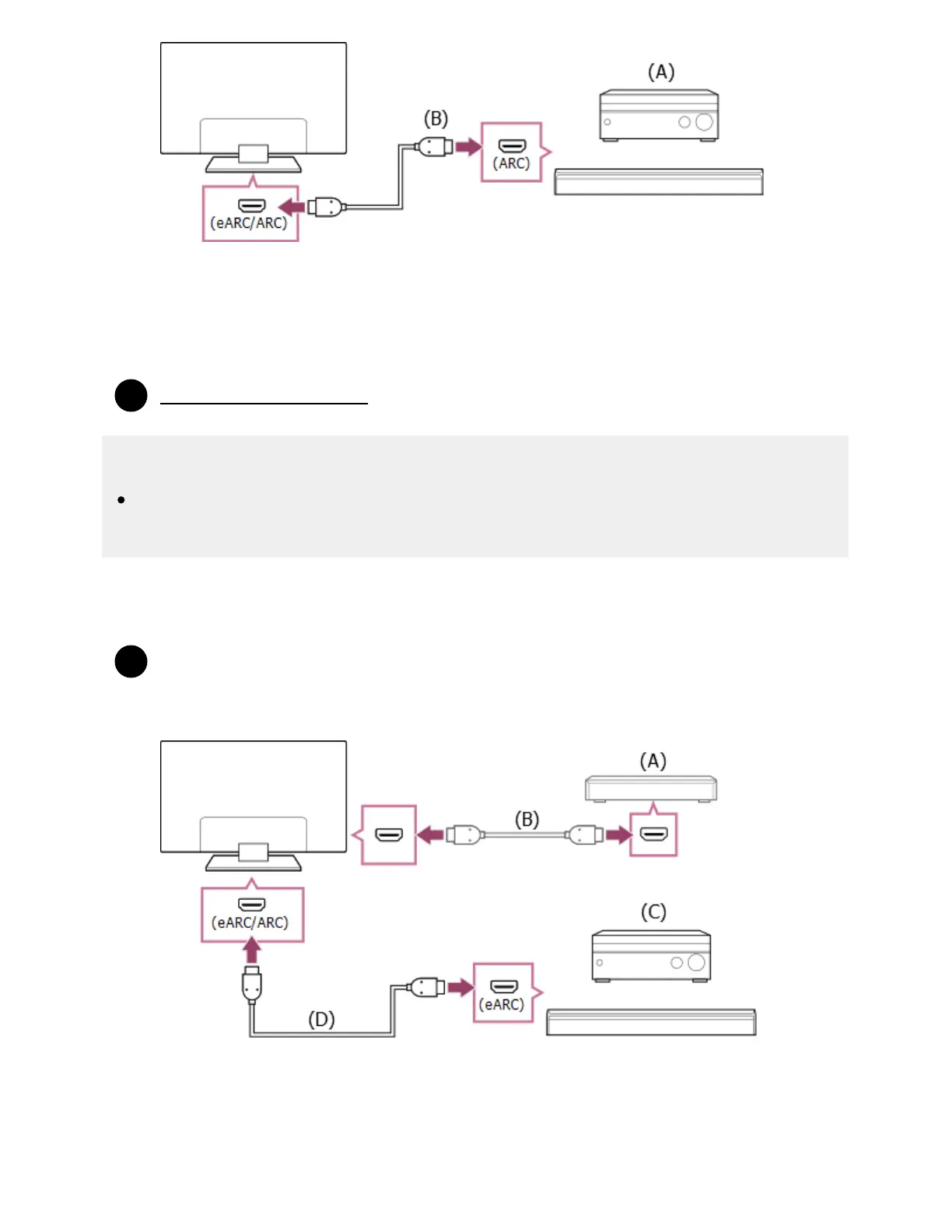
(A) AV receiver or sound bar
(B) HDMI cable (not supplied)
We recommend authorized Premium High Speed HDMI Cable(s) bearing the HDMI logo.
Adjusting an audio system
Note
For ARC connections, voice recognition performance may degrade (only TVs with a built-in
MIC).
HDMI connection (eARC supported)
Connect the external input device and TV with an HDMI cable. Connect the TV and audio
system with another HDMI cable.
Connect the audio system to the TV’s HDMI input terminal bearing the text “eARC/ARC”.
(A) External input device (such as a Blu-ray/DVD recorder)
(B) HDMI cable (not supplied)
(C) AV receiver or sound bar
(D) HDMI cable with Ethernet (not supplied)
*
* ™
*



 To Next Page