MHC-EC99/EC79/EC69/EC99T/EC79T/EC69T.GB.4-131-117-11(1)
13
GB
Getting Started
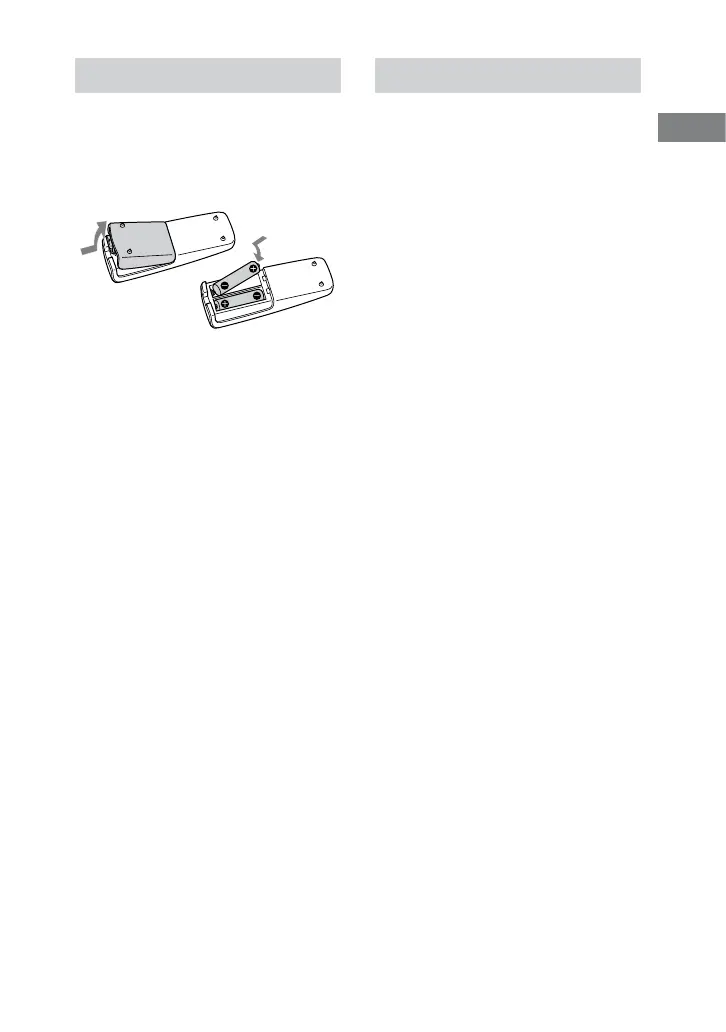
Inserting batteries
Slide and remove the battery
compartment lid, and insert the two
supplied R6 (size AA) batteries, side
rst, matching the polarities shown
below.
Notes
With normal use, the batteries should last for
about six months.
Do not mix an old battery with a new one or
mix dierent types of batteries.
If you do not use the remote for a long period
of time, remove the batteries to avoid damage
from battery leakage and corrosion.
Batteries installed devices shall not be
exposed to excessive heat such as sunshine,
re or the like.
When carrying this system
Use buttons on the unit.
1
Remove all discs to protect the CD
mechanism.
2
Press CD to select the CD function.
3
Hold down , and then press /
until “STANDBY” appears.
4
After “LOCK” appears, unplug the
power cord.












 To Next Page