Chapter 12 Setup Menus
Chapter 12 Setup Menus 12-29
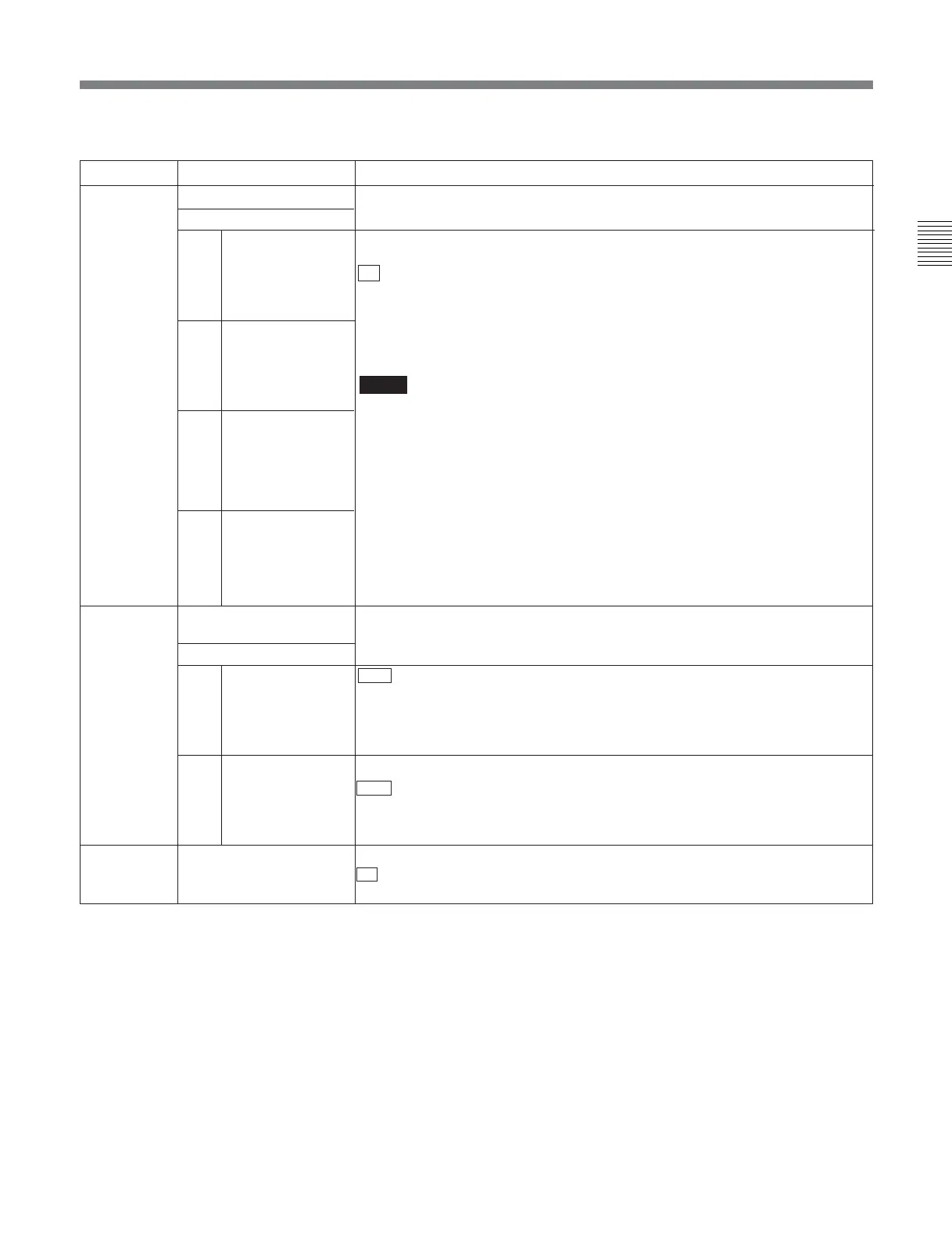
Menu items in the range 800 to 899, relating to audio control (Continued)
Item number
Item name
Settings
823 NON-AUDIO FLAG PB Controls the non-audio flag when the playback format is Digital Betacam or
Betacam SX.
Sub-item
1 CH1/CH2 During playback (except E-E mode), sets the digital audio non-audio flag as
follows.
off : OFF (the data is audio)
on: ON (the data is non-audio)
AUTO: As follows, depending on whether tape data has been confirmed.
• Tape data has been read and confirmed: ON or OFF, according to the data.
• Tape data has not been confirmed: Current state is maintained.
Notes
• During playback of analog tapes, the non-audio flag is OFF regardless of the
setting of this item.
• In the MPEG IMX format, during recording or playback, and in E-Emode, the
non-audio flag follows the setting of maintenance menu item M372. (SY
software versions before 3.05)
• In the MPEG IMX format, operation is the same as for the OFF setting or AUTO
setting, and for recording follows maintenance menu M372. (SY software
version 3.05 and later)
For more information about the maintenance menu item M372, refer to the
Maintenance Manual.
824 ANALOG LINE OUTPUT
SELECT
Select the analog audio signals (tracks 1 to 8) to be assigned to audio output
channels 1 to 4.
Sub-item
1 CH1/CH2 tr1/2 : Tracks 1 and 2 assigned to audio output channels 1 and 2
tr3/4: Tracks 3 and 4 assigned to audio output channels 1 and 2
tr5/6: Tracks 5 and 6 assigned to audio output channels 1 and 2
tr7/8: Tracks 7 and 8 assigned to audio output channels 1 and 2
2 CH3/CH4 tr1/2: Tracks 1 and 2 assigned to audio output channels 3 and 4
tr3/4 : Tracks 3 and 4 assigned to audio output channels 3 and 4
tr5/6: Tracks 5 and 6 assigned to audio output channels 3 and 4
tr7/8: Tracks 7 and 8 assigned to audio output channels 3 and 4
3
CH5/CH6
Valid only for an
MPEG IMX format
8-channel
recording tape
4
CH7/CH8
Valid only for an
MPEG IMX format
8-channel recording
tape
2 CH3/CH4
825 AUDIO ADVANCE MODE
Set the audio output phase.
off : Same as the video output phase
on: One frame ahead of the video output phase
(Continued)








 To Next Page