Chapter 12 Setup Menus
Chapter 12 Setup Menus 12-31
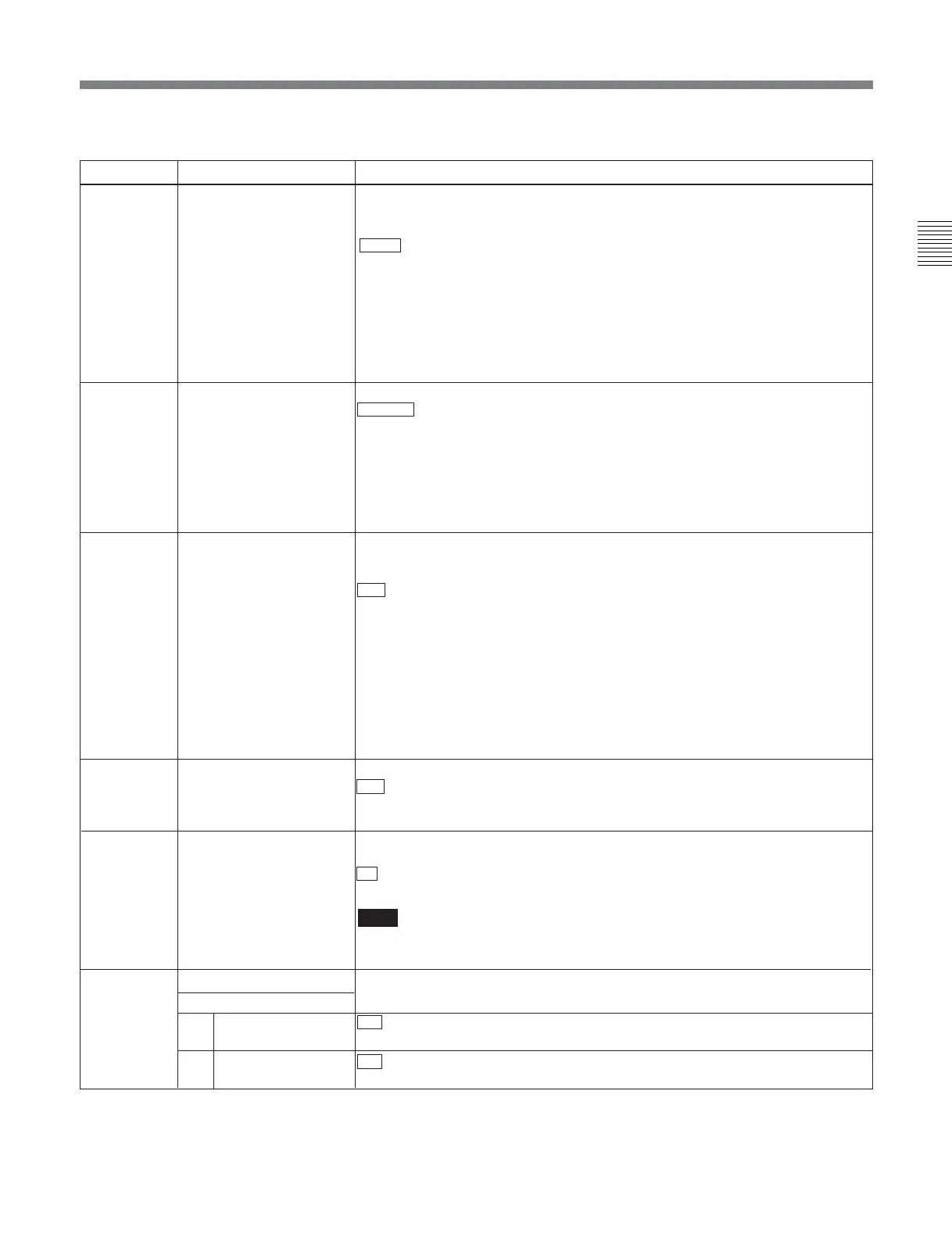
Menu items in the range 900 to 999, relating to digital processing
a) Not supported in this version of the unit
Item number Item name Settings
903
a)
FREEZE MODE Select the freeze mode and freeze timing.
FIELD: Freeze a video field. Field may be odd or even, according to the timing.
FLD1: Freeze an odd field.
FLD2 : Freeze an even field.
FRM12: Freeze a frame consisting of an odd field and following even field.
FRM21: Freeze a frame consisting of an even field and following odd field.
Odd and even fields are distinguished by the reference video signal.
Changing the menu setting during a freeze does not affect the freeze image.
The setting is reflected the next time a freeze is carried out.
You can freeze an image using the DELETE button and TRIM + button.
For details, see menu item 904.
904
a)
FREEZE CONTROL
FROM KEY PANEL
Determine how the buttons used to freeze an image function.
MOMNT : Holding the DELETE button and pressing the TRIM + button carries out
a freeze. The freeze ends when the buttons are released.
LATCH: Holding the DELETE button and pressing the TRIM + button carries out
a freeze. The freeze continues even after the buttons are released.
• To update the freeze image
Hold the DELETE button and press the TRIM + button again.
• To end the freeze
Hold the DELETE button and press the TRIM – button.
905
a)
AUTO FREEZE
CONTROL
Set the auto freeze function operation (conditions for ending a freeze, etc.).
In normal playback, if there is a sudden worsening of the channel condition (entry
into unrecorded area), this function freezes the image.
DIS : Disable the auto freeze function.
MODE1: End the freeze when signals which can be recorded normally are
restored.
MODE2: End freeze automatically on playback after stopping.
• The automatic freeze mode is determined by item 903.
• The freeze is ended immediately, regardless of the above conditions, when this
unit is switched to any of the following modes:
Eject
EDIT preset on
Cue up
Recording
906
a)
STOP FREEZE
CONTROL
Select whether or not the STOP FREEZE function should operate.
DIS : Does not operate.
ENA: Operates.
stby: Operates only in the standby mode.
915 SDTI-CP OUTPUT
FORWARD ERROR
CORRECTION
Select whether or not to add an FEC (Forward Error Correction) signal for
protection against SDTI-CP signal transfer errors.
on : Add an FEC signal.
off: Do not add an FEC signal.
Note
Although the FEC specifications are provided in the SDTI-CP (SMPTE 326M)
standards, FEC is not supported in some devices.
920
SD-SDI H-ANC CONTROL
Select whether or not to add information to the SDI output.
Sub-item
1
AUDIO 5CH-8CH
2 RP188 ATC
ON : Add digital audio data channels 5 to 8.
OFF: Do not add digital audio data channels 5 to 8.
ON : Add RP188 time code data.
OFF: Do not add RP188 time code data.








 To Next Page