63
Recording TV programs
filename[010BAS.FM] model name1[SLV-N81] model name2[SLV-N71]
[3-065-551-11 (1)]
Basic Operations
To stop recording
Press x STOP.
To check the remaining tape length
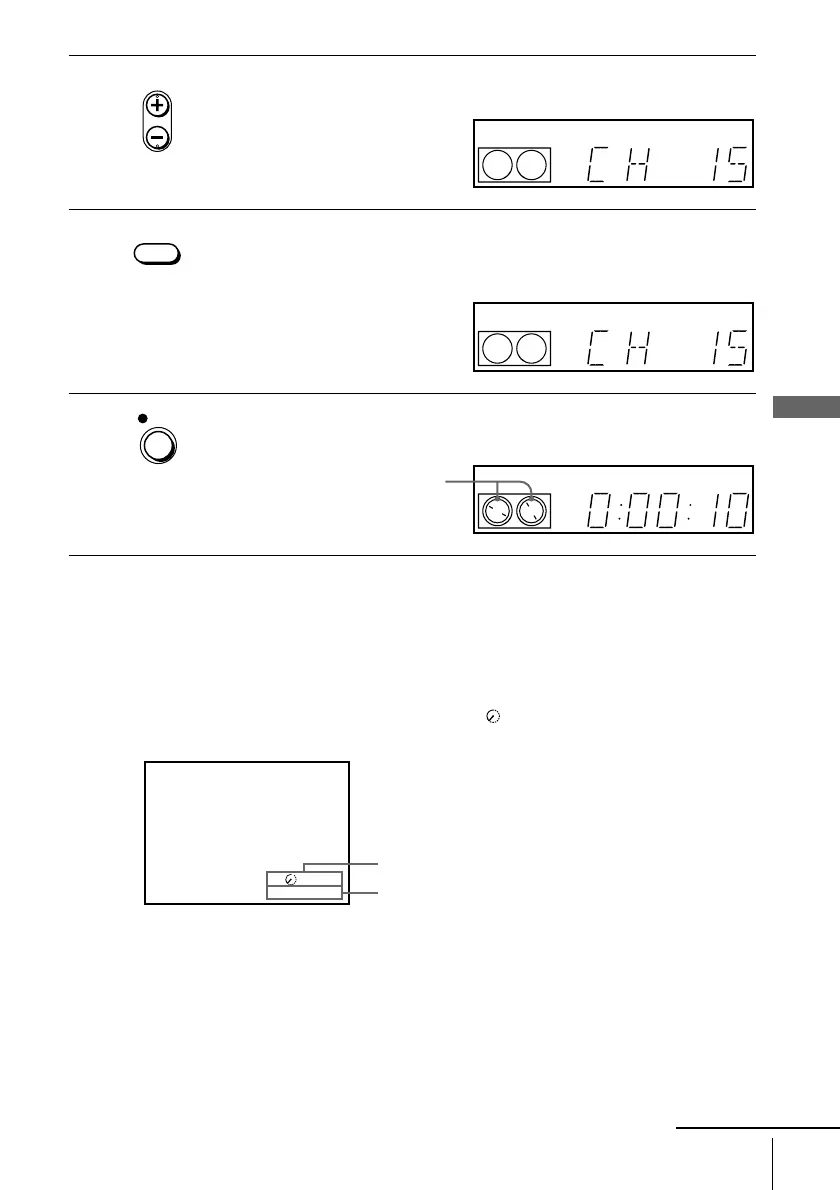
Press DISPLAY repeatedly until the remaining tape length and the time counter
appear on the TV screen. Each time you press COUNTER/REMAIN, the time
counter and the remaining tape length with the indicator appear alternately in the
VCR’s display window.
To check the remaining tape length of a T-140 or T-180 tape, set TAPE SELECT in
the ADVANCED OPTIONS menu to 180. (For details, see page 92.)
3
Press CH +/– to select the channel or line input video source you want to
record.
4
Press SP/EP to select the tape speed, SP or EP.
EP (Extended Play) provides recording time three times as long as SP
(Standard Play). However, SP produces better picture and audio quality.
5
Press z REC to start recording.
The recording indicator lights up red in the display window.
• CH
EP
VIDEO
APC
SP / EP
SP
VIDEO
APC
REC
SP
VIDEO
APC
Recording indicator
SP 20:00:2
81:3
Time counter
Remaining tape length
continued








 To Next Page