2-680-300-01(1)
Basic Operations
Menu Operations
You can switch between screens, read/play/view content, or
set items, using the 5-way control button, number buttons,
or MENU.
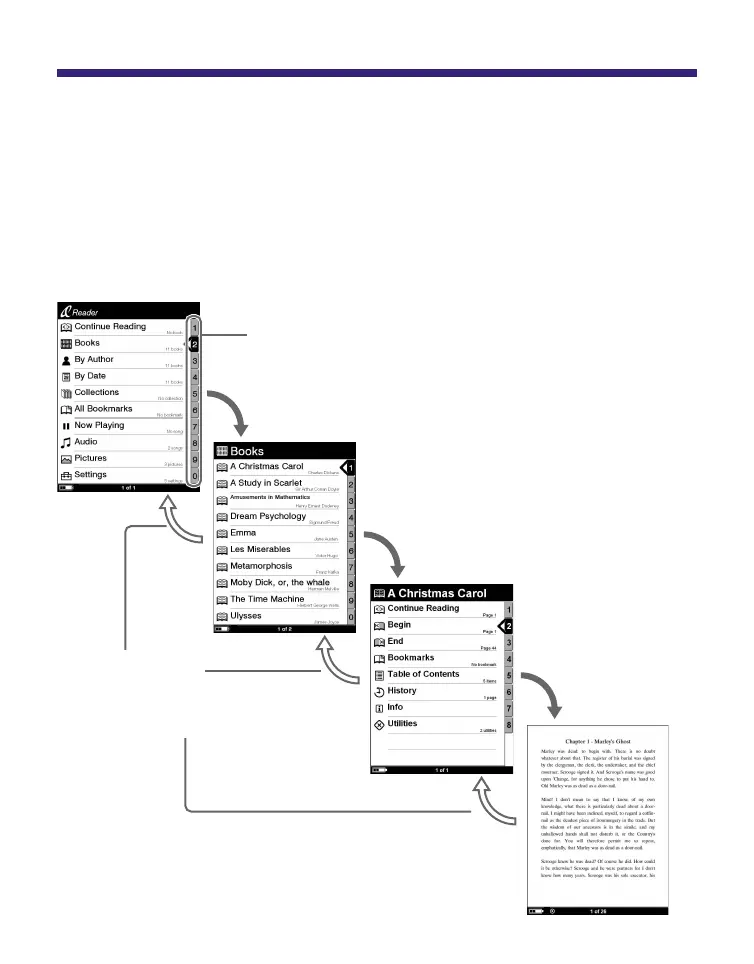
Example: screen transition diagram of the Home menu –
Book list – Option menu – Book page
Press / to
select, then
press ENT.
Press MENU to
return to the
previous screen.
Number tab
Selected item is highlighted in black.
Press / to select
“Books” then press ENT.
Press / to select,
then press ENT.
Continued
13















 To Next Page