PRS-T2
5
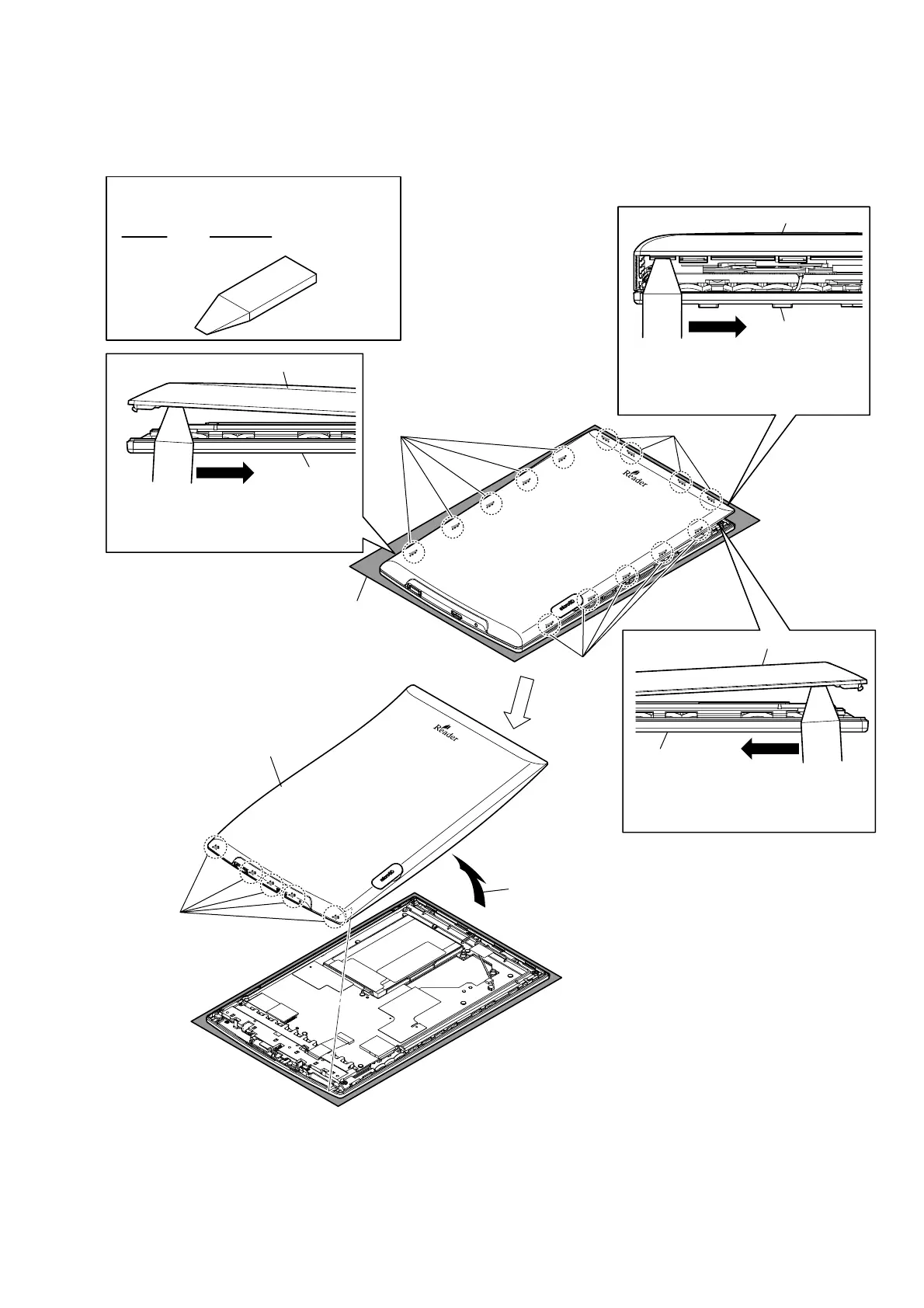
Note: Follow the disassembly procedure in the numerical order given.
2-2. REAR CASE BLOCK
Note:
Please spread a sheet under a
unit not to injure case front.
2 four claws
6 five claws
7 five claws
4 five claws
rear case block
case front assy
Top side:
1 Insert the jig in the gap between rear
case block and case front assy.
Then slide it to arrow direction to remove
claws of rear case block.
9 rear case block
– Rear bottom side view –
5 Insert the jig in the gap between rear
case block and case front assy.
Then slide it to arrow direction to remove
claws of rear case block.
Left side:
rear case block
case front assy
Right side:
rear case block
case front assy
3 Insert the jig in the gap between rear
case block and case front assy.
Then slide it to arrow direction to remove
claws of rear case block.
•
JIG
When disassembling the set, use the following jig.
Part No. Description
9-913-402-33 Tool for Disassembling
8 Remove the rear case block
in the direction of an arrow.














 To Next Page