22
Note
Attach/remove the eyepiece while the camcorder is
turned off.
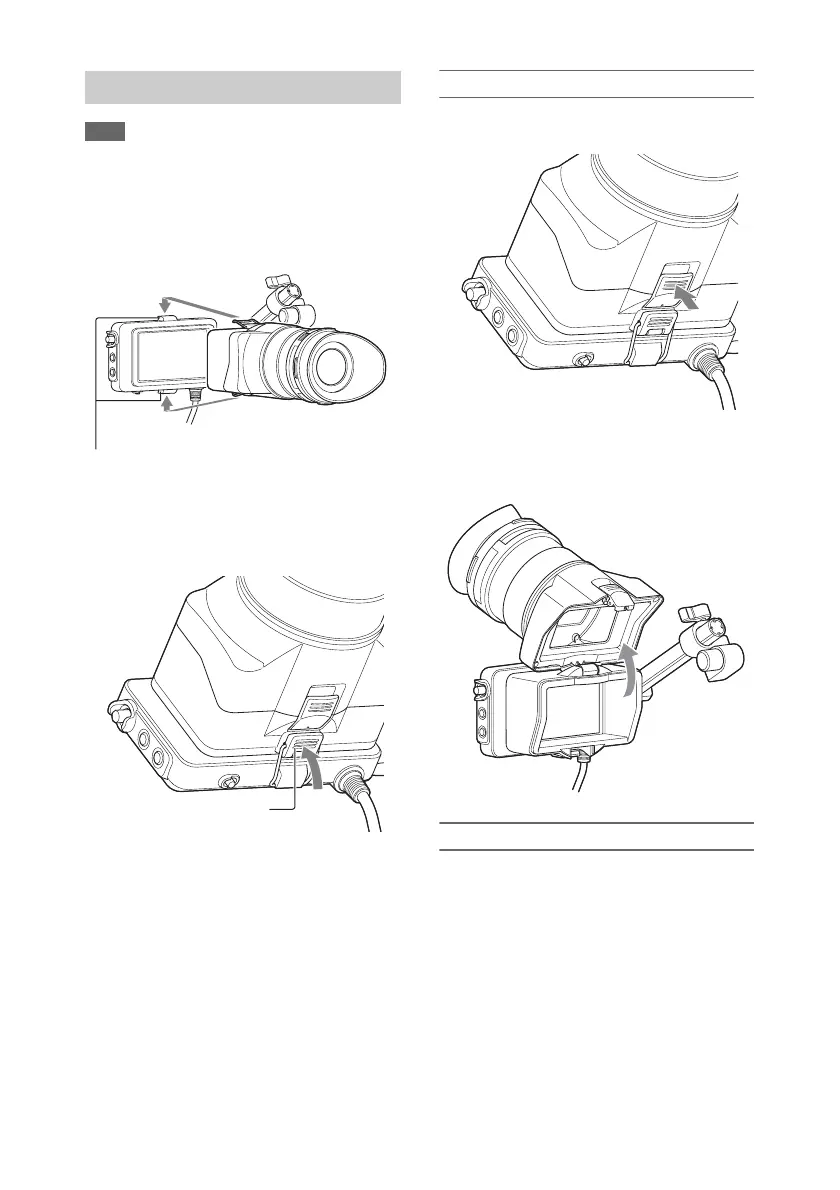
1 Attach the metal clips of the eyepiece to
the eyepiece attachment hooks on the
viewfinder.
2 Push the lock plate on the bottom of the
eyepiece in the direction of the arrow to
lock the eyepiece into position.
Opening the eyepiece
Press the button indicated by the arrow.
Open the eyepiece upwards when the lock
disengages. The viewfinder is directly visible
when the eyepiece is opened.
Removing the eyepiece
Unclip the eyepiece lock, and remove the
eyepiece from the viewfinder.
Attaching the Eyepiece
Eyepiece attachment hooks
Lock plate




 To Next Page