52
Plug the IFU-WML3 into the USB wireless LAN
module connector (page 7).
After attaching the unit, set Wi-Fi >Wi-Fi
(page 93) in the System menu to “Enable” to
enable wireless LAN.
Note
Attach/remove the IFU-WLM3 while the camcorder is
turned off.
Note
Attach/remove the CBK-WA100 while the camcorder is
turned off.
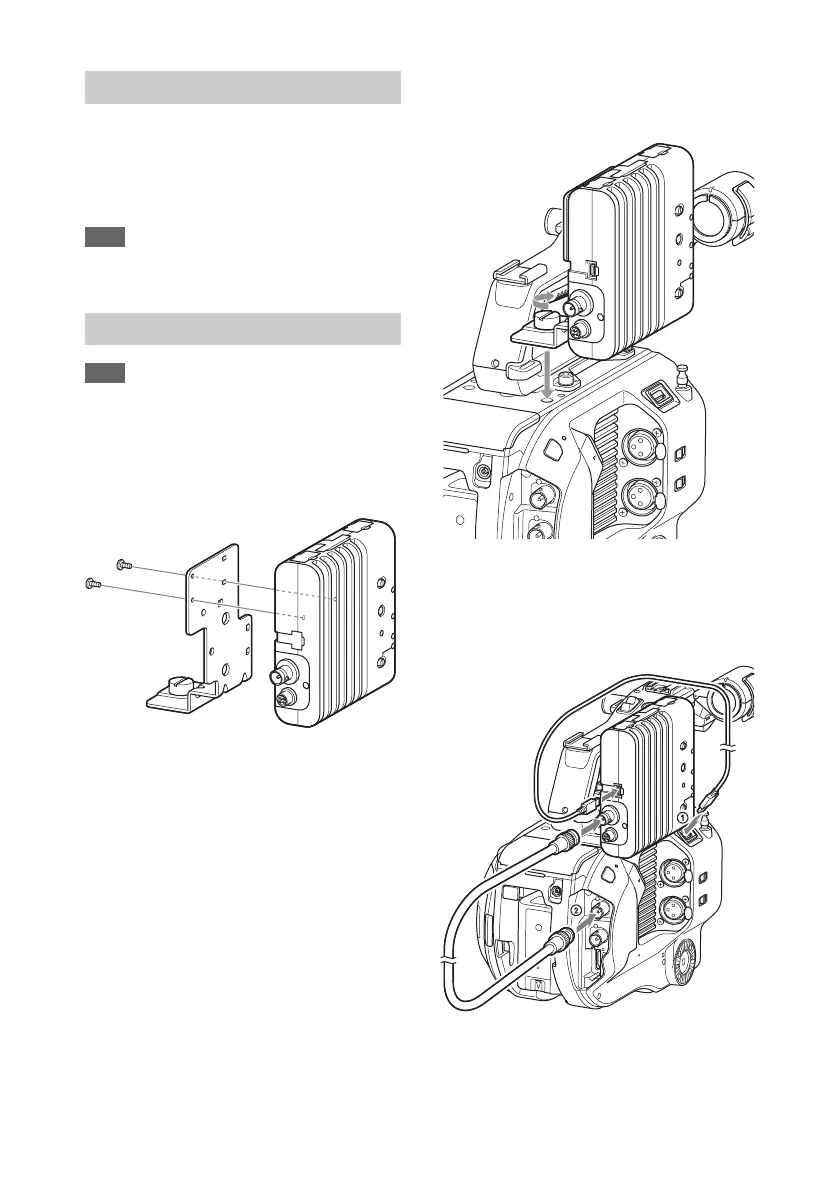
1 Attach the CBK-WA100 to the
mounting bracket, and tighten the two
screws.
2 Attach the CBK-WA100 mounting
bracket on the camcorder, and tighten
the screws.
3 Connect the CBK-WA100 USB cable to
the USB wireless LAN module
connector (1), and the SDI cable to the
SDI OUT connector (2).
4 Turn the CBK-WA100 on, and then
turn the camcorder on.
Attaching the IFU-WLM3
Attaching the CBK-WA100




 To Next Page