33
Pull the battery pack out from the battery pack
attachment on the XDCA-FS7 while holding
down the BATT RELEASE button.
You can switch the timecode input/output using
the TC IN/OUT switch (page 12).
For details, see page 98.
You can record RAW video (page 50) to an
AXS-R5 RAW Recorder (option) using an HXR-
IFR5 Interface Unit (option) and an XDCA-FS7
(option).
For details about setting up the HXR-IFR5 and
AXS-R5, refer to the HXR-IFR5 operation
manual.
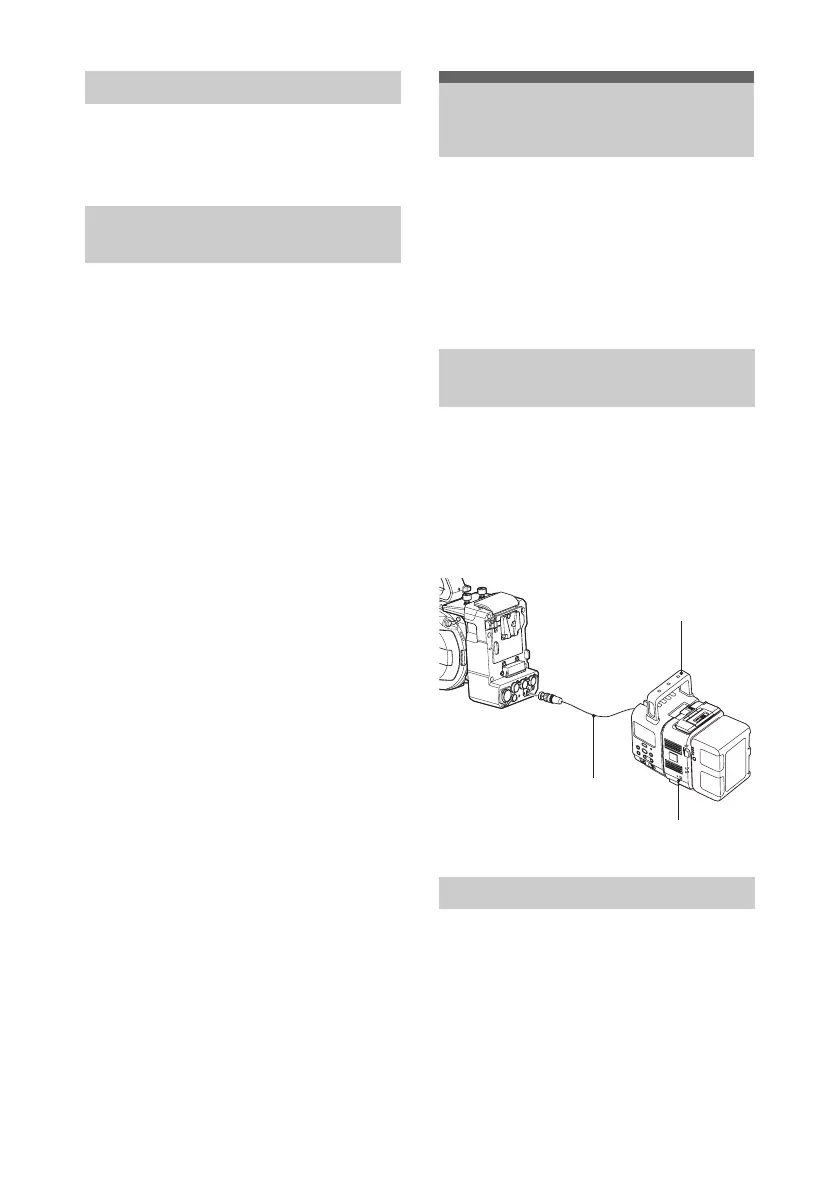
1 Attach the XDCA-FS7 to the camcorder
(page 31).
2 Connect the RAW OUT connector of
the XDCA-FS7 to the SDI IN (RAW)
connector of the HXR-IFR5 using an
SDI cable.
Disconnect the SDI cable from the RAW
OUT connector of the XDCA-FS7.
Removing the Battery Pack
Switching the Timecode Input/
Output
Using an HXR-IFR5 and
AXS-R5
Connecting the HXR-IFR5 to the
Camcorder
Removing the HXR-IFR5
SDI cable
HXR-IFR5
AXS-R5




 To Next Page