32
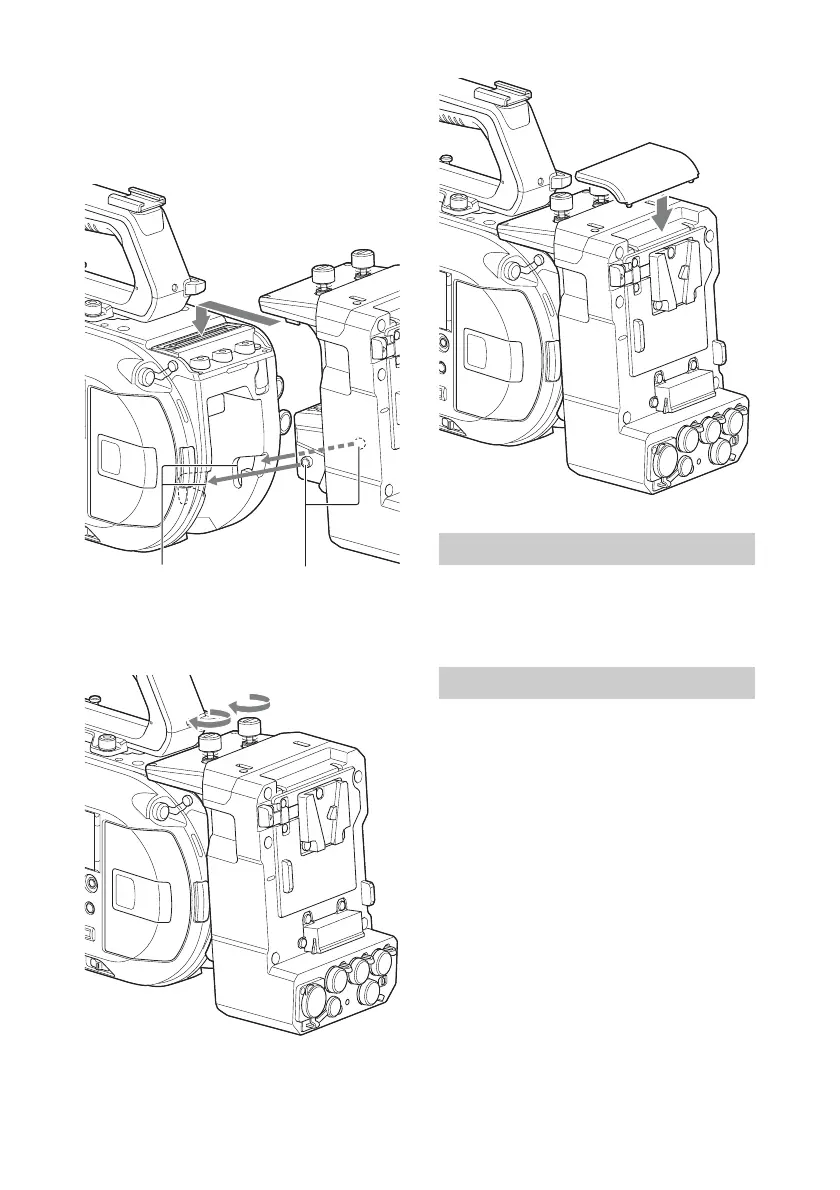
3 Align the protrusions of the XDCA-FS7
with the left and right grooves of the
camcorder and slide all the way in, then
slide the XDCA-FS7 down into the
connector section.
4 Tighten the two screws on the top of the
XDCA-FS7 to secure the XDCA-FS7.
The cover of the extension unit connector
section can be inserted into the top of the
extension unit.
Loosen the two screws on the top of the
XDCA-FS7, and remove the XDCA-FS7 from
the camcorder.
Insert the battery pack into the battery pack
attachment on the XDCA-FS7.
The following Sony genuine battery packs are
supported.
Lithium-ion battery packs
BP-L80S
BP-FL75
Grooves Protrusions
Removing the XDCA-FS7
Attaching the Battery Pack




 To Next Page