33
GB
“BRAVIA” Sync Features
Setting the Control for HDMI
function to off
Set the Control for HDMI function to off when
you connect components not compatible with the
“BRAVIA” Sync, or that do not have HDMI
jacks, etc.
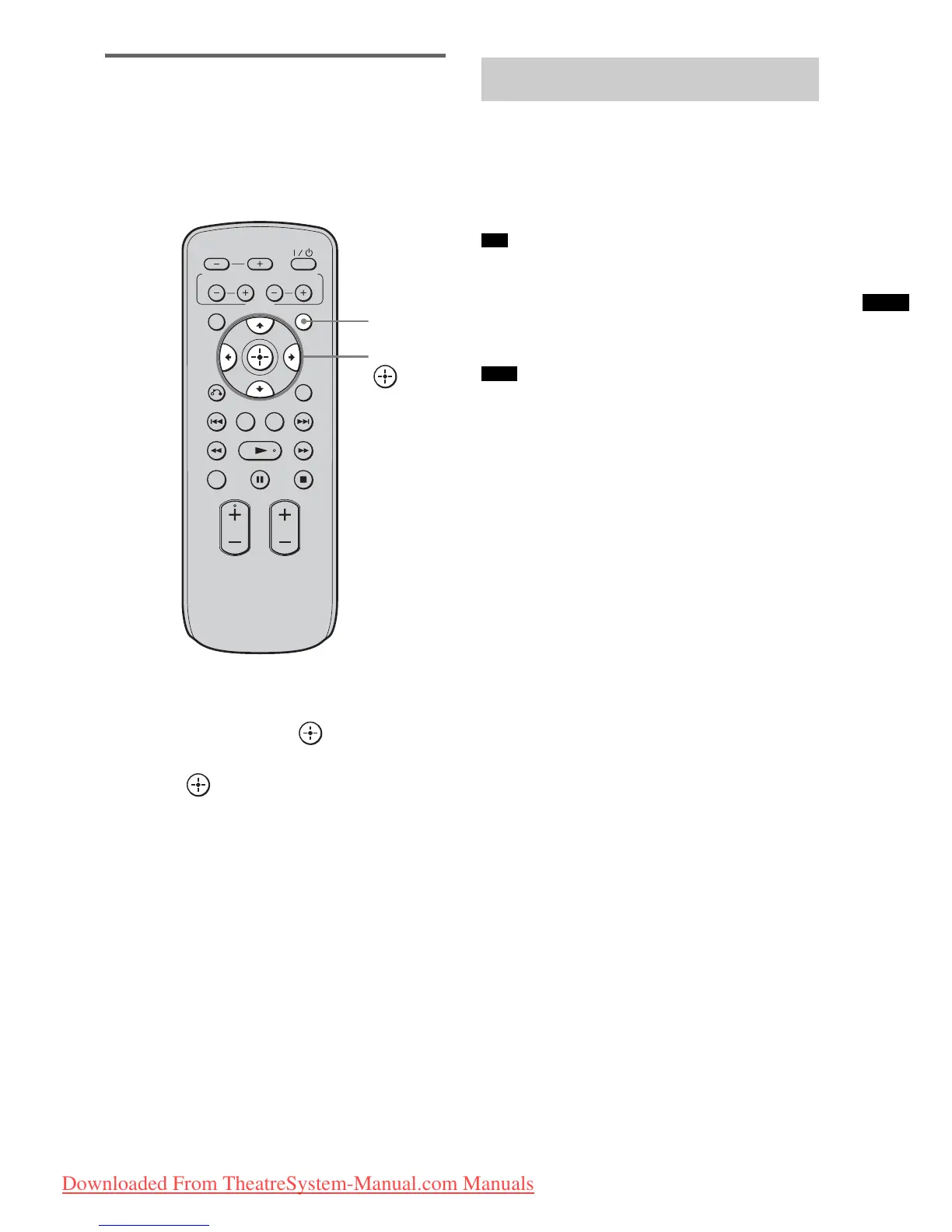
1 Press AMP MENU.
2 Press X/x repeatedly until “SET HDMI”
appears, then press or c.
3 Press X/x to select “CTRL: HDMI,” then
press or c.
4 Press X/x to select “OFF.”
5 Press AMP MENU.
The AMP menu turns off.
Play back a connected component.
The TV turns on automatically and switches to
the appropriate HDMI input.
• Even if the stand is turned off (active standby mode),
the HDMI signal will be sent from the connected
component to the TV via the HDMI connection. You
can enjoy image and sound of the component on the
TV.
• Depending on the TV, the start of the content may not
be output.
VOLUME
MUTING
TUNING
-
PRESET
-
NIGHT
DISPLAY
CENTER SUBWOOFER
INPUT SELECTOR
AMP MENU
LEVEL
DIMMER
TUNING
+
PRESET+
RETURN
MENU
SOUND FIELD
AMP
MENU
C, X, x, c,
Enjoying Blu-ray Disc/DVD
(One-Touch Play)
Tip
Note
Downloaded From TheatreSystem-Manual.com Manuals






 To Next Page