EasyManua.ls Logo

Sony RM-E300 - Page 39

Sony RM-E300
73 pages
Print Icon
To Next Page IconTo Next Page
To Previous Page IconTo Previous Page
Loading...
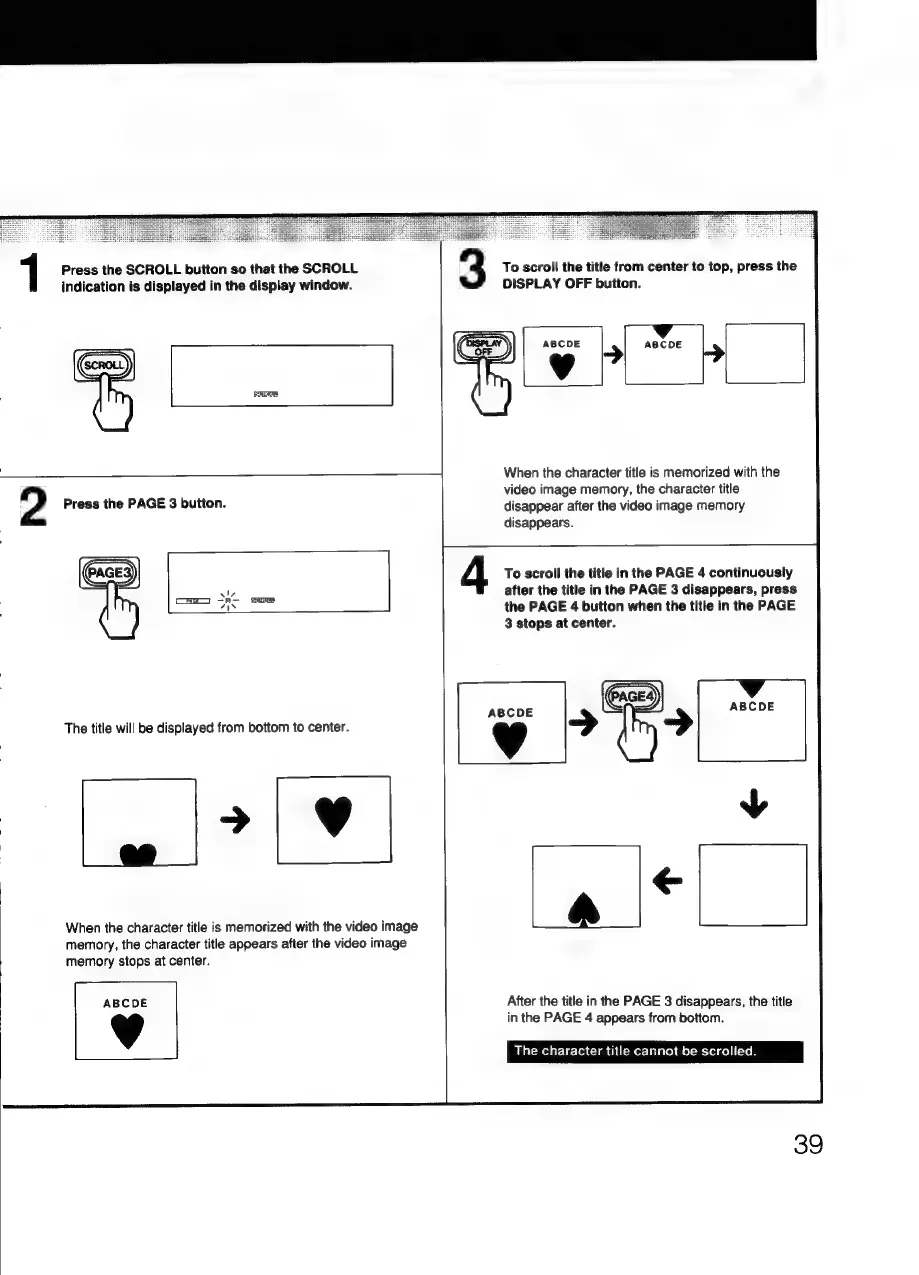
Press
the
SCROLL
button
so
that
the
SCROLL
indication
is
displayed
in
the
display
window.
1
3
a
2
Press
the
PAGE
3
button.
To
scroll
the
title
from
center
to
top,
press
the
DISPLAY
OFF
button.
ABCDE
lp
When
the
character
title
is
memorized
with
the
video
image
memory,
the
character
title
disappear
after
the
video
image
memory
disappears.
4
The
title
will
be
displayed
from
bottom
to
center.
To
scroll
the
title
in
the
PAGE
4
continuously
after
the
title
in
the
PAGE
3
disappears,
press
the
PAGE
4
button
when
the
title
in
the
PAGE
3
stops
at
center.
eR
aries
When
the
character
title
is
memorized
with
the
video
image
memory,
the
character
title
appears
after
the
video
image
memory
stops
at
center.
ABCDE
Vv
rc
After
the
title
in
the
PAGE
3
disappears,
the
title
in
the
PAGE
4
appears
from
bottom.
The
character
title
cannot
be
scrolled.
39

Related product manuals