EasyManua.ls Logo

Sony RM-E300 - Title Keyboard Operation Guide

Sony RM-E300
73 pages
Print Icon
To Next Page IconTo Next Page
To Previous Page IconTo Previous Page
Loading...
|
Moxer-}
((olamr-lele
Mal
Olareiicelemelmere)aiiae)
i=)
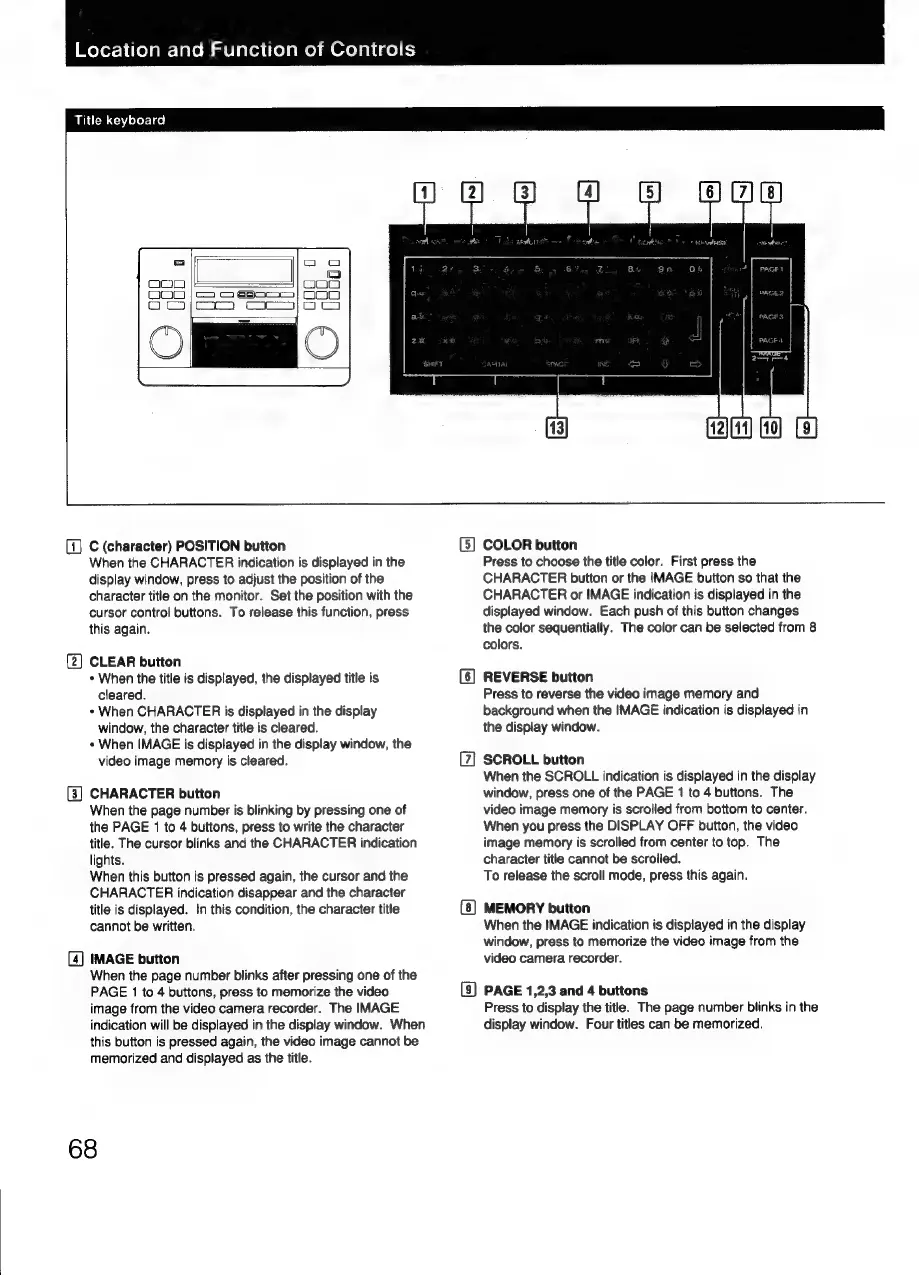
Title
keyboard
OOO
ca
C
(character)
POSITION
button
When
the
CHARACTER
indication
is
displayed
in
the
display
window,
press
to
adjust
the
position
of
the
character
title
on
the
monitor.
Set
the
position
with
the
cursor
control
buttons.
To
release
this
function,
press
this
again.
(2)
CLEAR
button
+
When
the
title
is
displayed,
the
displayed
title
is
cleared.
*
When
CHARACTER
is
displayed
in
the
display
window,
the
character
title
is
cleared.
+
When
IMAGE
is
displayed
in
the
display
window,
the
video
image
memory
is
cleared.
(3]
CHARACTER
button
When
the
page
number
is
blinking
by
pressing
one
of
the
PAGE
1
to
4
buttons,
press
to
write
the
character
title.
The
cursor
blinks
and
the
CHARACTER
indication
lights.
Wher
this
button
is
pressed
again,
the
cursor
and
the
CHARACTER
indication
disappear
and
the
character
title
is
displayed.
In
this
condition,
the
character
title
cannot
be
written.
[4]
IMAGE
button
When
the
page
number
blinks
after
pressing
one
of
the
PAGE
1
to
4
buttons,
press
to
memorize
the
video
image
from
the
video
camera
recorder.
The
IMAGE
indication
will
be
displayed
in
the
display
window.
When
this
button
is
pressed
again,
the
video
image
cannot
be
memorized
and
displayed
as
the
title.
68
G)
COLOR
button
Press
to
choose
the
title
color.
First
press
the
CHARACTER
button
or
the
IMAGE
button
so
that
the
CHARACTER
or
IMAGE
indication
is
displayed
in
the
displayed
window.
Each
push
of
this
button
changes
the
color
sequentially.
The
color
can
be
selected
from
8
colors.
REVERSE
button
Press
to
reverse
the
video
image
memory
and
background
when
the
IMAGE
indication
is
displayed
in
the
display
window.
SCROLL
button
When
the
SCROLL
indication
is
displayed
in
the
display
window,
press
one
of
the
PAGE
1
to
4
buttons.
The
video
image
memory
is
scrolled
from
bottom
to
center.
When
you
press
the
DISPLAY
OFF
button,
the
video
image
memory
is
scrolled
from
center
to
top.
The
character
title
cannot
be
scrolled.
To
release
the
scroll
mode,
press
this
again.
MEMORY
button
When
the
IMAGE
indication
is
displayed
in
the
display
window,
press
to
memorize
the
video
image
from
the
video
camera
recorder.
PAGE
1,2,3
and
4
buttons
Press
to
display
the
title.
The
page
number
blinks
in
the
display
window.
Four
titles
can
be
memorized.

Related product manuals