EasyManua.ls Logo

Sony RM-E300 - Page 45

Sony RM-E300
73 pages
Print Icon
To Next Page IconTo Next Page
To Previous Page IconTo Previous Page
Loading...
3
Press
the
<
PGM
button
twice
so
that
the
8
Press
the
TIMING
ADJ
button.
CUT
IN
indication
of
the
PGM
[1]
is
displayed
in
the
display
window.
TIMING
ADJ
timing adjust
count
+
4
Press
the
GO
TO
button.
The
tape
runs
and
9
Press
the
PGM
button
to
set
time
lag.
stops
at
the
cut-in
point
in
the
playback
pause
mode
Time
lag
(sec.)
0,1
|
0,2
|
0,3
Timing
adjust
count
PGM
c>
Each
push
of
this
button
advances
the
timing adjust
count.
To
reverse,
press
the
PGM
button.
View
the
position
of
the
second
hand
on
the
monitor.
This
position
is
the
cut-in
point.
Press
the
TIMING
ADJ
button.
The
setting
of
the
timing adjust
has
been
Set
the
recorder
in
the
recording
pause
mode
completed.
and
press
the
PGM
EDIT
button
to
start
TIMING
ADJ
automatic
assemble
editing.
/
Play
back
the
edited
tape
if
the
recording
of
the
second
hand
is
started
at
the
exact
cut-in
:
point.
Set
the
recorder
in
the
recording
pause
mode
and
press
the
PGM
EDIT
button
to
start
editing.
Play
back
the
tape
and
view
the
starting
point.
cut-in
point
Cut
out
point
Original
tape
Repeat
steps
8
to
11
to
set
the
timing
adjust
time
so
that
the
recording
is
started
at
the
exact
starting
point.
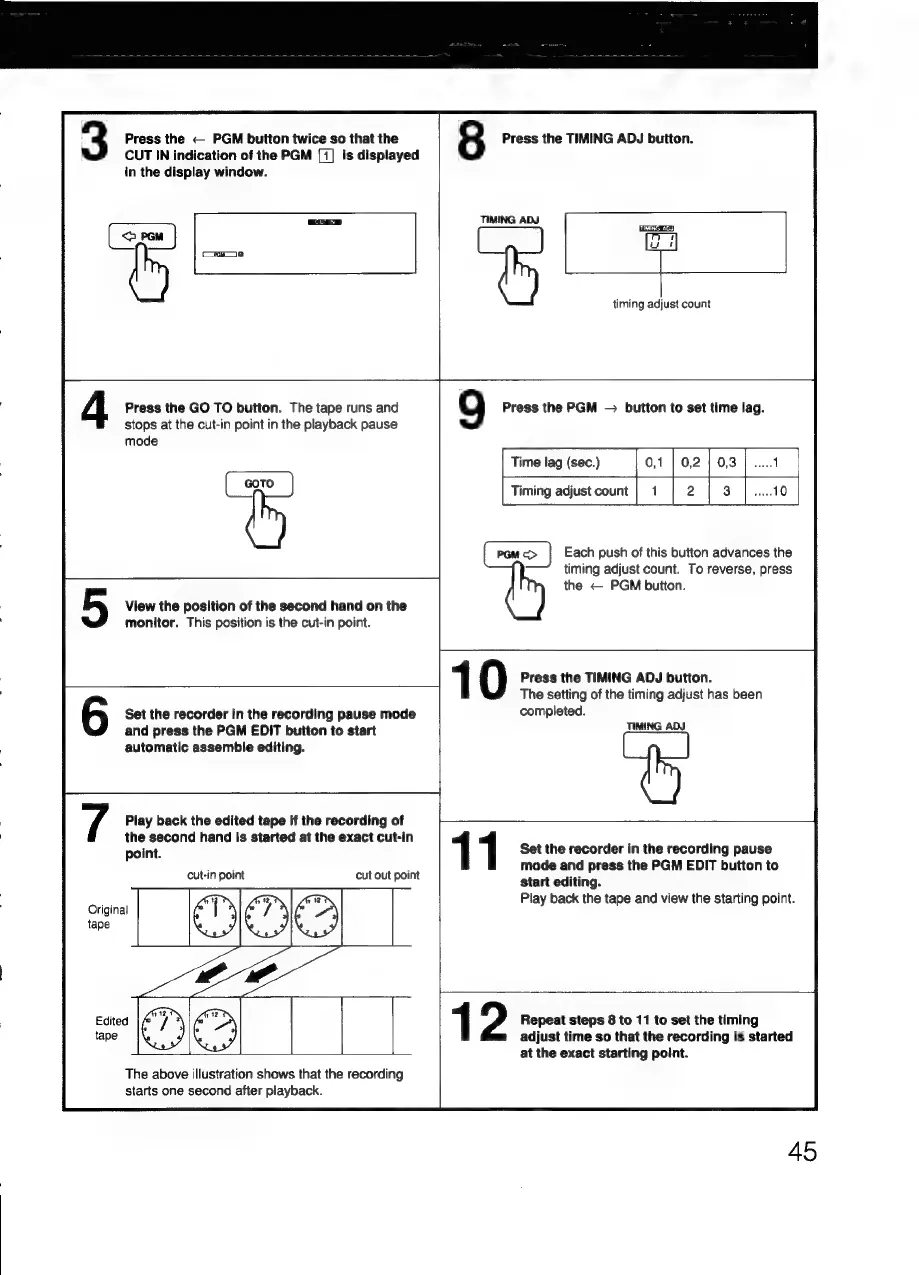
The
above
illustration
shows
that
the
recording
starts
one
second
after
playback.
45

Related product manuals